Moving or transporting the printer 155
[6]
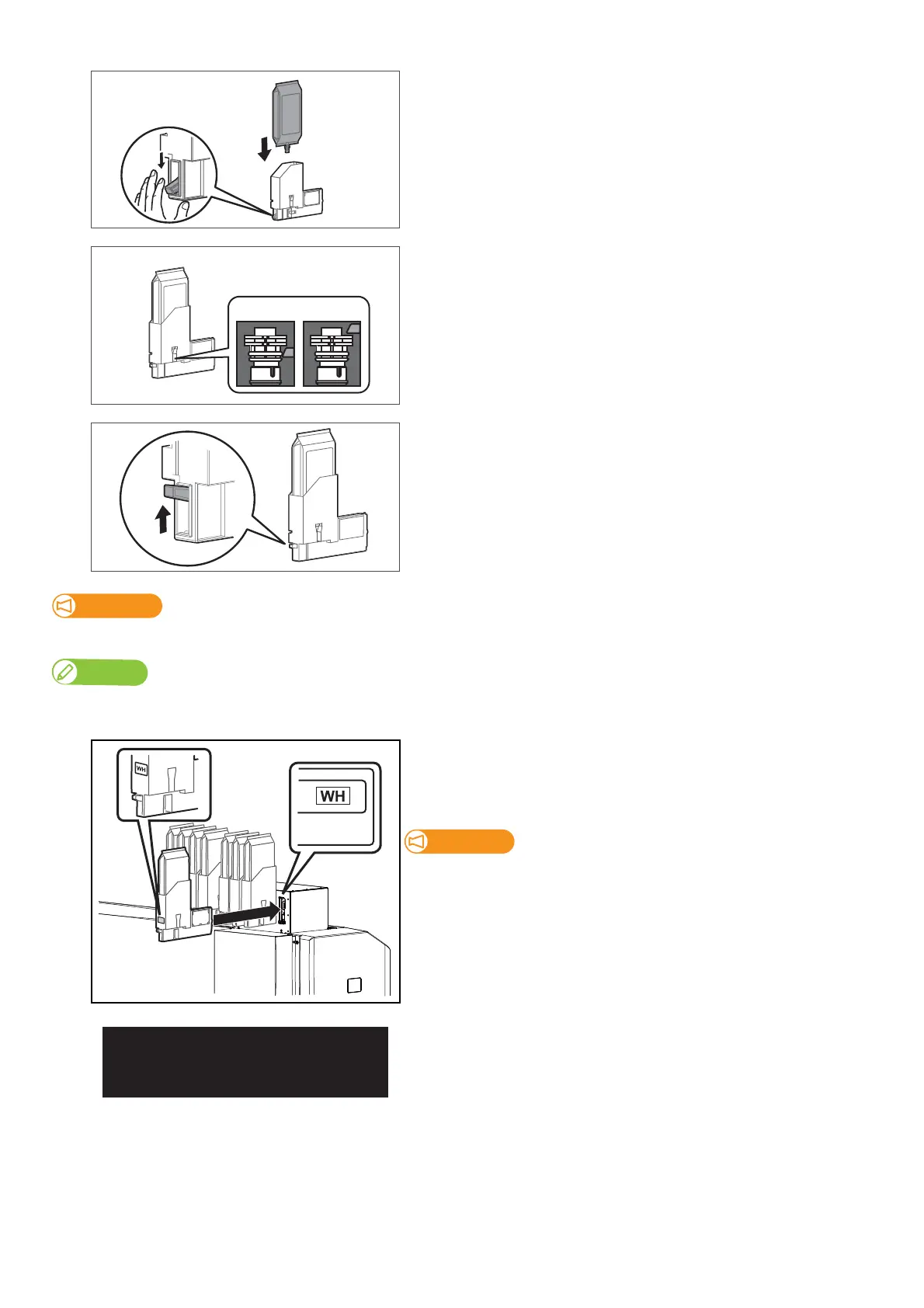
While lowering the lock lever of the high-capacity ink pack adapter,
insert an ink bag.
• Make sure to fully insert the ink bag into the high-capacity ink pack
adapter.
[7]
Confirm ink bag is fully seated by checking the lock mechanism is at
the top of the ink delivery neck through the observation window, see
proper placement in illustration left.
[8]
Make sure that the lock lever of the high-capacity ink pack adapter is
back to its original position.
Important!
If Lock lever does not return to its original position and is left that way, it may cause ink leakage.
Note
After inserting an Ink bag to high-capacity ink pack adapter, if Lock lever does not return to its original position, push up the lever with your finger. If it still
does not return, insert the Ink bag again.
[9]
Re-insert the high-capacity ink pack adapters into Ink slots.
• Make sure to match the ink color with the label of this printer.
• Insert all the way to the end.
Make sure you insert the high-capacity ink pack adapters into the
original slots. Even when you have the same color ink packs, do not
switch and insert them into different slots.
The message on the left will appear.
• Ink charging begins.



 To Next Page