6
EN
hyperion - TECHNICAL MANUAL
Once hyperion has been put in place for installation, lower the slide by loosening the four screws that connect the
brackets to the wheels.
Intheunitisinstalledonaplate,securethexingscrewstothelatterbeforelooseningtheslidecompletely.
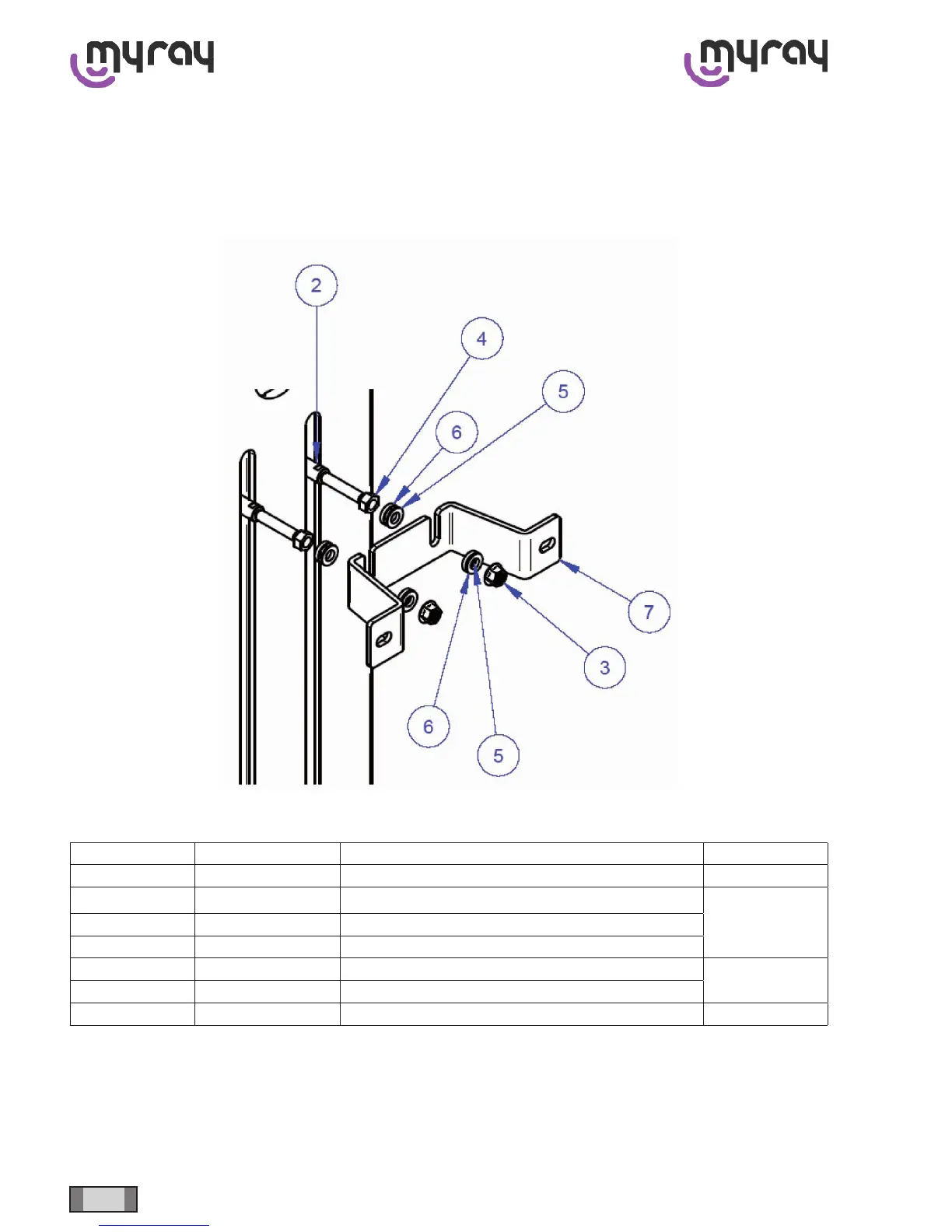
Iftheunitiswall-mounted,securehyperion’sposttothewallasshowninthefollowinggure.
Loosentheslideonlyaftertheposthasbeenrmlyattachedtothesupport.
Position Code Name Quantity
1 99932078 MOBILE POST (MACHINED) 1
2 99932130 PIN FOR WALL-MOUNTING
2
3 52220045 FLANGED M12 NUT FOR WALL BRACKET
4 52220011 MEDIUM NUT UNI 5588 M12
5 53135024 CONVEX WASHER M12
4
6 53135025 CONCAVE WASHER M12
7 99932076 WALL BRACKET 1
Before going on to the next installation steps, remember to remove the safety screw that blocks the head assembly.
The screw is found at the top of the head assembly.



 To Next Page