210 NetApp AltaVault Cloud Integrated Storage Administration Guide
Beta Draft
System maintenance AVA-400, AVA-800 Hot-swapping controller fan modules
Removing fan modules
You must replace the fan module within two minutes of removing it from the chassis to minimize disruption to the
system's airflow. System airflow is disrupted and the controller module associated with the failed fan module shuts
down after two minutes to avoid overheating. To understand AltaVault system behavior for single and multiple fan
failure scenarios, see “Fan redundancy policy” on page 190.
To remove a fan module
1. If you are not already grounded, properly ground yourself.
2. With two hands, grasp the openings on each side of the bezel and pull it toward you until the bezel releases from
the four ball studs on the chassis frame.
3. Identify the fan module that you must replace by checking the error messages and looking at the attention LED on
each fan module cam handle.
Note: If the fan attention LED is lit solid amber, the fan module has failed.
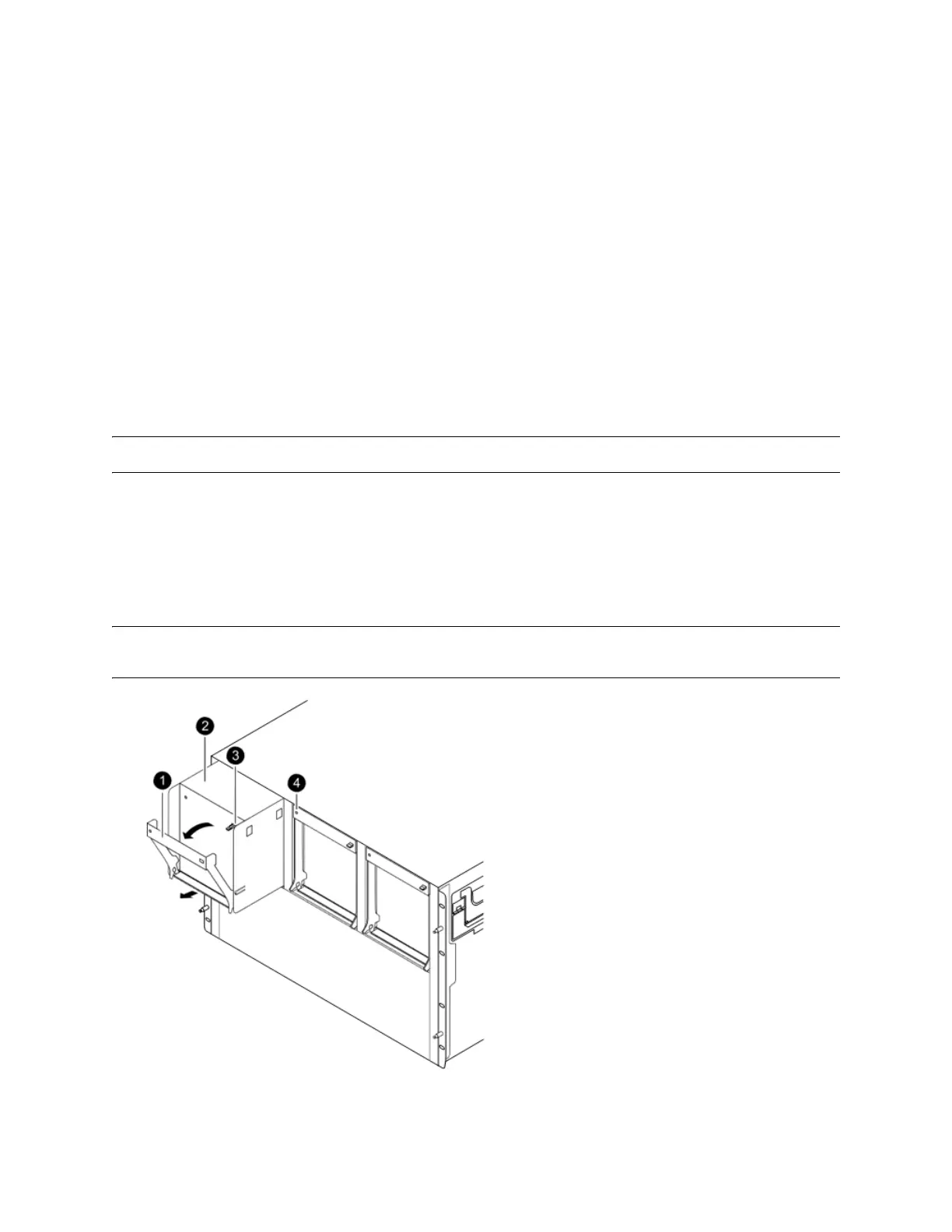
4. Press down the release latch on the fan module cam handle and pull the cam handle downward to unseat the fan
module from the chassis.
5. Pull the fan module straight out from the chassis, as shown below. Make sure that you support the base of the fan
module with your free hand, so that it does not fall out of the chassis.
Note: Controller fan modules are short. Always support the bottom of the module with your free hand, so that it does not suddenly
drop free from the chassis.



 To Next Page