11
S
MARTNA™ 10G NETWORK ACCESS (SMARTNA-X)
INTRODUCTION TO NETWORK TAPS | SUITABLE LOCATIONS FOR PLACING TAPS
DRAFT
Once traffic has entered the SmartNA-X system it can be directed, or mapped, to monitoring ports within the
system. Tools can be attached to the monitoring ports and the traffic analyzed as required, as shown in Figure 2-2
.
Suitable locations for placing TAPs
Where you place a TAP on your network is of critical importance. Place a TAP in the wrong place and you may
take down the whole network, miss vital packets, or cause packets to be dropped on the network and/or
monitoring ports. This section explores the various locations you can place TAPs and the various advantages and
disadvantages associated with each.
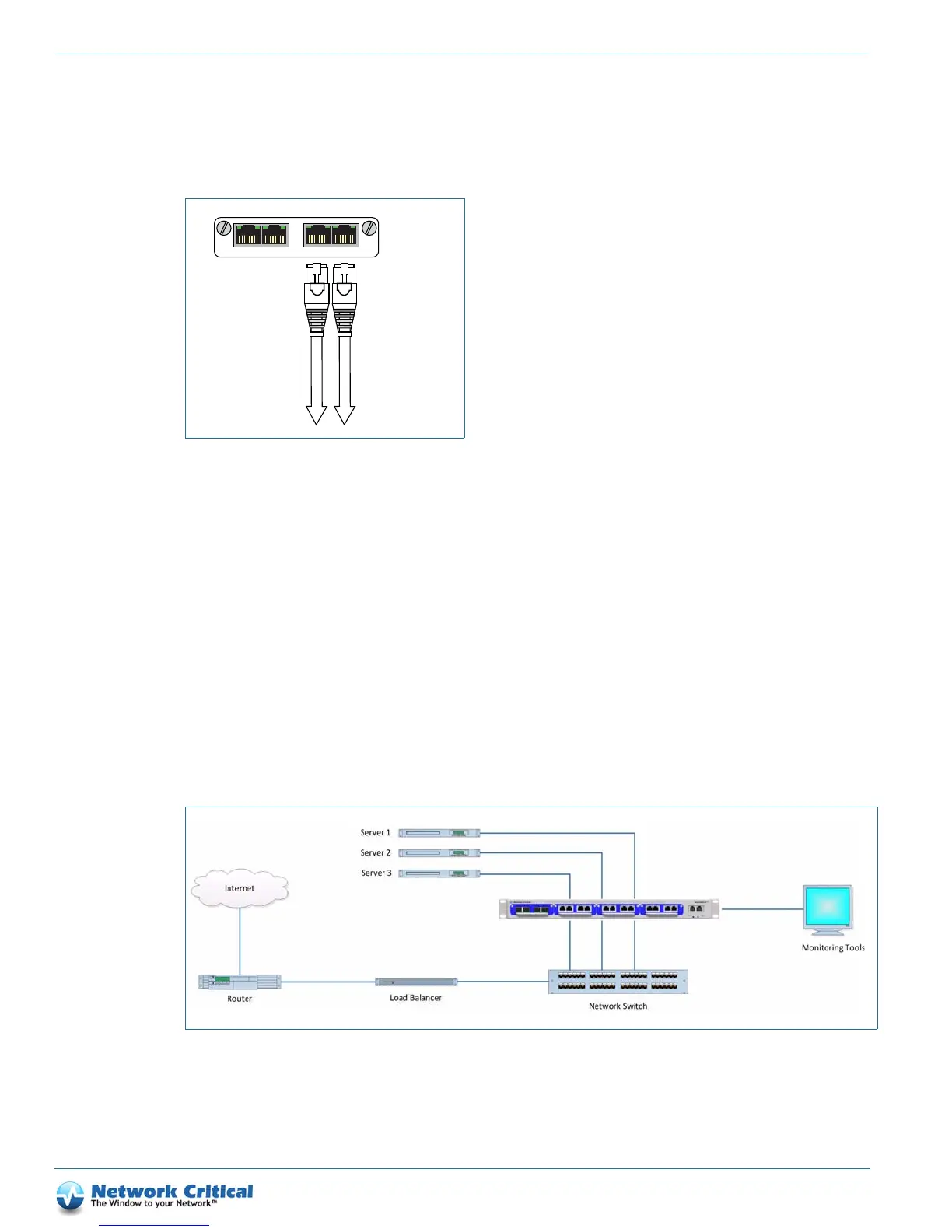
Placing TAPs on individual servers
Figure 2-3 shows a configuration where TAPs are placed on the individual servers that are to be monitored. A fully
populated SmartNA-X chassis with four modules inserted will allow up to four servers to be monitored (more if
the C&D ports are used as failsafe TAPs on some types of module). This method allows for greater control when
scheduling network outages, since there is no need to take down all servers when placing TAPs. This configuration
is suitable for environments where servers are in a single location.
Figure 2-2 Connecting to network tools
To Network
Monitoring Tool
To Network
Monitoring Tool
A
BC
D
Figure 2-3 TAPs placed at server connection



 To Next Page