26
S
MARTNA™ 10G NETWORK ACCESS (SMARTNA-X)
ADMINISTERING SMARTNA-X | MANAGING USER ACCOUNTS AND AUTHENTICATION
DRAFT
Managing user accounts and authentication
This section covers information regarding SmartNA-X user accounts. For security, access to the management
system is restricted to authorized users, who must provide valid user credentials in order to access the management
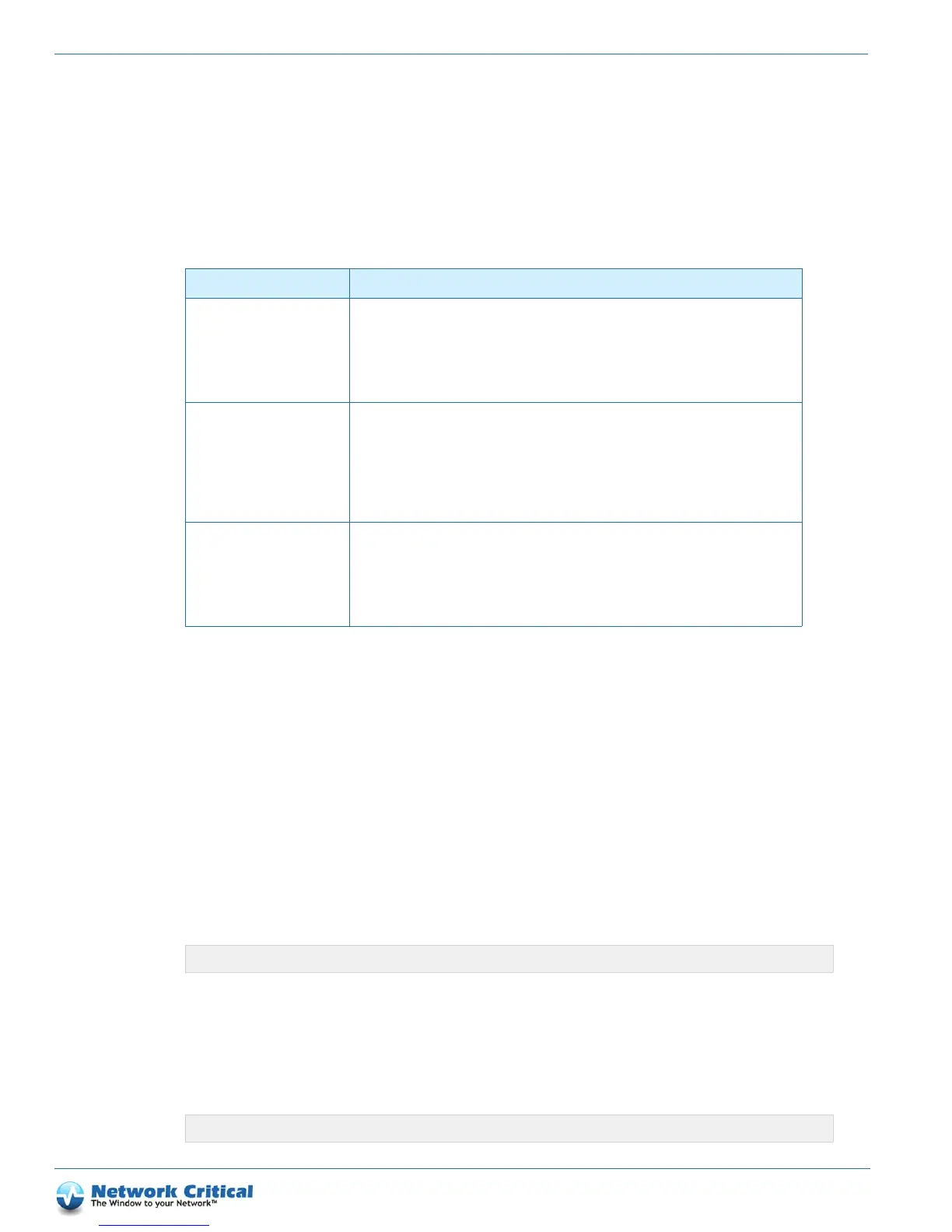
system. Table 4-2 shows the user accounts that are initially enabl
ed on the device. You should change the log on
credentials in the first instance to secure access to the system.
Administrator Full read-write access to SmartNA-X. Typically assigned to network administrators who
initially deploy the box into the network and administer users.
Default username:
admin
Default password: admin
Access level: admin
Operator Read-write access to ports and module settings. R
ead-only access to system settings, such as
network configuration and user administration. Typically assigned to network security
administrators who use SmartNA-X to TAP data networks.
Default username: user
Default password: user
Access level: user
Audit Read-only access. Typically assigned to technical au
ditors and other users who need access to
system information only.
Default username: audit
Default password: audit
Access level: audit
Authenticating users
Users must be authenticated before they can use the SmartNA-X management interfaces. Authentication can be
performed locally or via a RADIUS/TACACS+ authentication server. To enable RADIUS/TACACS+
authentication, see the “Enabling RADIUS and TACACS+ authentication ser
vers” section on page 27.
Local users can be added by specifying the create user c
ommand in the CLI. For example, to add the following
user:
•Username: SNAX-
user1
• Password: SNAX
-pass1
• Access level: Operator/user
log in to the CLI as Administrator and enter the following command:
See page 96 for information on the create user command.
Resetting passwords
Administrators can reset/change passwords with the set user password command. For example, to reset the
password for user SNAX-user1, log in as Administrator and enter this command at the prompt:
User Access details
Table 4-2 SmartNA-X default user accounts
CONTROLLER>create user SNAX-user1 SNAX-pass1 user
CONTROLLER>set user johnsmith password <new-password>



 To Next Page