40
S
MARTNA™ 10G NETWORK ACCESS (SMARTNA-X)
CONFIGURING PORTS | CONFIGURING PORT FAILSAFE AND LFP (TAP MODE)
DRAFT
Configuring port failsafe and LFP (TAP mode)
Copper port pairs (AB and CD)
1
support ‘TAP mode’ for integrated fail-to-safe and Link Failure Propagation
(LFP). TAP mode allows the port to quickly failover to an integrated relay switch and maintain link up status in
the event of a port or device failure. LFP allows the TAP to monitor each live port link: if one of the devices
connected to the live port fails, the paired port will immediately drop (LFP will re-establish connection as soon as
the devices are back up).
TAP mode requires port pairs to be mapped as follows:
AÖB, BÖA
or
C
ÖD, DÖC
Note that if power loss occurs, fail-to-safe (failsafe) will result in a small break in the connection before the
connection is re-established.
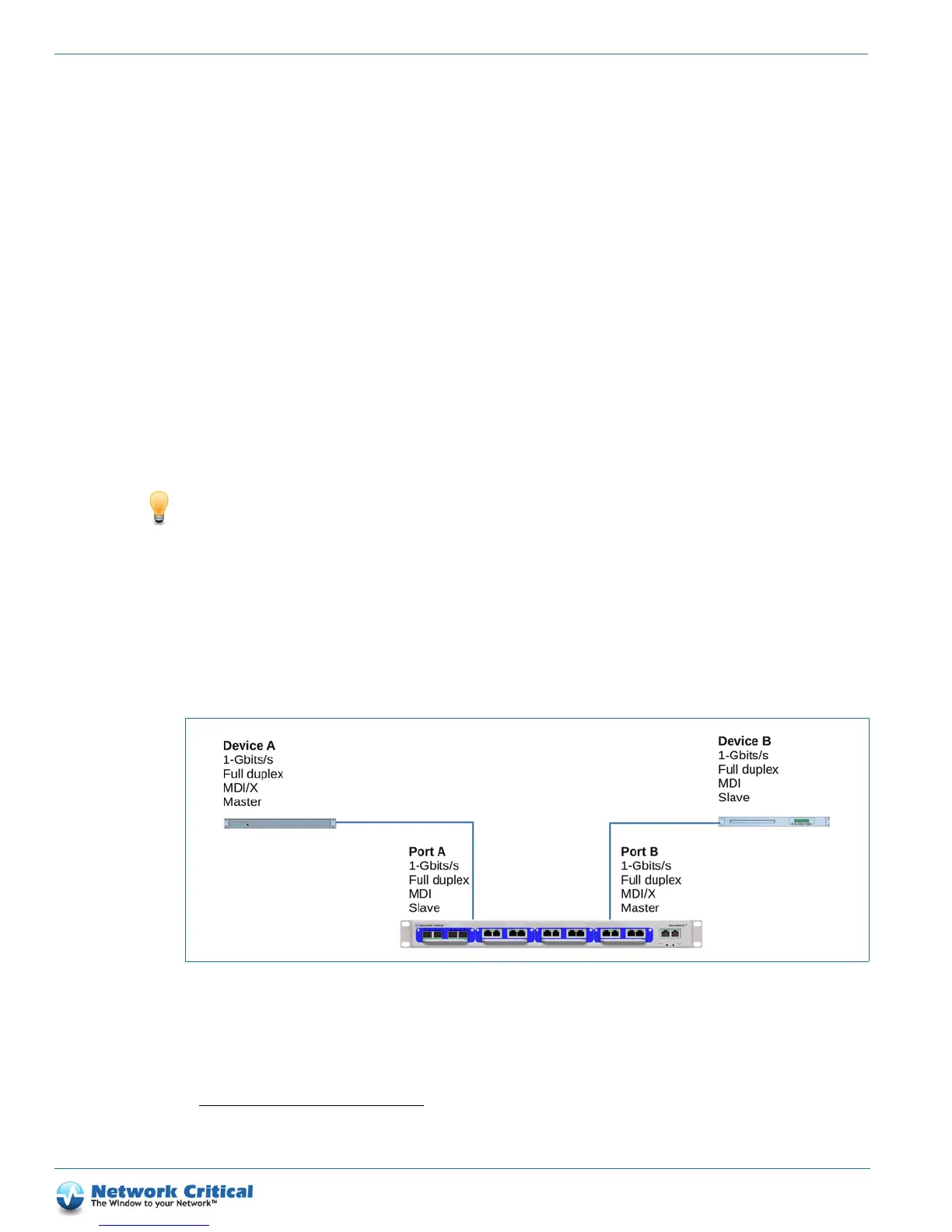
Tip: You can reduce failsafe delay by avoiding using ‘Auto’ port settings, as this may result in re-negotiation of the
link. To prevent re-negotiation, you should configure each TAP pair and its link partner as follows:
•same speed
•half-duplex
•MDI and MDI-X
• Master! and Slave! (if Master/Slave settings are available on the link partner)
The general advice is to set port A the same as port B’s link partner, and port B the same as port A’s partner, as
shown in Figure 6-1.
Using the web UI to enable TAP mode
1. Log in to the web UI.
2. Click on the port you want to configure and select the Port Configuration tab.
1. TAP mode is support on AB and CD port pairs only.
Figure 6-1 Port configuration for minimizing failover delay



 To Next Page