NewSonic SonoDur2 Issue 04 09/2016 Page 24
7.1.1 Operating Structure
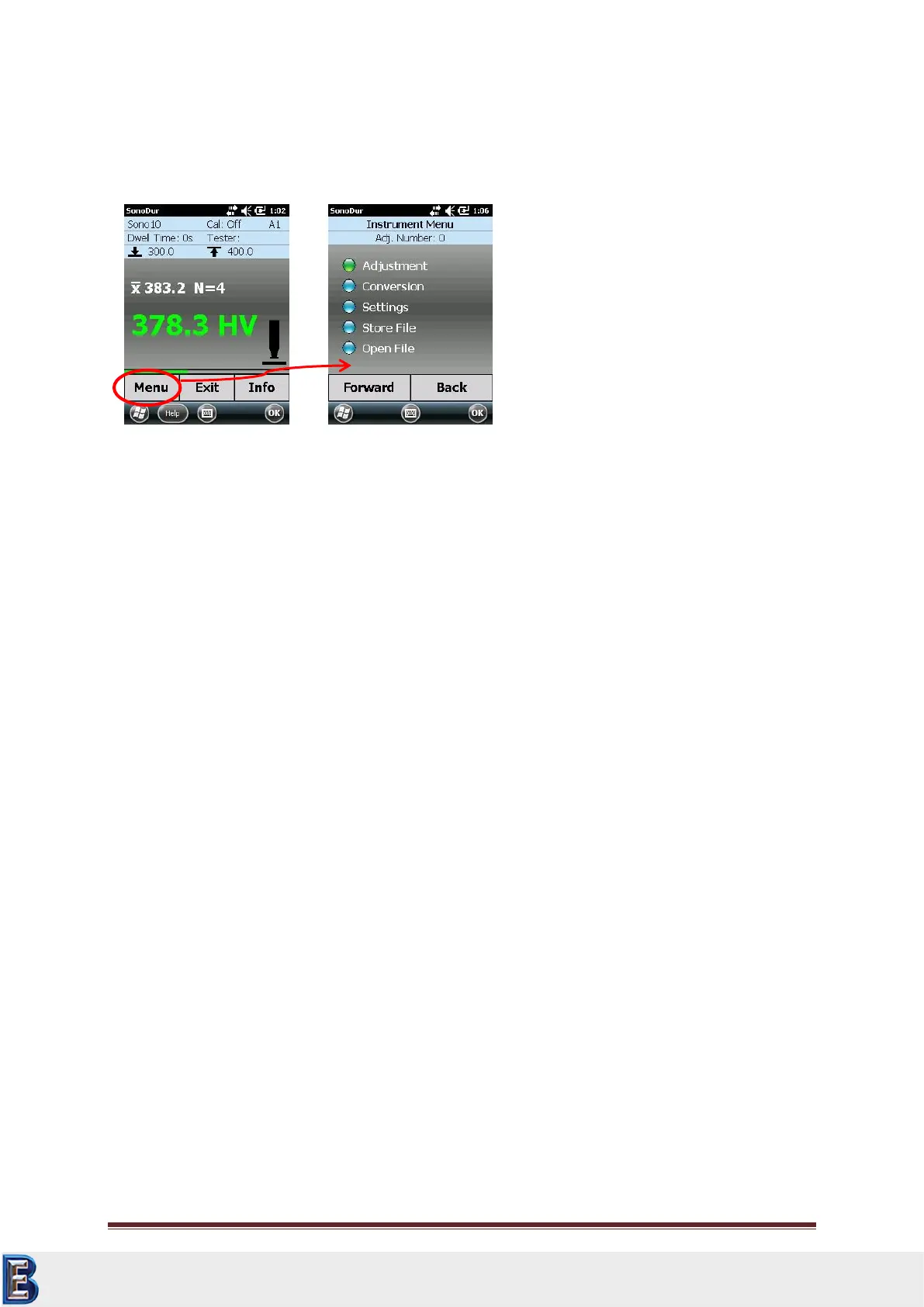
The SonoDur2 basically provides two-level operation, the measurement menu (Figure 7.2) and the
instrument menu (Figure 7.3).
7.1.2 Description of Control Elements
Changeovers between the menus are performed via touch-sensitive menu buttons at the lower edge
of the screen or symbols or tiles.
Menu
Changeover to the Instrument Menu.
Exit
1. Exiting the Measurement Menu, end of the measurement series
2. Exiting any sub-program within the Instrument Menu and changeover into the Measurement
Menu
3. Closing SonoDur2 (after processing the last measuring series and prior to the first new
measurement value).
Info
Display device settings for the measurement process, display of measurement results such as
statistics, single values and corresponding correction possibilities.
Forward
Call up “green” highlighted menu item and take one step forward within the sub-menu.
Back
Go back one step within the sub-menu.
File (within the “Info” sub-menu)
Activating and displaying of stored measurement data.
Your Complete Source for
Testing Equipment. Since 1969!
www.BergEng.com
Berg Engineering & Sales Company, Inc.
Tel 847-577-3980
info@bergeng.com



 To Next Page