NewSonic SonoDur2 Issue 04 09/2016 Page 25
7.2 Soft Keys
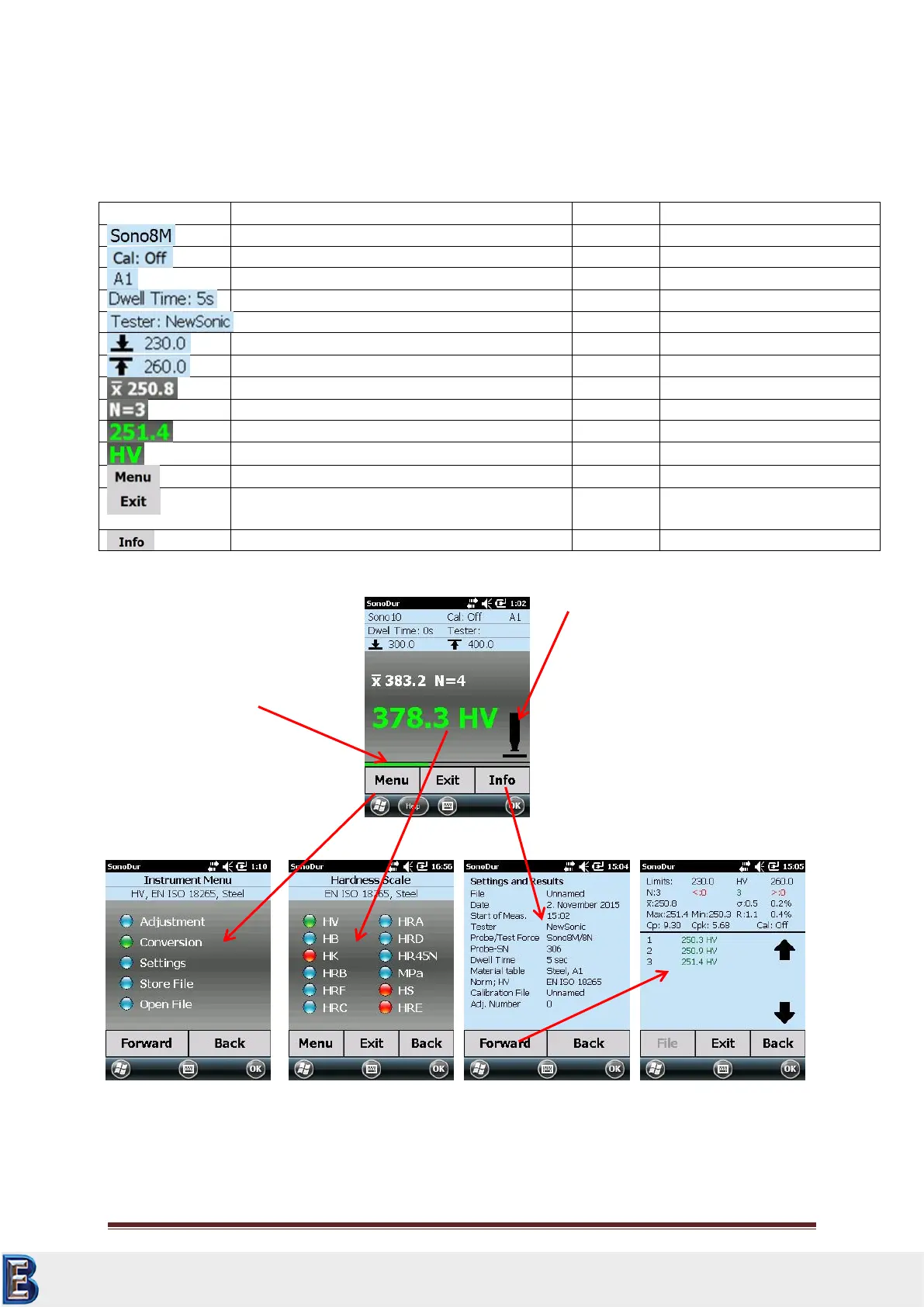
By touching the screen within the Measurement menu, direct changeovers to specific sub-menus can
take place. See next table and for functions of the touchable symbols/tiles.
Attached motorized probe, 3N test force
measurement method selection
Adjustment off, standard adjustment for mild steel
Short cut for material table
Indentation time set to 5 sec
Actual (last) measurement
Opens the instrument menu
Exits from the SonoDur2 program, or jumps back
to the measuring menu from any sub-menus
Measurement menu, end
program
Opens the information menu
Table 7-1
Probe Symbol:
Manual initiation of
measurement cycle by
touching the probe symbol
(solely motor probes)
Instrument Control:
Menu = Instrument Menu
Exit = Change over to
“measurement” or “end of
measurement”
Info = Display of settings
and results
Status bar: Represents the
speed of applying the test force
Your Complete Source for
Testing Equipment. Since 1969!
www.BergEng.com
Berg Engineering & Sales Company, Inc.
Tel 847-577-3980
info@bergeng.com



 To Next Page