NewSonic SonoDur2 Issue 04 09/2016 Page 54
Note:
The adjustment „Turn off backlight if device is not used for“ within the menu Battery Power does
not affect the brightness of the background, but the automatic shutdown function, after the adjusted
time!
We recommend that you don’t undertake any changes.
10.3 Automatic Shutdown
You can change the behavior for automatic switch off via the menu “Backlight”, see preceding tips.
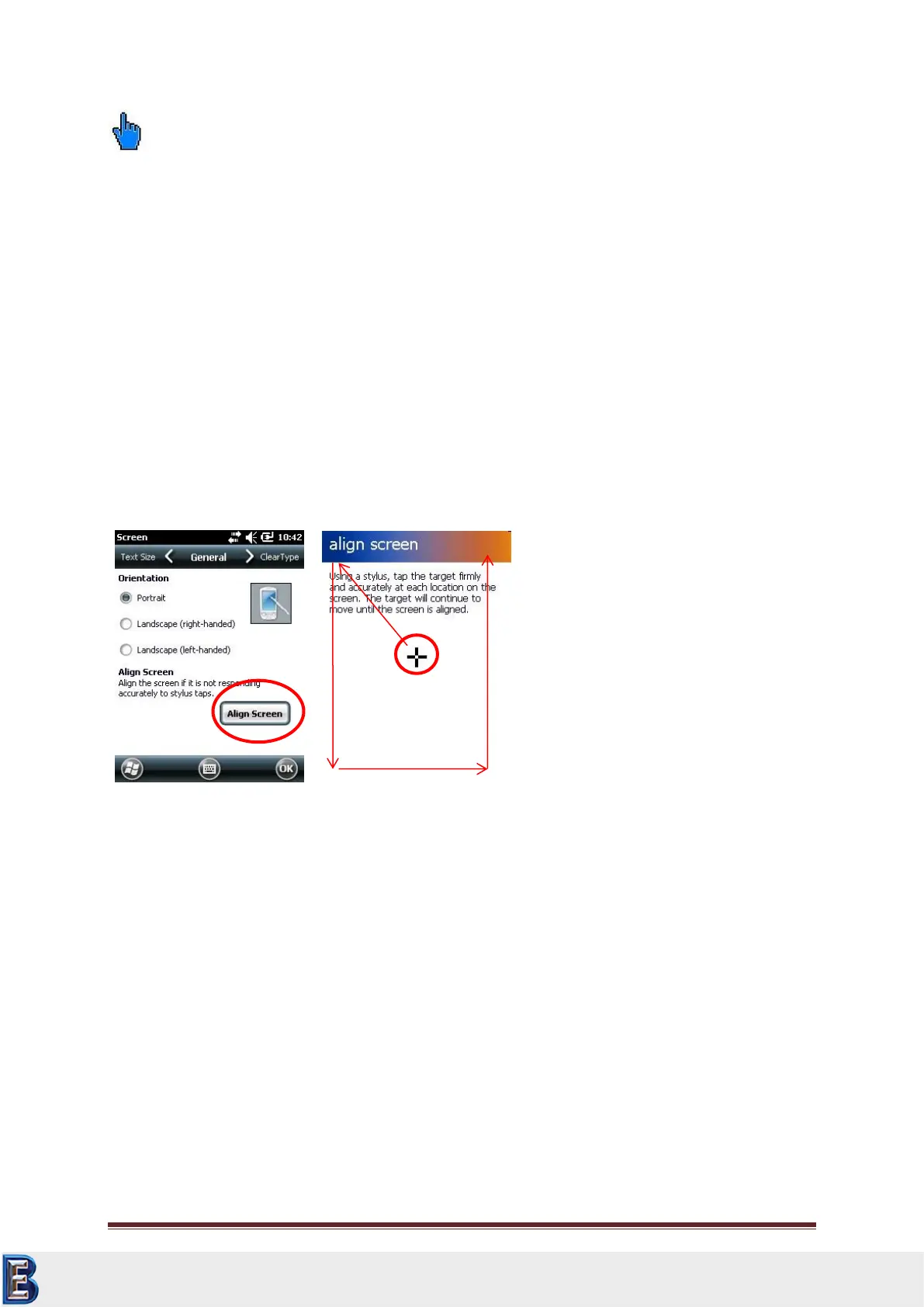
10.4 Adjust Touch Screen
In case the operation of the touch-sensitive screen fails, you should adjust the touch screen.
You find this function by touch lightly the Screen of symbol in the system menu. You reach this
function in lower half of the system menu by pushing (wipe) the screen upwards. Press the button
Align Screen and follow with the touch pen the shown crossing. Close the adjustment with OK.
10.5 Virtual Keyboard
The virtual keyboard can be activated by pressing the button at the lower bottom of the screen (if
entries are necessary). The appearance can be modified by selection via the arrow symbol.
Your Complete Source for
Testing Equipment. Since 1969!
www.BergEng.com
Berg Engineering & Sales Company, Inc.
Tel 847-577-3980
info@bergeng.com



 To Next Page