NewSonic SonoDur2 Issue 04 09/2016 Page 46
7.11.2 Open File
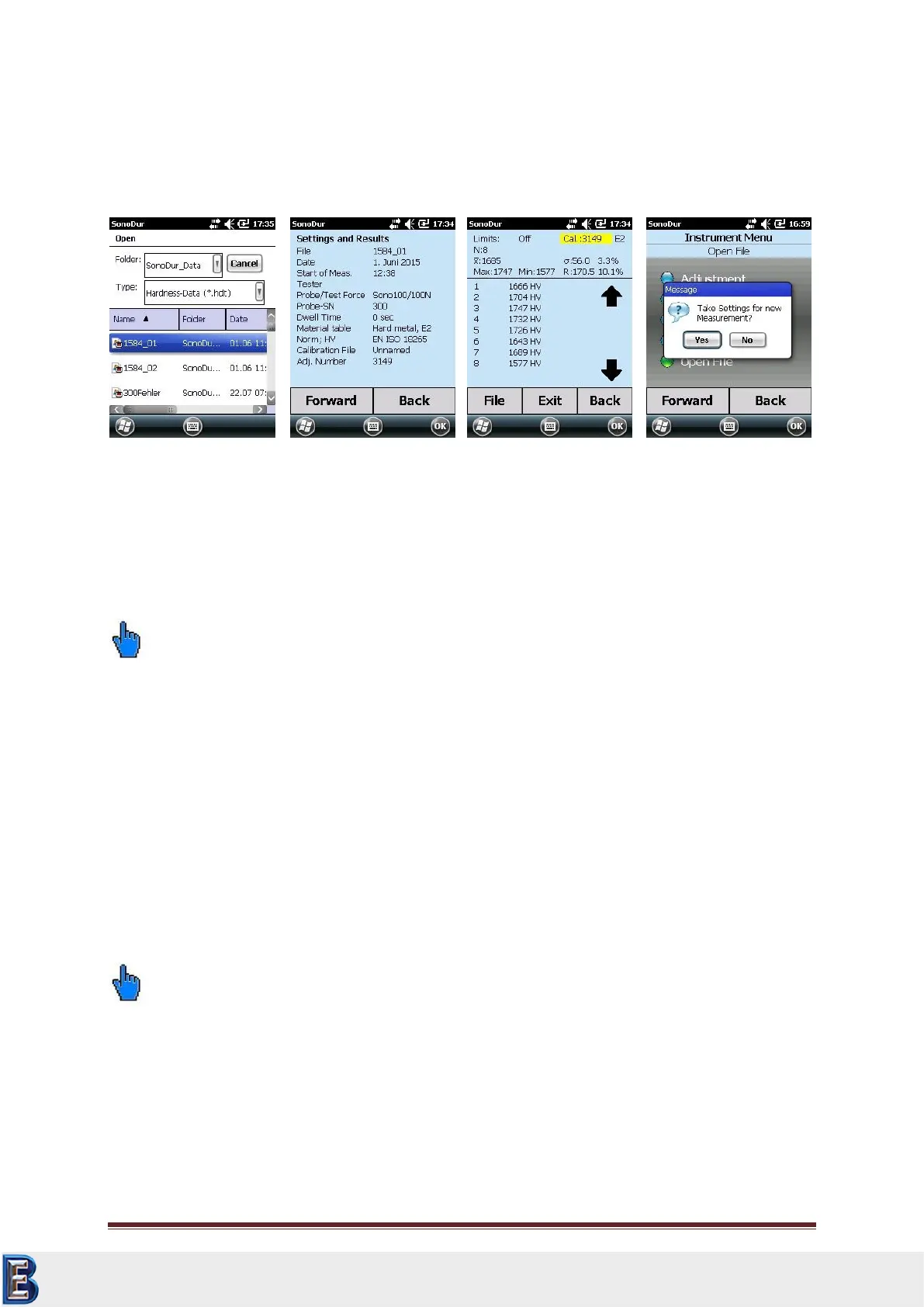
If you select "Open File" in the device menu, any saved measurement series can be indicated again.
The accessible program area is limited to the information area, i.e., the data can only be viewed (see
Figure 7.97 to Figure 7.100).
It is not possible to make any further changes (measuring value correction) and tapping on a
measurement line is responded with an error message. This can be easily cancelled by clicking the
“OK”-button.
Please note:
When leaving the INFO menu via the EXIT button (Figure 7.99), the stored measurement settings of
this file can be carried over in the transition to the measurement menu, if the query becomes
confirmed with "Yes" (Figure 7.100) and the currently connected probe features the same test force
than the probe under which the measurements have been stored. This enables the direct
continuation of measurement series with the familiar settings.
7.11.3 Data Transfer and Interfaces
In order to be able to transfer data via USB cable, Bluetooth or WLAN, the installation software for
the SonoDur2 device must be installed.
Detailed descriptions of computer systems, based on WIN XP and WIN 7 can be found in section 10.6,
“Installing Interfaces and Drivers”.
Please note:
It is generally recommended to back up important adjustment data into higher-level computer
systems in order to avoid data loss in case the device is defective.
The saved measurement data is stored in two file formats, namely text files (.txt), and source
files (.hdt). After data transfer completion the text files can be further processed in any
desired form.
However, the original data is immutable and should therefore also be stored in higher-level
computer systems.
Your Complete Source for
Testing Equipment. Since 1969!
www.BergEng.com
Berg Engineering & Sales Company, Inc.
Tel 847-577-3980
info@bergeng.com



 To Next Page