NewSonic SonoDur2 Issue 04 09/2016 Page 45
7.11 SonoDur2 Data Handling
SonoDur2 provides the opportunity to store and access measurement data and transfer to external
computers.
7.11.1 Save Files
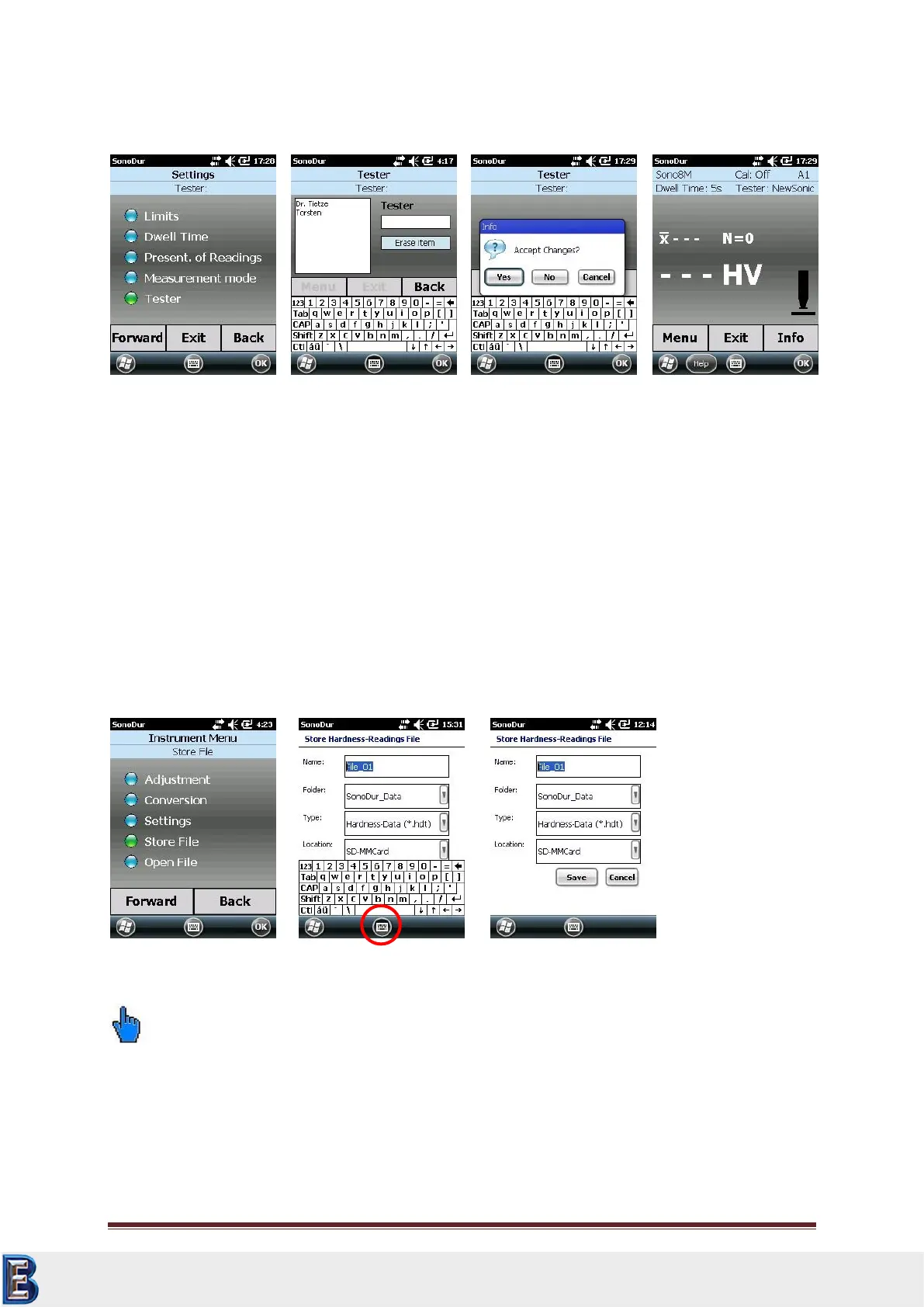
Measurement data can be stored under an individual name and reactivated. Upon completion of the
measurement series via the “Exit”-button, SonoDur2 queries whether the measurement data should
be stored. This also applies to the event, that the process parameters should be changed (dwell time,
new adjustment). If the question is answered with "Yes", the device menu for the saving of
measurement data opens up (Figure 7.95). SonoDur2 suggests a file name and increments each with
+1 if a new measurement series has been finished.
Please note:
The virtual keyboard must be closed first get access to the “SAVE” Button.
The domain "SonoDur2_Dat" is predefined as data folder. This can be modified in the PDA menu. All
data is stored on the installed micro SD-Card, which can be removed and externally read from a card
reader connected to a PC. Further details are provided in the next Section “Open File“, section
7.11.2.
Your Complete Source for
Testing Equipment. Since 1969!
www.BergEng.com
Berg Engineering & Sales Company, Inc.
Tel 847-577-3980
info@bergeng.com



 To Next Page