NewSonic SonoDur2 Issue 04 09/2016 Page 33
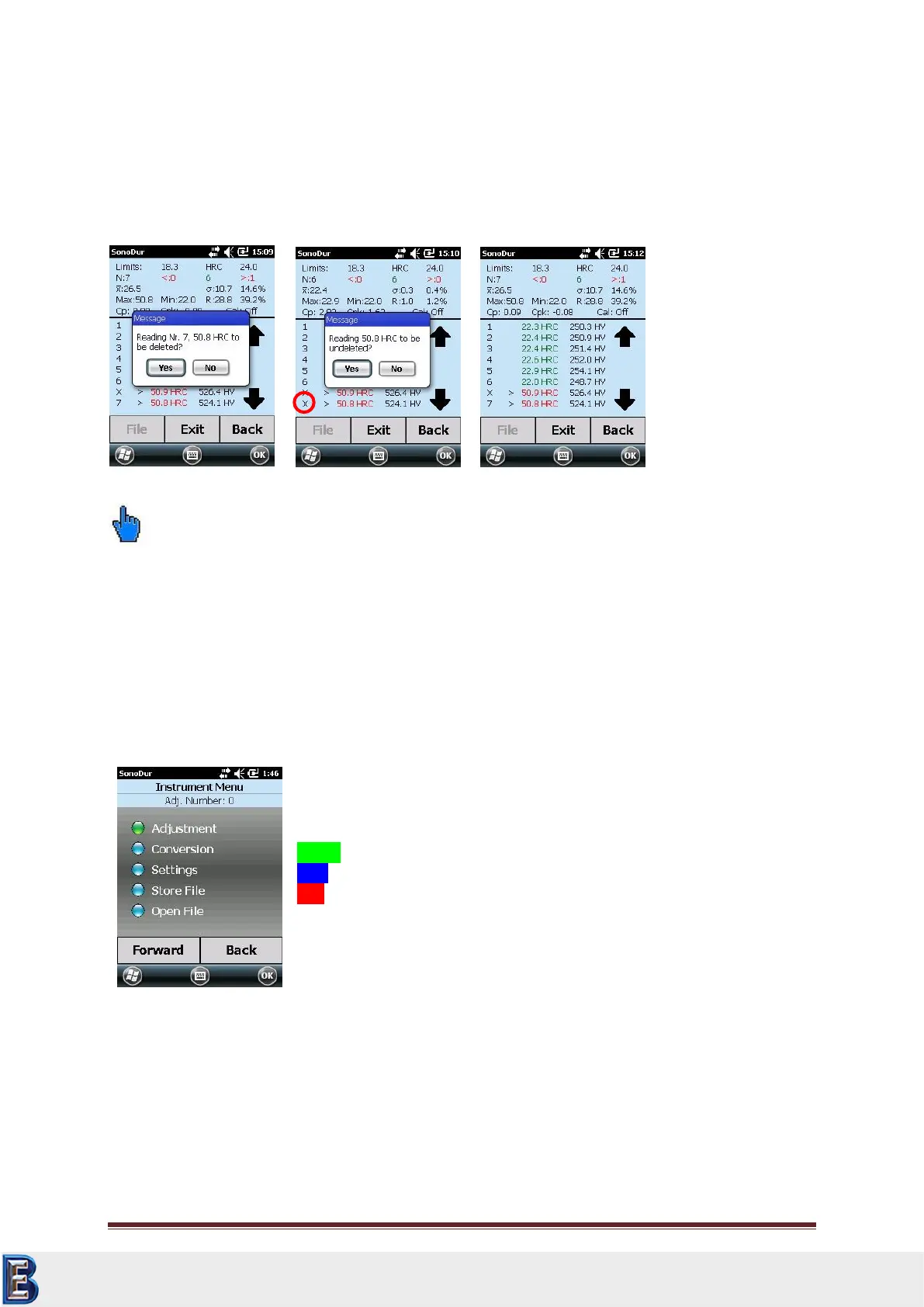
Correction of measurement results by tapping on a measurement value (in this case: No. 7,
50.8 HRC, Figure 7.32) by confirming (Yes/No) or recovery of deleted measurement values (in this
case: Same measurement value 50.8 HRC, former measuring point, No. 7, Figure 7.34). Any
Measurement values can be deleted or restored after analysis has been performed. The statistic
results are updated and newly calculated for each condition.
Please note:
Deleted measurements are marked with a “X” in the position row (see Figure 7.33, red circle) and
will still be shown, but not taken account of in the statistic calculations!
This deleted data can be restored. After re-storage the value will appear at the same position and the
statistic will be re-calculated.
7.6 Device Menu
The device menu can be accessed via the Menu button with access to all instrument parameters, the
data logger and the adjustment function.
Additional program steps are indicated in plain text with the aforesaid
colored dots:
Green: Will be executed by the “Forward” button
Blue: Is available as menu item
Red: Is not available as menu item
By tapping a blue highlighted menu item, the item will become
highlighted in green and executed via the “Forward” button.
Within the new menu item, the name of the menu item and the currently
selected setting will appear once again on the top of the status bar.
7.7 Adjustment
This is where the measuring system can be adjusted to the test material by determining a setting
value containing the material properties (modulus of elasticity deviating from low-alloy steel) and
applies to the specified test method. This setting value depends on the test load, probe type (hand-
held or motorized measuring probe) and on the frequency sweep (penetration time and
measurement direction). Stored adjustments only apply to the specific probe type.
Your Complete Source for
Testing Equipment. Since 1969!
www.BergEng.com
Berg Engineering & Sales Company, Inc.
Tel 847-577-3980
info@bergeng.com



 To Next Page