NewSonic SonoDur2 Issue 04 09/2016 Page 34
The adjustment is carried out via the subprogram "Adjust Measurement Value", in which the setting
value is directly determined through a direct adjustment measurement on the test object or via
"Setting Value Directly" by entering the setting value without performing a adjustment
measurement, whereas all measurement values will be immediately recalculated by using this new
setting value.
7.7.1 Adjust Measurement Value
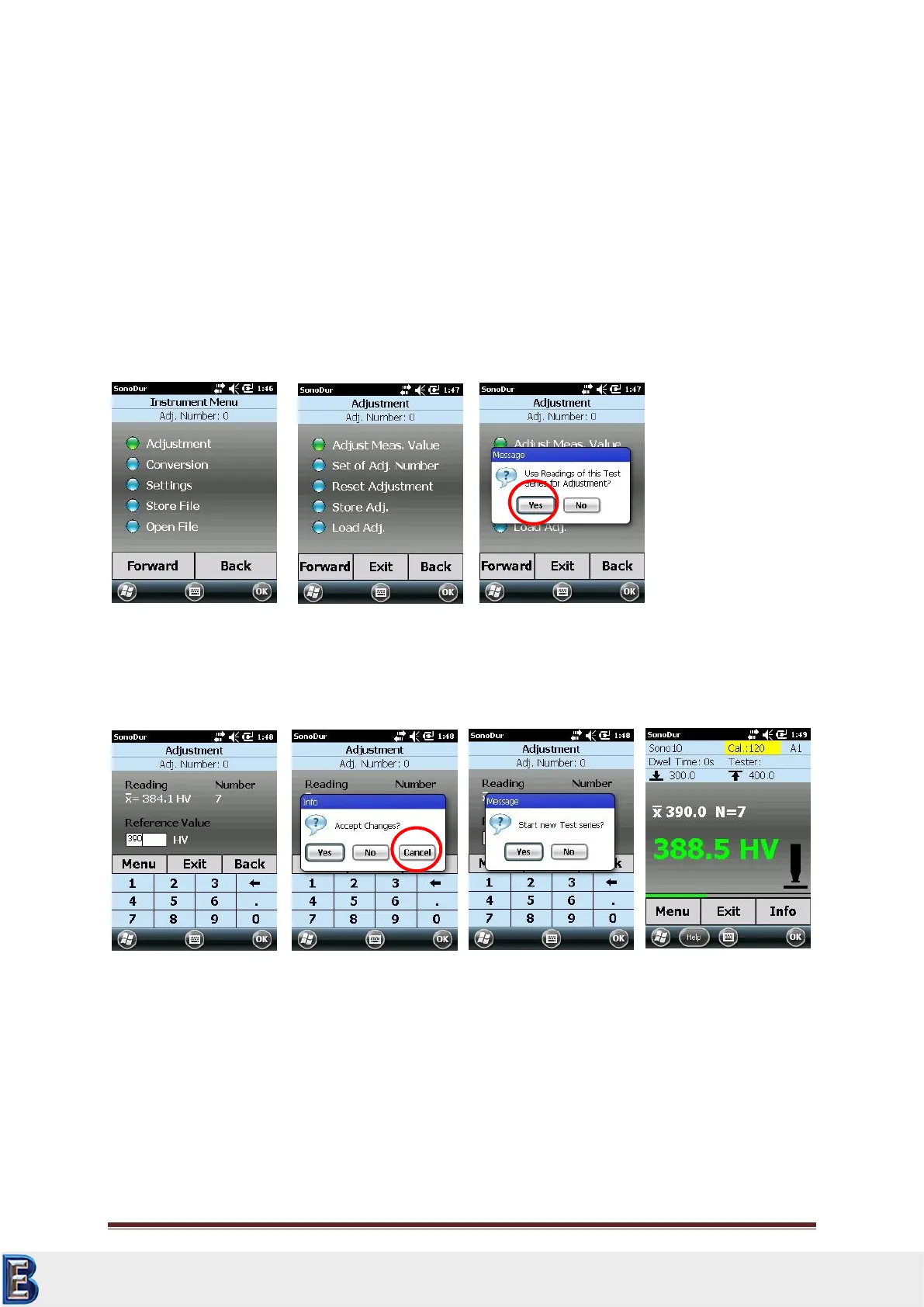
If a measurement series has been recorded, one can choose between two adjustment options, which
are described under a) and b). Then the system will ask whether the result (average value) of the
already recorded readings already recorded, should be used for the adjustment (see Figure 7.38).
a.) “YES": The determined average value will be immediately indicated in the "Reading"
(measurement value) field as well as in the "Reference Value" (nominal value) field. The
desired reference hardness value can now be entered here via the keyboard (Figure 7.39).
Thereby, each digit in the nominal value field can be separately highlighted and modified.
If there is subsequently a difference between “measured value” and “nominal value”, by pressing
one of the buttons "Menu", "Exit", "Back" it is queried whether these changes should be carried
over (YES) or not (NO) with the possibility of cancellation (Figure 7.40). In case of cancellation (red
circle), the system remains in the previous state and further modifications can be carried out (e.g. to
correct incorrect inputs). If the result of the adjustment is accepted with a "Yes" (Figure 7.40),
SonoDur2 will then query whether the new adjustment should be applied to the current
measurement series or if a new series should be started (Figure 7.41). With a "Yes", the
measurement data will be converted with the new adjustment number and the measurement series
Your Complete Source for
Testing Equipment. Since 1969!
www.BergEng.com
Berg Engineering & Sales Company, Inc.
Tel 847-577-3980
info@bergeng.com



 To Next Page