ACCESS GATEWAY
System Administration 111
After successful redirection occurs the list of signed parameters and signature
methods are passed to the portal page.
HTTP/1.0 302 RD
http://portal1.myhotel.com/details?OS=<Original
Server>&UI=<NSE’s ID>&MA=<subscriber’s MAC>&RN=<Room
name>&PORT=<VLAN>&SIP=<subscriber’s
IP>&TS=<timestamp>&NONCE=<16 chars>&SIGN=<signature>&
SIGNED=<list of signed parameters>& METHOD=<signature
method>
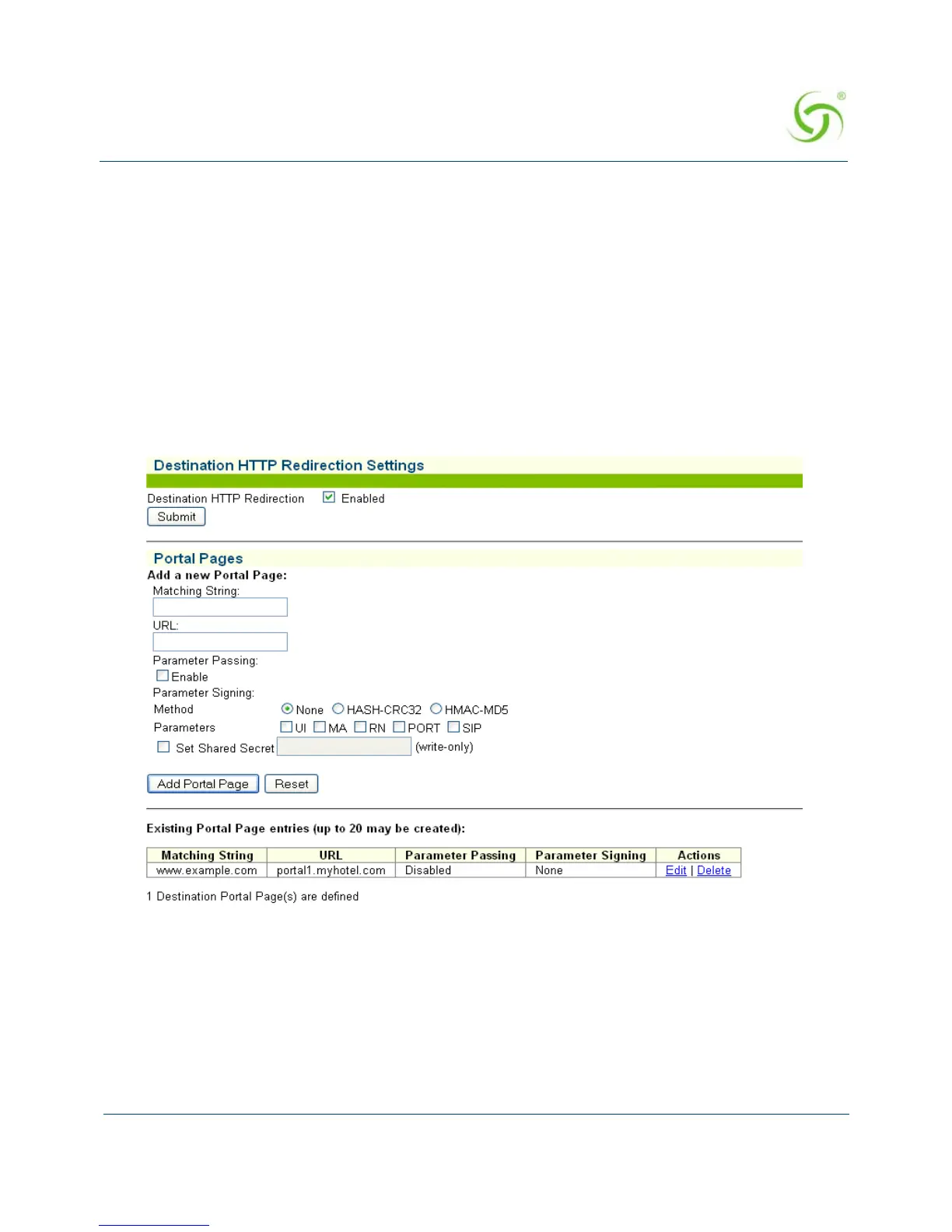
1. From the Web Management Interface, click on Configuration, then Destination HTTP
Redirection. The Destination HTTP Redirection Settings screen appears:
2. To enable Destination HTTP Redirection, click on the Enabled check box. The default
setting is disabled.
You may create up to 20 portal pages.
3. In the Portal Pages section, enter the matching string that will be directed to the portal
page in the
Matching String field.
4. Enter the portal page’s URL in the URL field.



 To Next Page