ACCESS GATEWAY
264 System Administration
System Menu
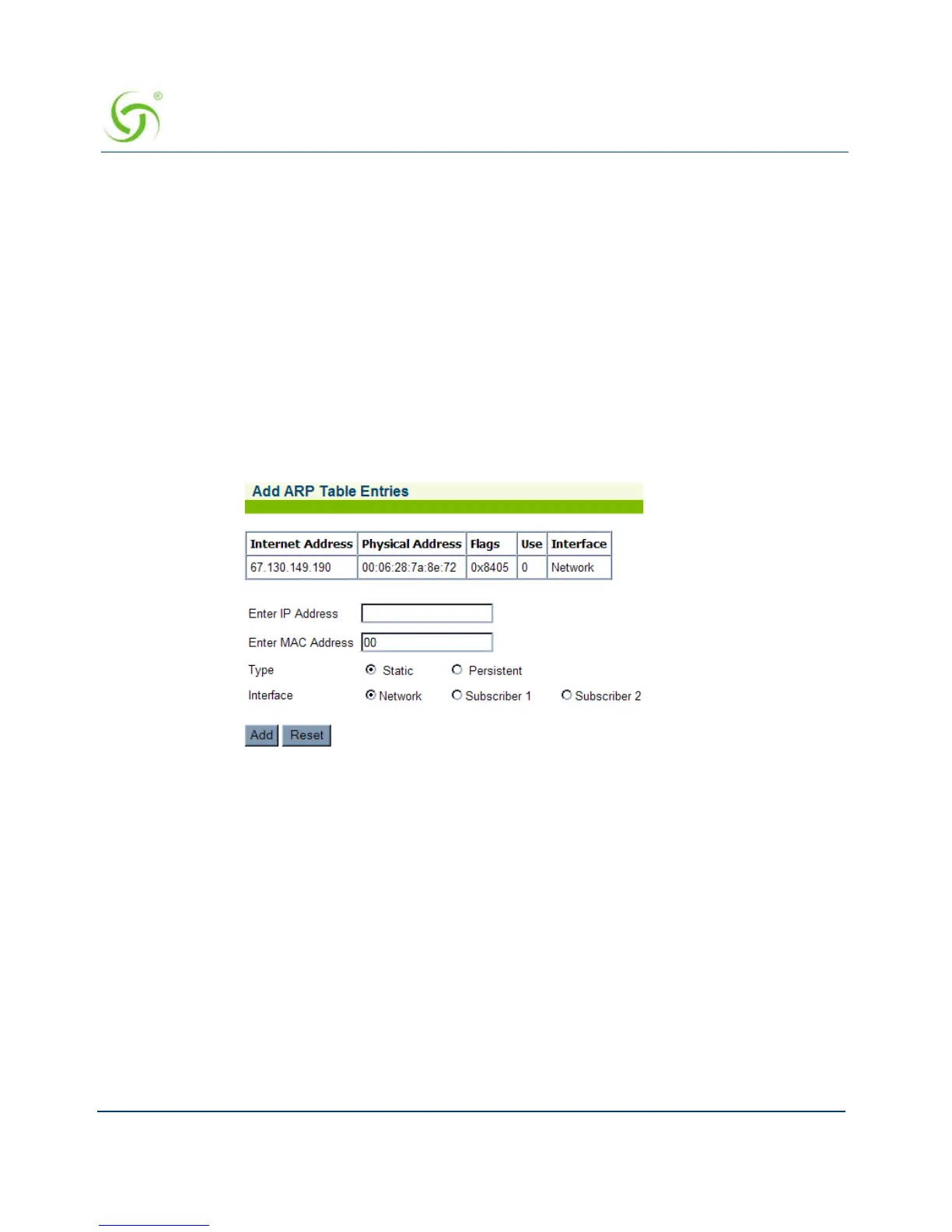
Adding an ARP Table Entry {ARP Add}
ARP (Address Resolution Protocol) is used to dynamically bind a high level IP address to a
low level physical hardware (MAC) address. ARP is limited to a single physical network that
supports hardware broadcasting. This procedure shows you how to add an ARP table entry.
Note: NSE releases 8.2 and later consolidate ARP operations to a single screen. See Adding
and Deleting ARP Table Entries.
1. From the Web Management Interface, click on System, then ARP Add. The Add ARP
Table Entries screen appears:
1. Enter the IP Address of the entry you are adding.
2. Enter the MAC Address of the entry you are adding.
3. Define whether this entry is:
Static – Will only last until the next reboot
Persistent – Will be written to the current.txt file and loaded on each boot of the NSE
4. Define whether the interface that the device the ARP entry is connected to is:
Network – WAN Interface
Subscriber 1 – LAN 1 Interface
Subscriber 2 – LAN 2 Interface



 To Next Page