56 Océ 3165 User Manual
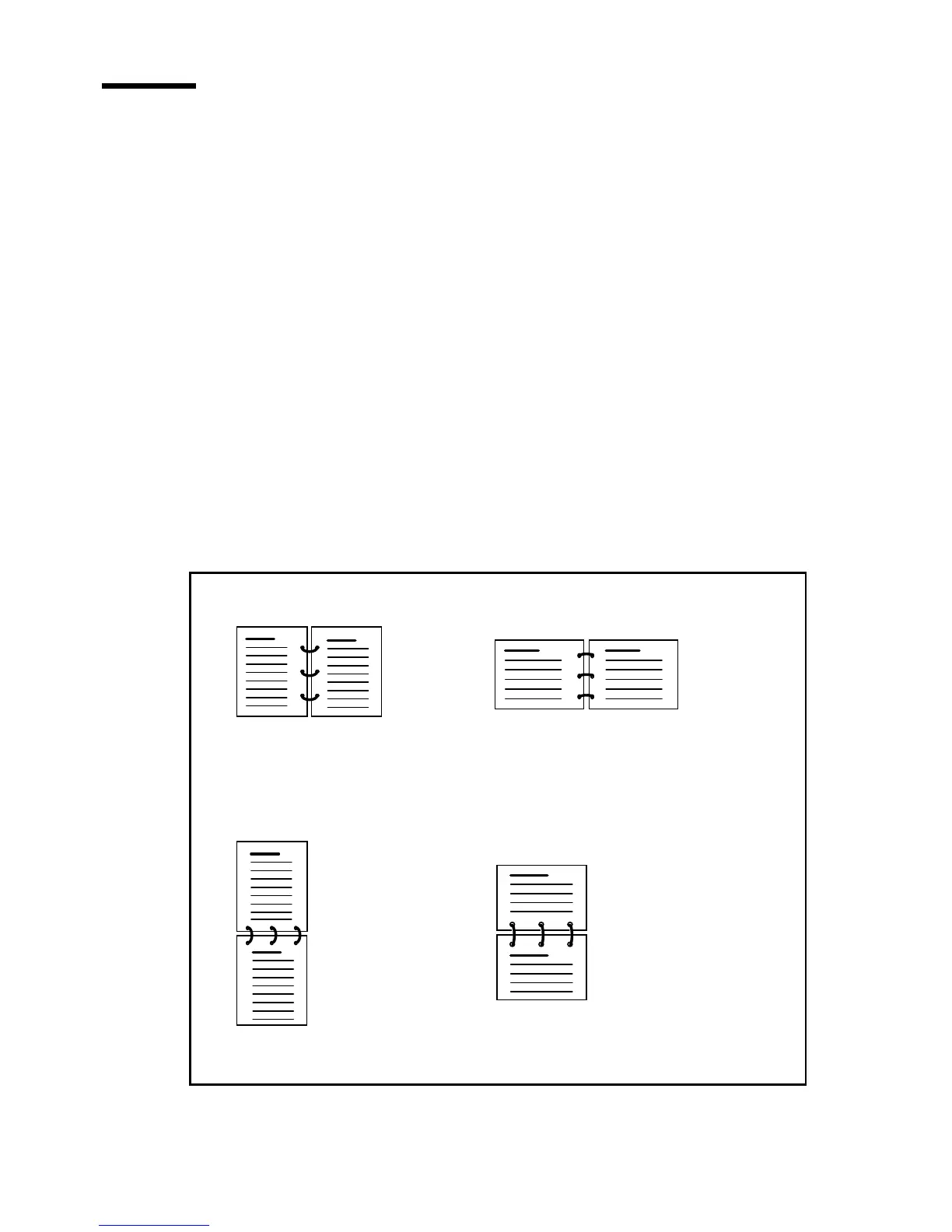
Defining the location and size of the binding edge
Reports are often bound or perforated. In some cases, the margin is not wide
enough so text gets lost when binding or perforating. You can prevent this by
widening the margin using the ‘Margin shift’-function.
Note: The margin can also be narrowed by entering a negative value. This can
be practical when limited space is left at the right side and lower side of the
original.
When printing a 2-sided report, setting a binding edge defines whether the
reader will leaf through the report by turning the pages horizontally or
vertically. In the latter case, even pages are rotated (tumbled) which will result
in a legible report for the reader. Also margins must be set for both page sides
to ensure a faultless binding.
If you are copying originals with landscape oriented information, you should
indicate this to ensure that two consecutive pages are printed in the correct
sequence.
[29] Various binding positions
2
3
landscape oriented original
binding edge: long
portrait oriented original
binding edge: long
portrait oriented original
binding edge: short
landscape oriented original
binding edge: short
23
23
2
3
(Even pages 180˚
rotated)
(Even pages 180˚
rotated)
Document in calendar form
Document in calendar form
Document in booklet form Document in booklet form



 To Next Page