66 Océ 3165 User Manual
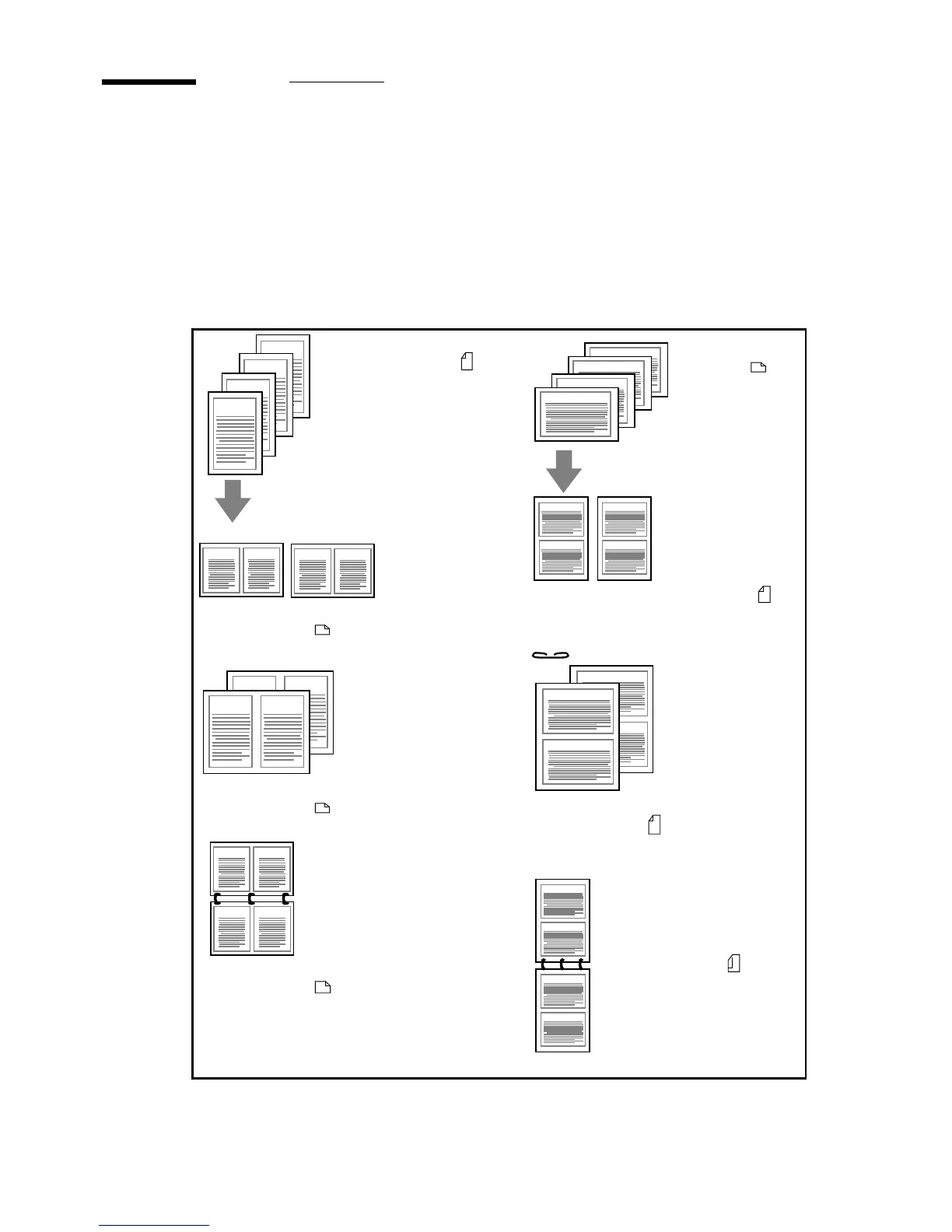
Copying two originals onto one page side
As the Océ 3165 works with scanned, digital images, it is possible to
manipulate these images. You can print two original pages (like two 1-sided
originals or the front and rear side of a 2-sided original) on one side of the page.
Depending on the chosen paper size, the originals are automatically reduced
(see figure 39). Copying two original pages onto one side can be convenient to
save paper when copying a document.
[39] Copying two originals onto one page side
71% reduction 2-images on A4
booklet form (long edge binding)
switch images
43
A4-document
portrait orientation
1:1 (100%)
2-images on A3
booklet form (short edge binding)
71% reduction
2-images on A4
booklet form (short edge binding)
A4-document
landscape
orientation
1:1 (100%)
2-images on A3
booklet form (long edge binding)
switch images
71% reduction
2-images on A4
calendar form (long edge binding)
Back pages 180˚ rotated
71% reduction
2-images on A4
calendar form
(short edge binding)
Back pages 180˚ rotated
switch images
1
1
2
3
4
1
2
3
4
1
2
3
3
1
2
34
1
1
2
3
4
4
2
1
2
3
4
12
34



 To Next Page