147
Command, function and parameter description Section 6-3
mc_offset
The address of the specified MC Unit memory area to write to. Range for VR
variables: [0, 250]. Range for Table variables: [0, 7999].
See also: HLM_COMMAND, HLM_STATUS, HLM_TIMEOUT, HLM_WRITE, SETCOM
Example: The following example shows how to read 20 words from the PC DM area
addresses 120-139 to MC Unit’s Table addresses 4000-4019. The PC has
Slave node address 17 and is connected to the RS-422A port.
HLM_READ(2,17,PLC_DM,120,20,MC_TABLE,4000)
6-3-92 HLM_STATUS
Type: Host Link Parameter
Syntax: HLM_STATUS PORT(
n
)
Description: The HLM_STATUS parameter contains the status of the last Host Link Master
command sent to the specified port. The parameter will indicate the status for
the HLM_READ, HLM_WRITE and HLM_COMMAND commands. The status
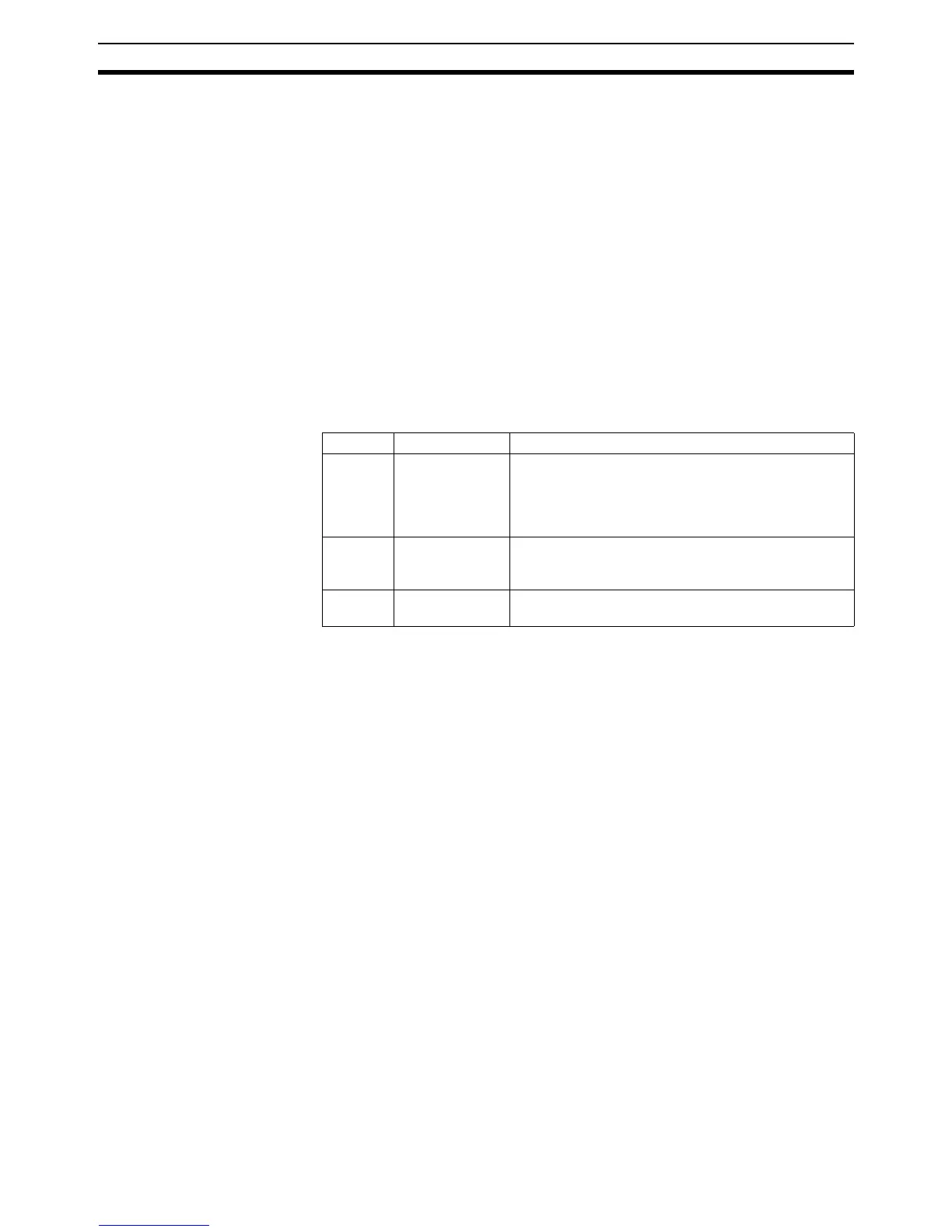
bits are defined in the following table.
The HLM_STATUS will have value 0 when no problems did occur. In case of
a non-zero value, any appropriate action such as a re-try or emergency stop
needs to be programmed in the user BASIC program.
Each port has an HLM_STATUS parameter. The PORT modifier is required to
specify the port.
Arguments:
n
The specified serial port.
See also: HLM_COMMAND, HLM_READ, HLM_TIMEOUT, HLM_WRITE
Examples: Example 1:
>> HLM_WRITE(1,28,PLC_EM,50,25,MC_VR,200)
>> PRINT HEX(HLM_STATUS PORT(1))
1
Apparently the CPU Unit is in RUN mode and does not accept the write oper-
ation.
Example 2:
>> HLM_COMMAND(HLM_TEST,2,0)
>> PRINT HLM_STATUS PORT(2)
256.0000
A timeout error has occured.
6-3-93 HLM_TIMEOUT
Type: Host Link Parameter
Bit Name Description
0 - 7 End code The end code can be either the end code which is
defined by the Host Link Slave (problem in sent com-
mand string) or an end code defined because of a
problem found by the Host Link Master (problem in
received response string).
8 Timeout error A timeout error will occur if no response has been
received within the timeout time. This indicates com-
munication has been lost.
9 Command not
recognized
This status indicates that the Slave did not recognize
the command and has returned a IC response.
1 RS-232C serial port 1
2 RS-422A serial port 2














 To Next Page