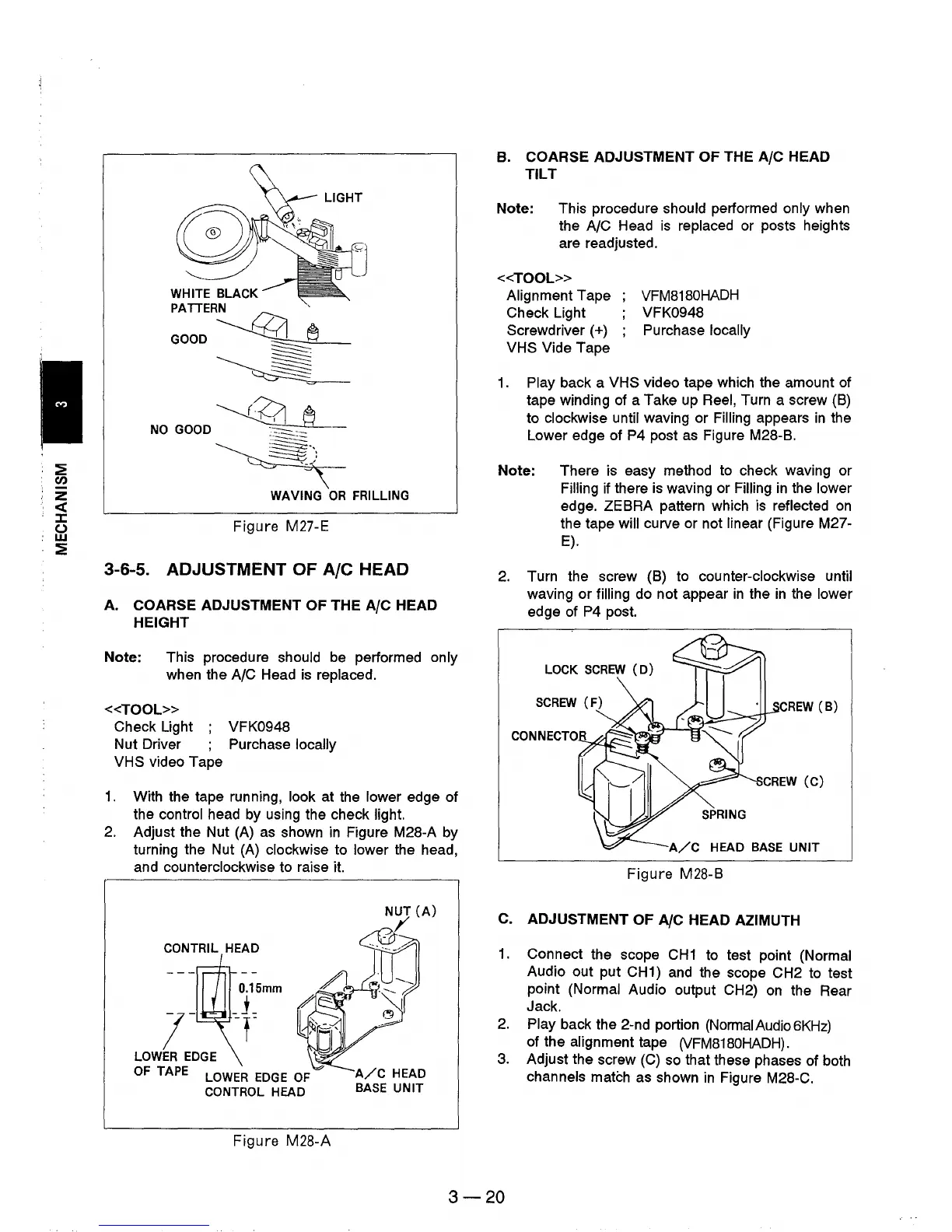
WHITE BLACK
PATTERN
~
GOOD~
-----~
~
~
NO
GOOD
-"::::::::::..-_-
~)
~~
WAVING
OR
FRILLlNG
Figure M27-E
3-6-5. ADJUSTMENT OF
Ale
HEAD
A. COARSE ADJUSTMENT OF THE
A/C
HEAD
HEIGHT
Note: This procedure should be performed only
when the
A/C Head
is
replaced.
«TOOL»
Check Light ; VFK0948
Nut Driver Purchase locally
VHS video Tape
1.
With the tape running, look at the lower edge of
the control head by using the check light.
2.
Adjust the Nut (A) as shown
in
Figure M28-A by
turning the Nut (A) clockwise to lower the head,
and counterclockwise to raise
it.
CONTRIL HEAD
O.15mm
7-
-+
LOWER
EDGE
OF
TAPE
LOWER
EDGE
OF
CONTROL HEAD
Figure
M28-A
A/C
HEAD
BASE
UNIT
B. COARSE ADJUSTMENT OF THE
A/C
HEAD
TILT
Note: This procedure should performed only when
the
A/C Head
is
replaced or posts heights
are readjusted.
<<TOOL»
Alignment Tape
Check Light
Screwdriver
(+)
VHS Vide Tape
VFM8180HADH
VFK0948
Purchase locally
1.
Play back a VHS video tape which the amount of
tape winding of a Take up Reel, Turn a screw
(B)
to clockwise until waving or Filling appears
in
the
Lower edge of P4 post
as
Figure M28-B.
Note: There is easy method to check waving or
Filling if there is waving or Filling
in
the lower
edge. ZEBRA pattern which is reflected
on
the tape will curve or not linear (Figure M27-
E).
2.
Turn the screw (B) to counter-clockwise until
waving or filling do not appear
in
the
in
the lower
edge of P4 post.
LOCK
SCREW
(D)
CREW
(B)
A/C
HEAD
BASE
UNIT
Figure
M28-B
C.
ADJUSTMENT OF
A/C
HEAD AZIMUTH
1.
Connect the scope
CH1
to test point (Normal
Audio out put CH1) and the scope CH2 to test
point (Normal Audio output CH2)
on
the Rear
Jack.
2.
Play back the 2-nd portion (NormaIAudio6KHz)
of the alignment tape
(VFM8180HADH).
3.
Adjust the screw
(C)
so that these phases of both
channels
match as shown
in
Figure M28-C.
3-20











 To Next Page