Chapter 4 Settings — [PROJECTOR SETUP] menu
188 - ENGLISH
5) Press the <ENTER> button.
f The conrmation screen is displayed.
6) Press qw to select [OK], and press the <ENTER> button.
Note
f The security password is the password set in the [SECURITY] menu → [SECURITY PASSWORD CHANGE].
Initial password of the factory default setting: awsqawsq
f To delete only a part of a registered signal, delete it following “Deleting the registered signal” (x page 192).
f To return the setting of [Time zone] in [Adjust clock] of the web control screen and the setting of the [PROJECTOR SETUP] menu → [DATE
AND TIME] → [TIME ZONE] to the factory default settings, initialize them by one of the following methods.
g Initializing by selecting the [PROJECTOR SETUP] menu → [INITIALIZE] → [FACTORY RESET]
g Initializing by setting the [PROJECTOR SETUP] menu → [INITIALIZE] → [USER SETTINGS] → [OTHER USER SETTING] to
[INITIALIZE]
f The self‑signed certicate already created in [Certicate] of the web control screen or the information of the server certicate already
installed can be deleted in the web control screen.
f If initialized by selecting [FACTORY RESET], the [INITIAL SETTING] screen is displayed when the projection is started the next time.
f If any of the following menu is set to [USER IMAGE 1], [USER IMAGE 2], [USER IMAGE 3] or [USER IMAGE 4] and is initialized by
selecting [USER IMAGE ONLY], the corresponding menu settings will be returned to factory default settings.
g The [DISPLAY OPTION] menu → [BACK COLOR]
g The [DISPLAY OPTION] menu → [STARTUP LOGO]
g The [TEST PATTERN] menu
Initializing the settings by selecting the items
1) Press as to select [INITIALIZE].
2) Press the <ENTER> button.
f The [SECURITY PASSWORD] screen is displayed.
3) Enter a security password and press the <ENTER> button.
f The [INITIALIZE] screen is displayed.
4) Press as to select [USER SETTINGS].
5) Press the <ENTER> button.
f The [USER SETTINGS] screen is displayed.
6) Press as to select an item.
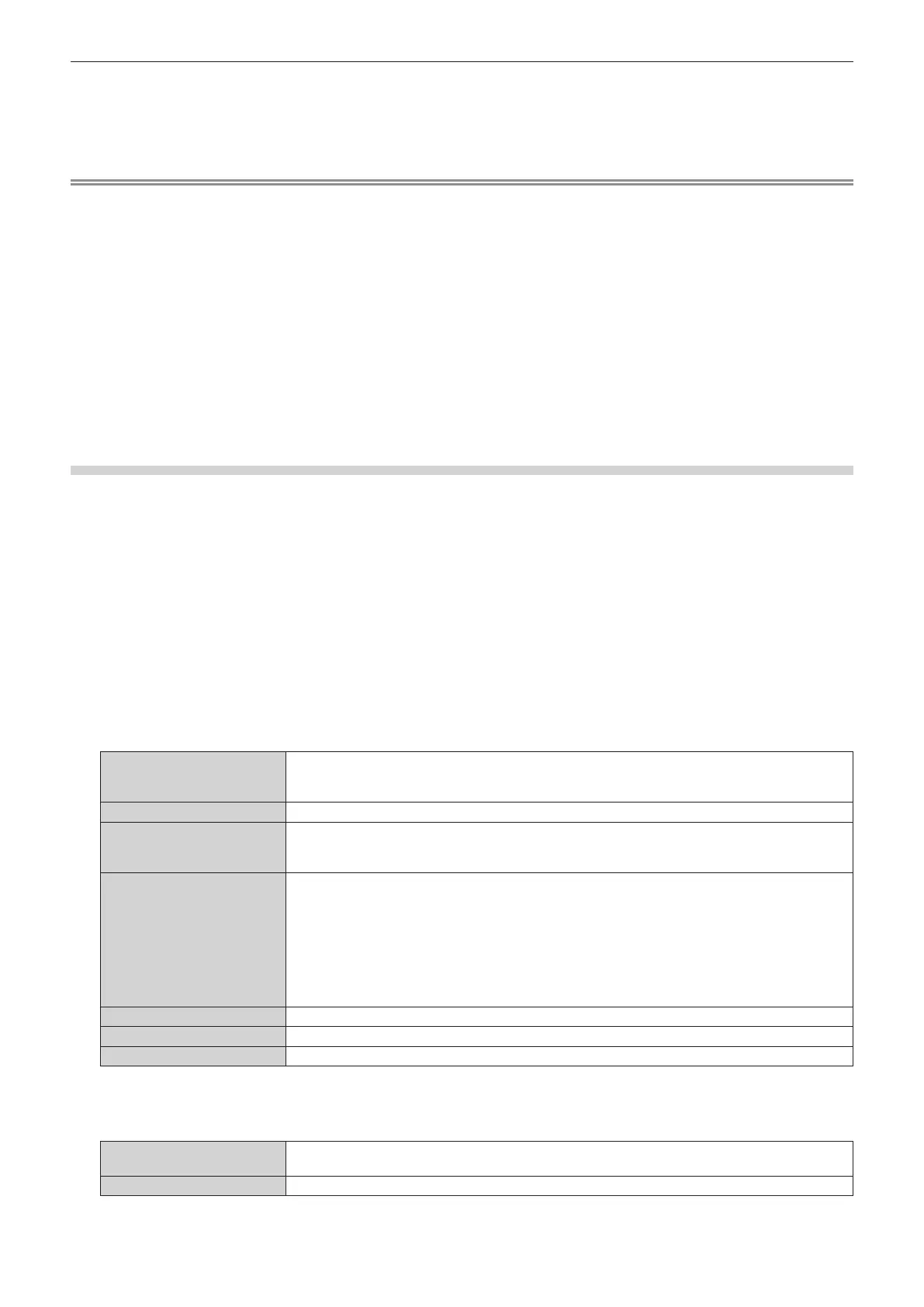
[OPERATION SETTING]
The [PROJECTOR SETUP] menu → [OPERATION SETTING] → [OPERATING MODE] and [MAX
LIGHT OUTPUT LEVEL] are initialized.
[LIGHT OUTPUT] is not initialized. The [LIGHT OUTPUT] setting is maintained.
[STANDBY MODE]
The [PROJECTOR SETUP] menu → [STANDBY MODE] is initialized.
[REGISTERED SIGNAL]
All the signals registered in [SIGNAL LIST] are initialized.
[REGISTERED SIGNAL] cannot be set when the [PROJECTOR SETUP] menu → [STORE TYPE] is
set to [SHARED].
[NETWORK/E-MAIL]
The following items are initialized.
f All the setting items under the [NETWORK] menu
f All the setting items under [Web secure] of the web control screen (The information such as the
self‑signed certicate already created in [Certicate] or the server certicate already installed is not
deleted.)
f All the setting items under [Network menu] of the web control screen (The items of [Time zone],
[Date], and [Time] in [Adjust clock] do not return to the factory default settings.)
f The setting items of [Remote preview] of the web control screen (x page 223)
[USER IMAGE] Image registered as user image is initialized.
[UNIFORMITY]
The [DISPLAY OPTION] menu → [UNIFORMITY] is initialized.
[OTHER USER SETTING] The user data other than mentioned above are initialized.
7) Press qw to switch the setting.
f The items will switch each time you press the button.
[KEEP]
Does not return to the factory default settings and maintains the current settings when initialization is
executed by [USER SETTINGS].
[INITIALIZE] Returns to the factory default settings when initialization is executed by [USER SETTINGS].
f Repeat Steps 6) to 7) until the desired initialization items are set.














 To Next Page