Chapter 5 Operations — Using the web control function
ENGLISH - 237
[Status]
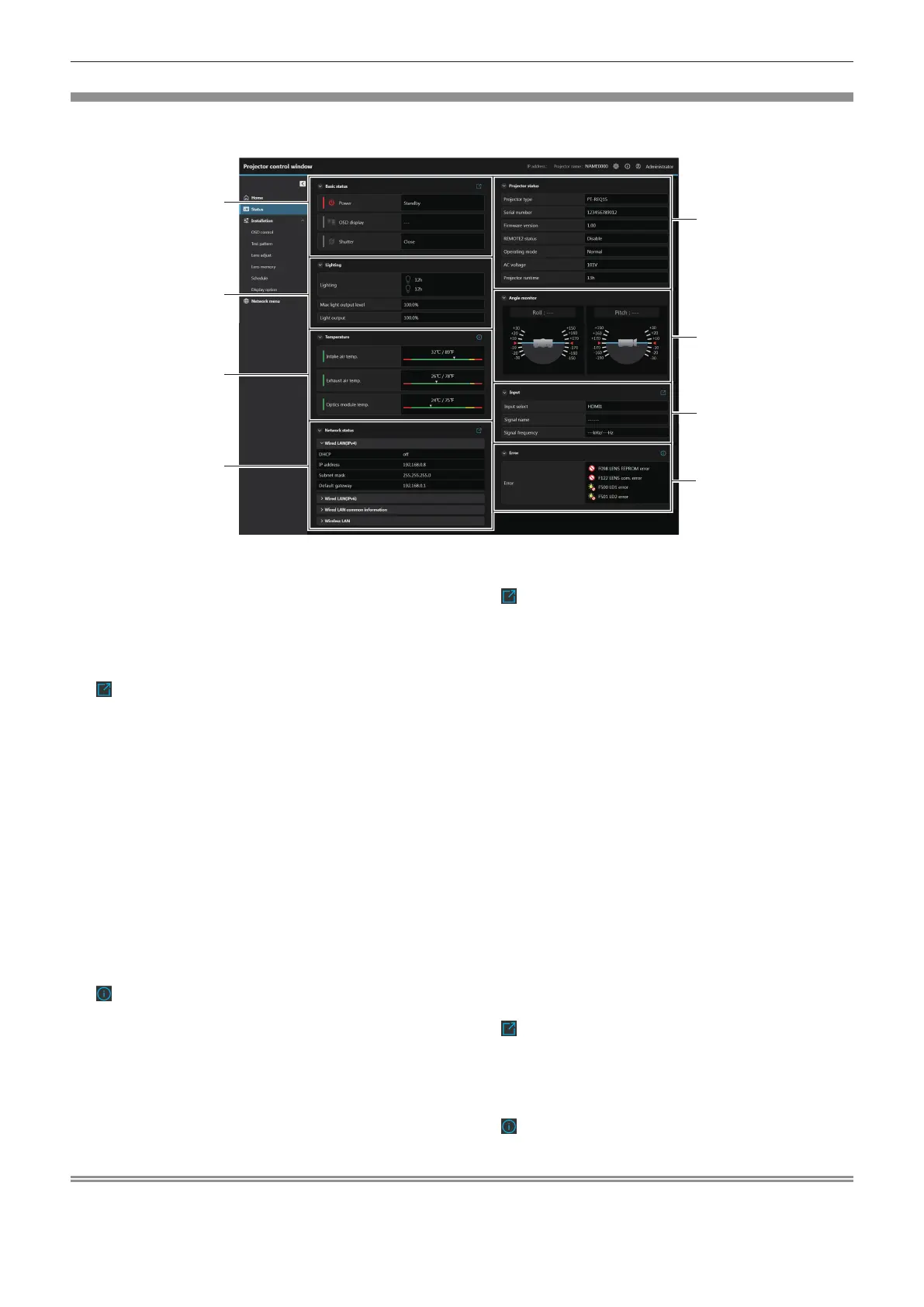
Display the status of the projector.
Click [Status].
7
1 [Basic status]
[Power]
Displays the status([Standby]/[Power on]) of the power.
[OSD display]
Displays the status of the on-screen display function.
([OFF]: Hide; [ON]: Display)
[Shutter]
Displays the status of the shutter. ([Close]: Shutter function
enabled; [Open]: Shutter function disabled)
icon
Click to go to [Home] screen and switches power([Standby]/
[Power on]), OSD display([OFF]/[ON]) and shutter([Close]/
[Open]).
2 [Lighting]
[Lighting]
Displays the lighting status and runtime of light sources.
[Max light output level]
Displays the setting status of [MAX LIGHT OUTPUT LEVEL].
[Light output]
Displays the setting status of [LIGHT OUTPUT].
3 [Temperature]
[Intake air temp.]
Displays the status of the intake air temperature of the projector.
[Exhaust air temp.]
Displays the status of the exhaust air temperature of the
projector.
[Optics module temp.]
Displays the status of the internal temperature of the projector.
icon
Click to display the temperature details.
4 [Network status]
[Wired LAN(IPv4)]
Displays the settings of wired LAN (IPv4).
[Wired LAN(IPv6)]
Displays the settings of wired LAN (IPv6).
[WIRED LAN common information]
Displays the information common for the wired LAN (IPv4) and
the wired LAN (IPv6).
[Wireless LAN]
Displays the settings of wireless LAN when the optional
Wireless Module (Model No.: AJ-WM50 Series) is attached.
icon
Click to go to [Network congs] screen and set the wired LAN
and wireless LAN.
5 [Projector status]
[Projector type]
Displays the type of the projector.
[Serial number]
Displays the serial number of the projector.
[Firmware version]
Displays the rmware version of the projector.
[REMOTE2 status]
Displays the control status of the <REMOTE 2 IN> terminal.
[Operating mode]
Displays the setting status of [OPERATING MODE].
[AC voltage]
Displays the input supply voltage.
[Projector runtime]
Displays the runtime of the projector.
6 [Angle monitor]
Displays the roll angle and pitch angle.
7 [Input]
[Input select]
Displays the selected input.
[Signal name]
Displays the input signal name.
[Signal frequency]
Displays the frequency of the input signal.
icon
Click to go to [Home] screen and switch the input.
8 [Error]
Displays the occurrence status of error/warning in icon.
Refer to “Self-diagnosis display” (x page 276) for the display
details.
icon
Click to display the error code.
Note
f No information will be displayed in [Network status] when the projector is connecting with a smartphone or tablet device via USB tethering.














 To Next Page