Chapter 5 Operations — Using the web control function
ENGLISH - 245
[Network menu]
[Network congs]
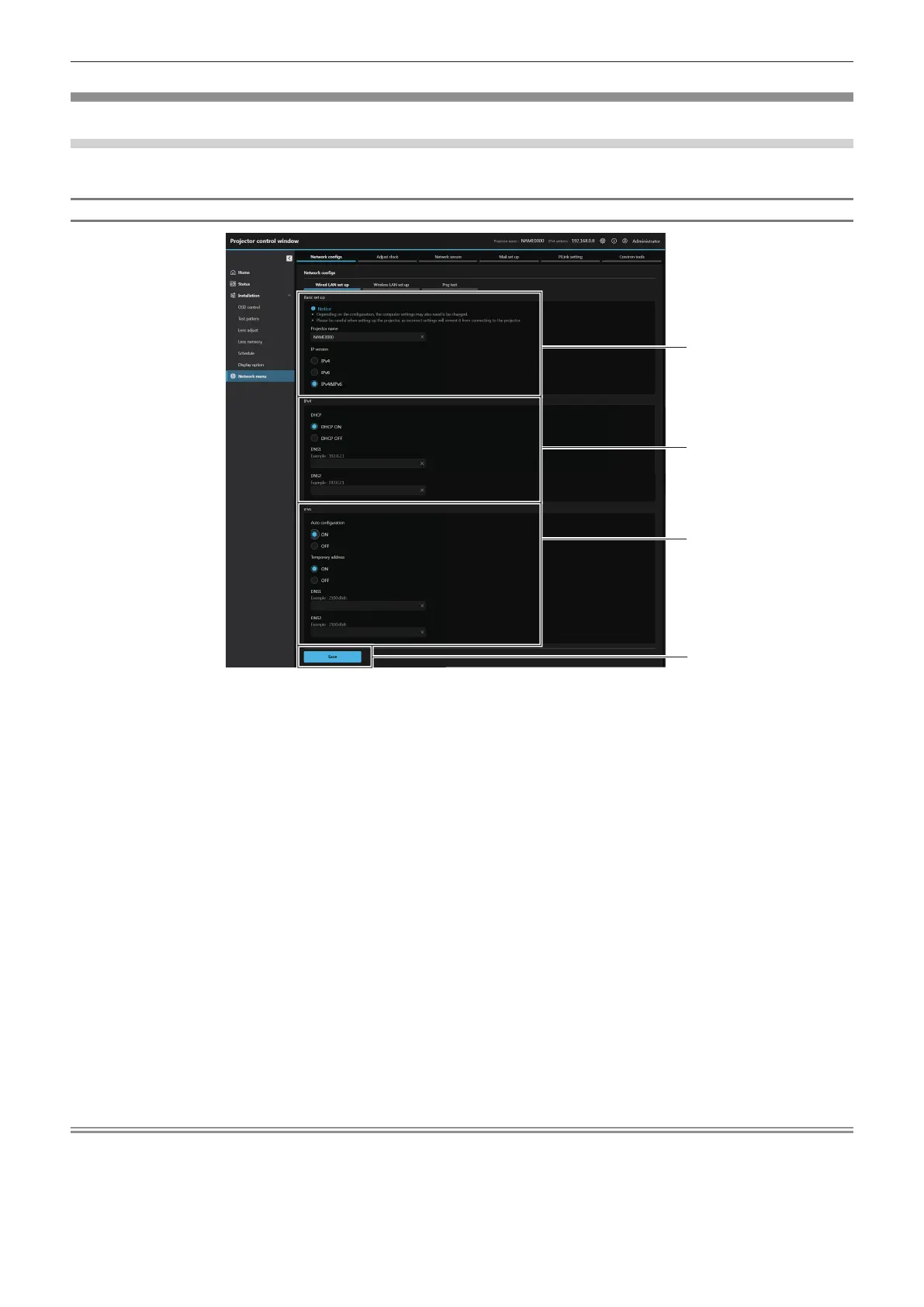
Click [Network menu] → [Network congs].
For wired LAN connection
1
2
3
1 [Basic set up]
[Projector name]
Enter the name of the projector. Enter the host name if it is
required when using a DHCP server etc.
[IP version]
[IPv4]: Uses only the “IPv4” protocol.
[IPv6]: Uses only the “IPv6” protocol.
[IPv4 & IPv6]: Both the “IPv4” and the “IPv6” protocols can be
used.
2 [IPv4]
[DHCP ON], [DHCP OFF]
To enable the DHCP client function, set to [DHCP ON].
[IP address]
Enter the IPv4 address if a DHCP server is not used.
[Subnet mask]
Enter the subnet mask if a DHCP server is not used.
[Default gateway]
Enter the default gateway address for IPv4 if a DHCP server is
not used.
[DNS1]
Enter the DNS1 server address (primary) for IPv4.
Allowed characters:
Numbers (0 - 9), period (.)
[DNS2]
Enter the DNS2 server address (secondary) for IPv4.
Allowed characters:
Numbers (0 - 9), period (.)
3 [IPv6]
[Auto conguration]
Select [ON] to automatically assign IPv6 address.
[Temporary address]
Select [ON] to use the temporary IPv6 address.
[IP address]
Enter the IPv6 address when the IPv6 address is not
automatically assigned.
[Prex length]
Enter the prex length when the IPv6 address is not
automatically assigned.
[Default gateway]
Enter the default gateway address for IPv6 when the IPv6
address is not automatically assigned.
[DNS1]
Enter the DNS1 server address (primary) for IPv6.
Allowed characters: Hexadecimal numbers (0 to f), colon (:)
[DNS2]
Enter the DNS2 server address (secondary) for IPv6.
Allowed characters: Hexadecimal numbers (0 to f), colon (:)
4 [Save]
Update the setting.
Note
f When you use the “Forward” and “Back” functions of your browser, a warning message “Page has Expired” may appear. In that case, click
[Network congs] again since the following operation will not be guaranteed.
f Changing LAN settings while connected to the LAN may cause the connection to disconnect.














 To Next Page