Chapter 5 Operations — Using the web control function
ENGLISH - 233
[Home]
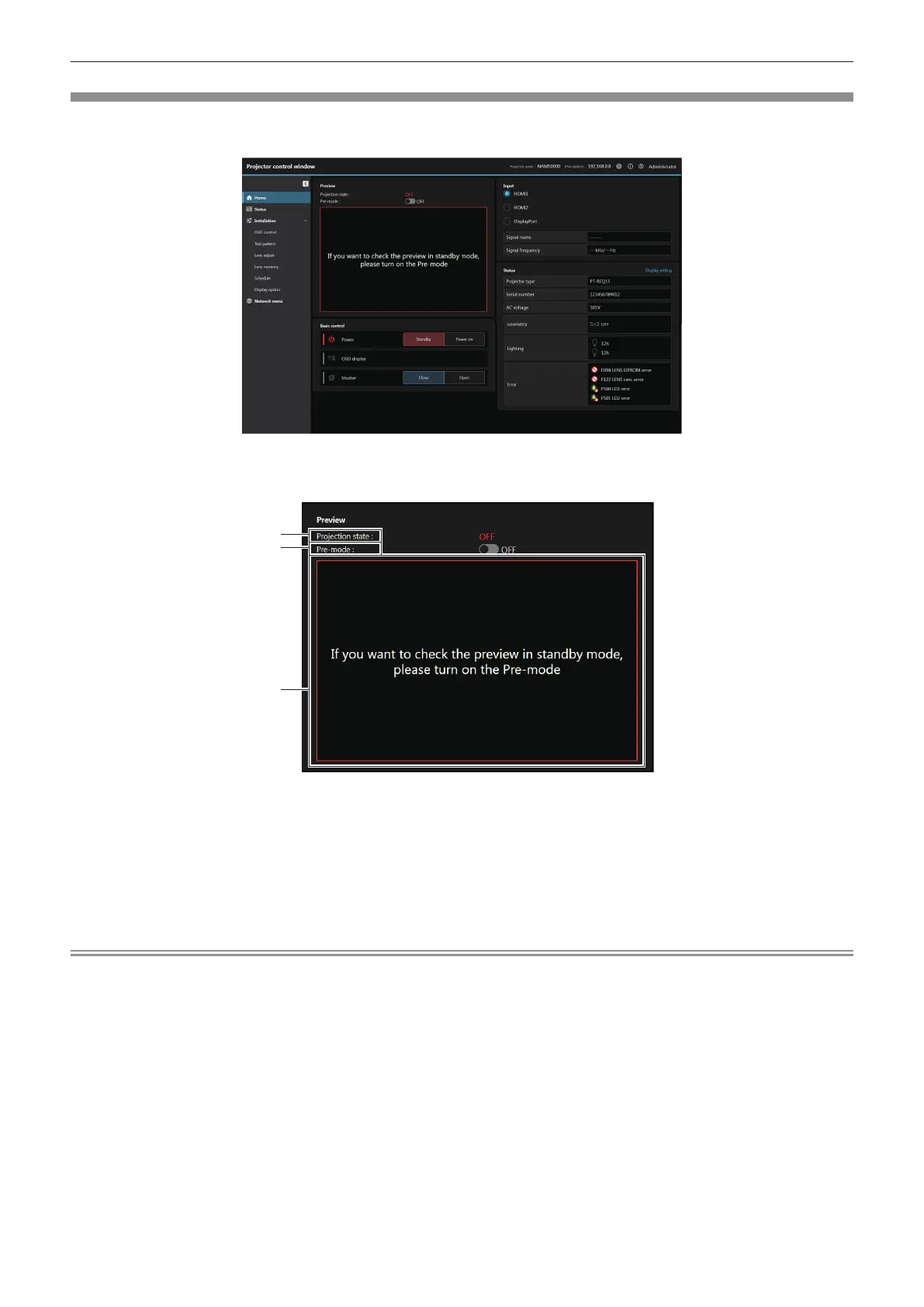
To operate the basic control and check the status.
Click [Home].
r [Preview]
The input image to the projector can be simply viewed on the web control screen.
2
1 [Projection state]
Indicates the projection status.
([ON]: Projecting; [OFF]: Not projecting)
2 [Pre-mode]
Set the preview mode to [ON] / [OFF].
If preview mode is set to [ON], the input image to the projector
can be viewed without projecting even if the projector is in the
standby status.
[Pre-mode] cannot be set in the projection mode.
3 Preview window
Simply displays the image corresponding to the input image to
the projector.
Color of the outside border of the preview window indicates the
projection status from the projector.
Red: Image from the projector is not projected.
Blue: Image from the projector is being projected.
Note
f The power indicator <ON (G)/STANDBY (R)> blinks red in frequency of 2.95 seconds illuminating → 0.25 seconds o during the Pre-Show
mode.
f The runtime in [PROJECTOR RUNTIME] continues to add up even if the projector is in the standby status while in the Pre-Show mode.
f In case of this projector, the input image to the projector can be displayed in the preview window in simplied manner even if [Web secure]
→ [HTTPS] → [Connection protocol] is set to [HTTPS]. However, it may not be displayed depending on the web browser in use when the
self-signed certicate is used as the security certicate to be used for the HTTPS communication.
f There are following restrictions on the image to be displayed in the preview window.
g The adjustment results for each item in the [PICTURE] menu, [POSITION] menu, and [ADVANCED MENU] menu are not reected.
However, some of the items such as [CONTRAST], [BRIGHTNESS], or [SHIFT] are reected.
g When an image is projected with a dierent aspect ratio from the input image using [ASPECT] or [ZOOM], the image may be displayed
with a dierent aspect ratio from the actual projected image.
g The eects set in [BACK COLOR] or [STARTUP LOGO] are not reected.
g The eects set in [SCREEN MARKER] are not reected.
f While the test pattern is displayed, it is also displayed in the preview window.














 To Next Page