Before Using Your Camera
1
37
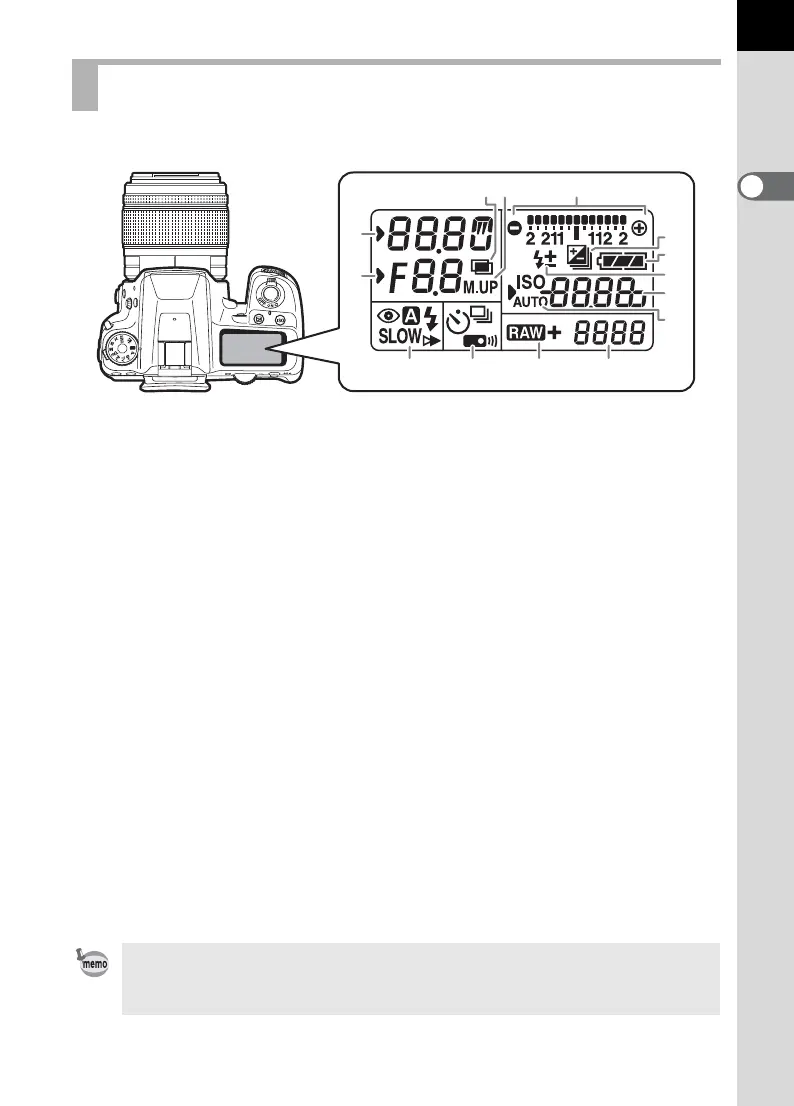
The following information appears in the LCD panel on top of the camera.
LCD Panel
1 Shutter speed/
Countdown of Noise Reduction
processing time (p.98)
11 Flash Mode (p.77)
b : Built-in flash is ready
(when blinking, flash
should be used)
2 Aperture value
nr :
Noise Reduction is
activated (p.98)
> :Red-eye Reduction
3 : Auto Flash Discharge
3 Multi-exposure (p.155) Q : Slow-speed Sync
4 Mirror Lock-up Shooting (p.149) E : Trailing Curtain Sync
5 EV bar (p.119)/
Electronic Level (p.38)
w :Wireless
12 Drive Mode (p.88)
6 EV Compensation (p.119)/
Exposure Bracketing (p.157)
9 : Single Frame Shooting
j : Continuous Shooting
7 Battery level (p.52) g : Self-timer Shooting
8 Flash Exposure Compensation
(p.82)
W :
Remote Control Shooting
13 File Format (p.202)
9 Sensitivity/EV compensation
value
1 :RAW capture
1P: RAW+JPEG capture
10 ISO/ISO AUTO 14 Remaining image storage
capacity/USB Connection mode
(p.317)
Appears when the sensitivity is
displayed.
Pc-S :MSC mode
Pc-P :PTP mode
LCD panel is illuminated when the exposure metering is performed. You can
choose [High], [Low] or [Off] for LCD panel backlight in [22. LCD Panel
Illumination] of the [A Custom Setting 4] menu (p.92).
2
1
5
7
6
8
9
10
4
141312
3
11



 To Next Page