42
Before Using Your Camera
1
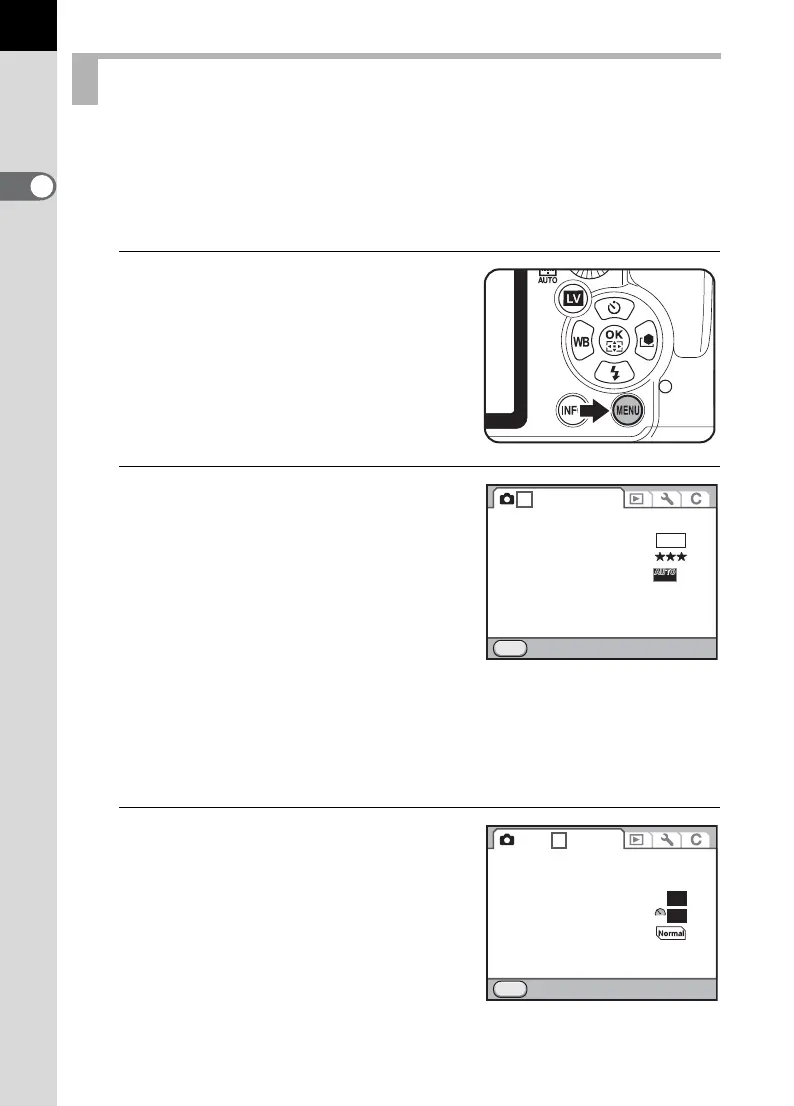
This section explains how to use the menus: [A Rec. Mode],
[Q Playback], [R Set-up] and [A Custom Setting] menus.
Following, how to set [Program Line] in the [A Rec. Mode 3] menu is
explained as an example.
1
Press the 3 button in
Capture mode.
The [A Rec. Mode 1] menu appears on
the monitor.
If the
3
button is pressed in
Playback mode, the [
Q
Playback 1]
menu appears.
2
Press the four-way controller (5)
twice or turn the rear e-dial (S)
two clicks to the right (toward
y).
Each time the four-way controller (5) is
pressed, the menu will change in the
following sequence: [A Rec. Mode 2],
[A Rec. Mode 3], [A Rec. Mode 4],
[A Rec. Mode 5], [Q Playback 1] … [A Rec. Mode 1].
When the front e-dial (R) is turned to the right, the menu will change
in the following sequence: [A Rec. Mode 1], [Q Playback 1],
[R Set-up 1], [A Custom Setting 1].
3
Use the four-way controller (23)
to choose an item.
Using the Menus
JPEG
Exit
MENU
1 2345
File Format
JPEG Recorded Pixels
JPEG Quality
AUTO AF Point Setting
Lens Correction
16M
11
Exit
MENU
123 45
D-Range Setting
ISO AUTO Setting
High-ISO NR
Slow Shutter Speed NR
Program Line
Color Space
RAW File Format PEF
sRGB
ISO
NR
AUTO
NR
AUTO



 To Next Page