157
Shooting Functions
4
Shooting while Adjusting the
Settings (Auto Bracketing)
Auto Bracketing is a function for shooting while automatically changing the
camera settings. There are two Auto Bracketing modes: Exposure
Bracketing and Extended Bracketing.
You can set Auto Bracketing Order in [8. Auto Bracketing Order] in the
[A Custom Setting 2] menu (p.91).
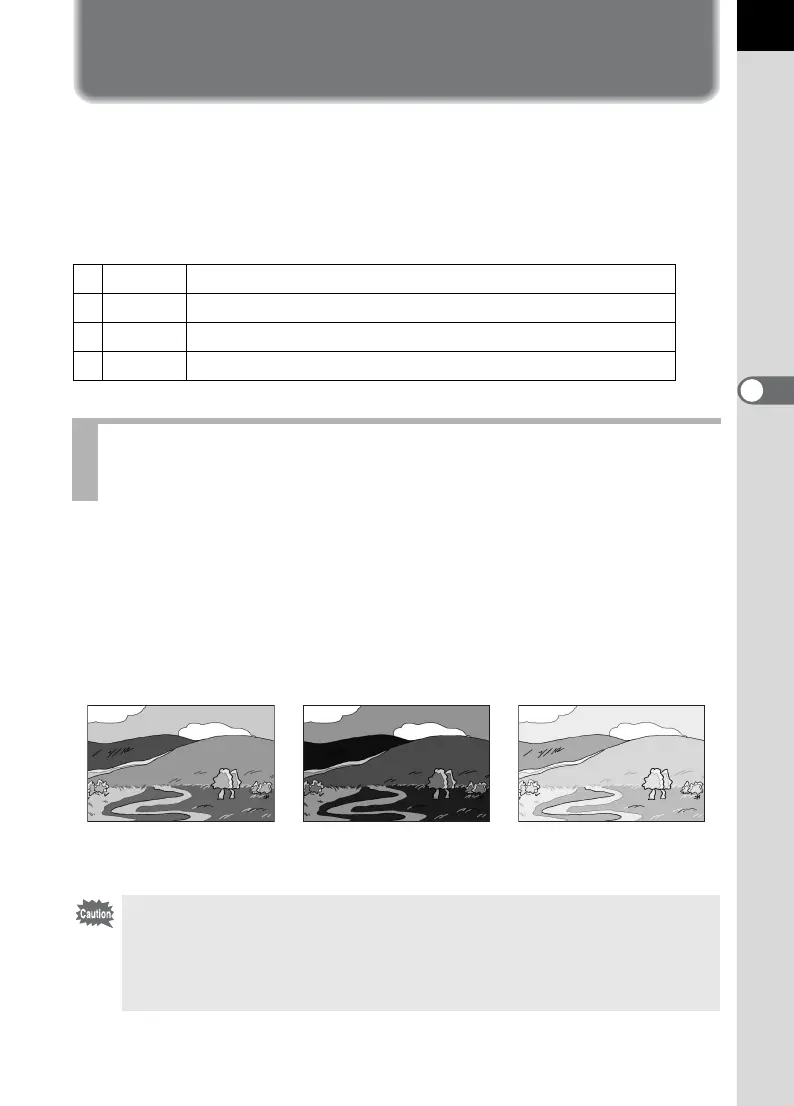
You can take continuous pictures with different exposures when the
shutter release button is pressed. You can select to take 2 images
(Standard/+), 2 images (Standard/-), 3 images or 5 images. When taking
3 pictures, the first image is exposed with no compensation, the second
image is underexposed (negative compensation) and the third image is
overexposed (positive compensation).
10 - +
Standard ´ Underexposed ´ Overexposed (default setting)
2 - 0 +
Underexposed ´ Standard ´ Overexposed
3+ 0 -
Overexposed ´ Standard ´ Underexposed
40 + -
Standard ´ Overexposed ´ Underexposed
Shooting while the Exposure is Automatically
Changed (Exposure Bracketing)
Standard exposure Underexposure Overexposure
• Exposure Bracketing is not available in the following situations.
- when the exposure mode is set to p (Bulb)
- when HDR Capture is set
• Exposure Bracketing and Multi-exposure cannot be used at the same time.
The function selected last is used.



 To Next Page