15192 Triton Lane
Huntington Beach, CA 92649
Office Tel: 714-892-3400
Hotline Tel: 714-891-6533
www.ppedm.com
This document is the property of PPedm Corp. and contains proprietary and/or patented information and may not be reproduced in
part or in whole without the express written permission of the company. Perfect Point logo, Perfect Point
TM
and E-Drill
®
are
trademarks of PPedm, Corp. US and worldwide patents pending.
4.0
APPENDIX 1. Advanced Functions:
The Advanced Functions screen is provided to enable the system to be adjusted to remove
non-standard fasteners, and to provide functions to assist in fault diagnosis. To access
advanced functions, the user will need to obtain a password from Perfect Point service
personnel.
Advanced functions include:
•
Manual Setting of Depth of Cut and Cycle Time
•
Manual Setting of Retract Distance
•
Manual Extend & Retract of Electrode (May also be activated by function keys).
•
Manual DI Pump and Vacuum Control
•
Manual Spark Power Control
4.1
Password Entry:
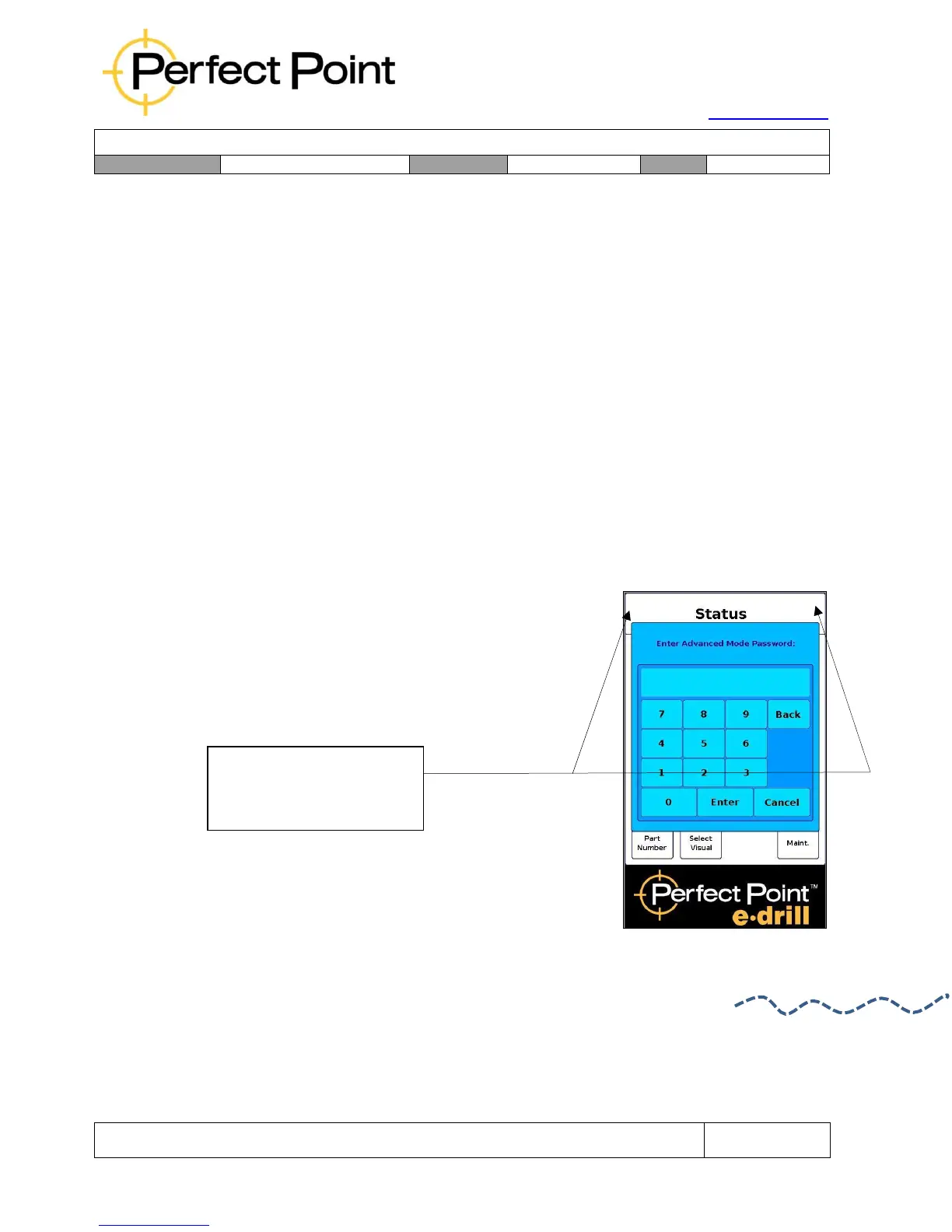
To enable the advanced menu tab, return to the home
screen, and then press in sequence the top left corner
of the screen followed by the top right corner, within
2 seconds. A prompt for password will appear.
To enter Advanced Mode
press left top corner of
screen then right.



 To Next Page