This document is the property of PPedm Corp. and contains proprietary and/or patented information and may not be reproduced in
part or in whole without the express written permission of the company. Perfect Point logo, Perfect Point
TM
and E-Drill
®
are
trademarks of PPedm, Corp. US and worldwide patents pending.
D)
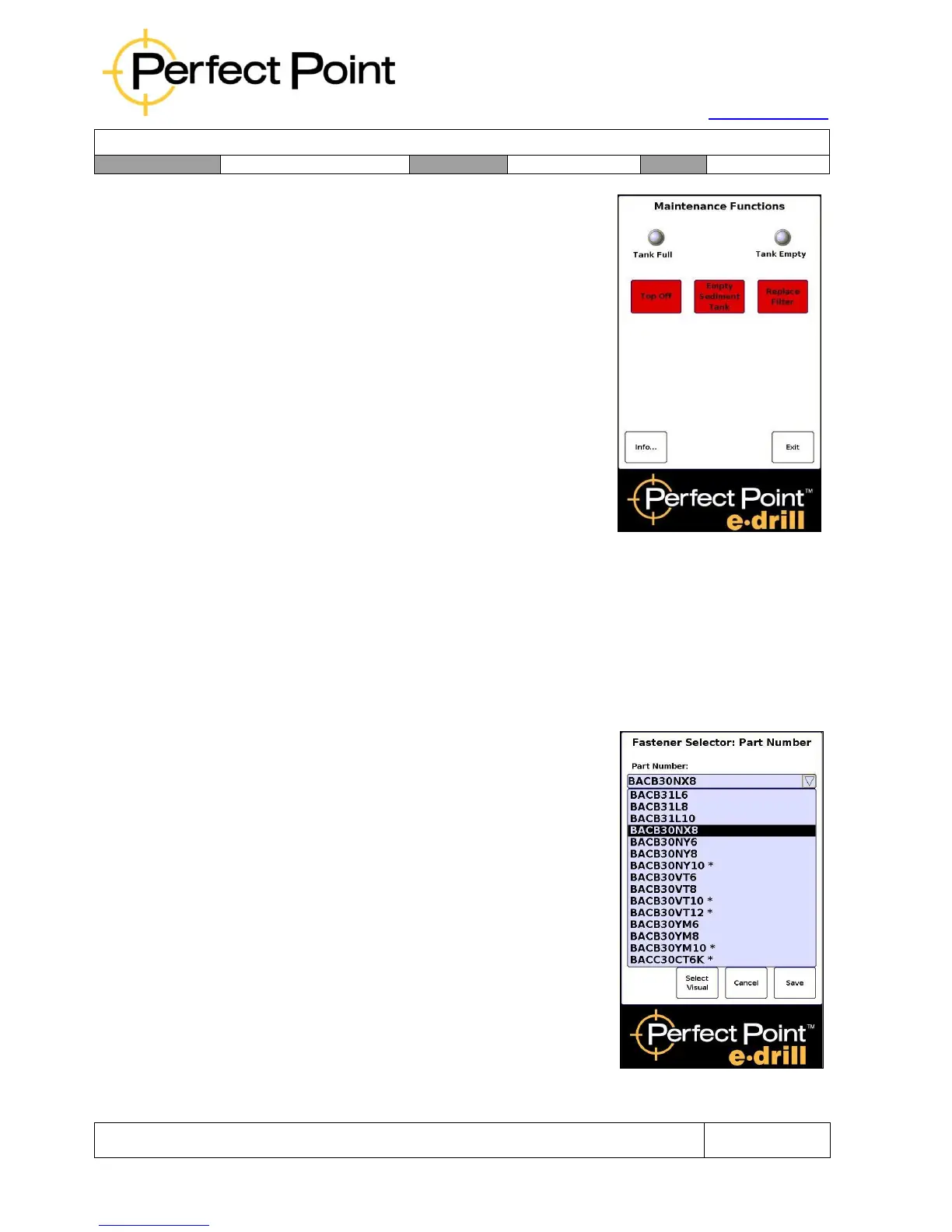
Maintenance Screen – provides options to
Top Off the de-ionized water system, empty
the Sediment Tank, or drain the system
completely (for filter replacement – see
Section 3).
E)
All screens display the screen name along
the top. The Home screen displays the
Perfect Point E-Drill title, below which is the
Status screen which communicates cut
time, warnings and errors.
2.0
OPERATION:
2.1
Using the Part Number Selector:
Setup for removal of any type of fastener may be carried out by one of two methods;
either by using the Part Number Selector or by using the Visual Selector (if available).
Either method may be used, or the user may switch between them at any time.
However, they are not interdependent, so the user cannot for example select Type in
the Visual Selector menu and then switch to the Part Number Selector and see a sub-
set of part numbers of that type.
To use the Part Number Selector:
Press Part Number on the home screen.
1.
Highlight the Part Number window, scroll
down to the correct part number and select
it by pressing it.
2.
Hit Save to select that part number and
load parameters from the library.



 To Next Page