DA80F/DA95F AddressRight™ Printers Service Manual (SV61962 Rev. A)
5-55
Removal and Replacement • 5
DA95F (WF96) - Printer Parts Removal
5.32 Entry
Roller Support
Assembly
1. Remove top cover (see section 5.x).
2. Remove the front cover assembly (see section 5.29) and rear cover (see
section 5.30).
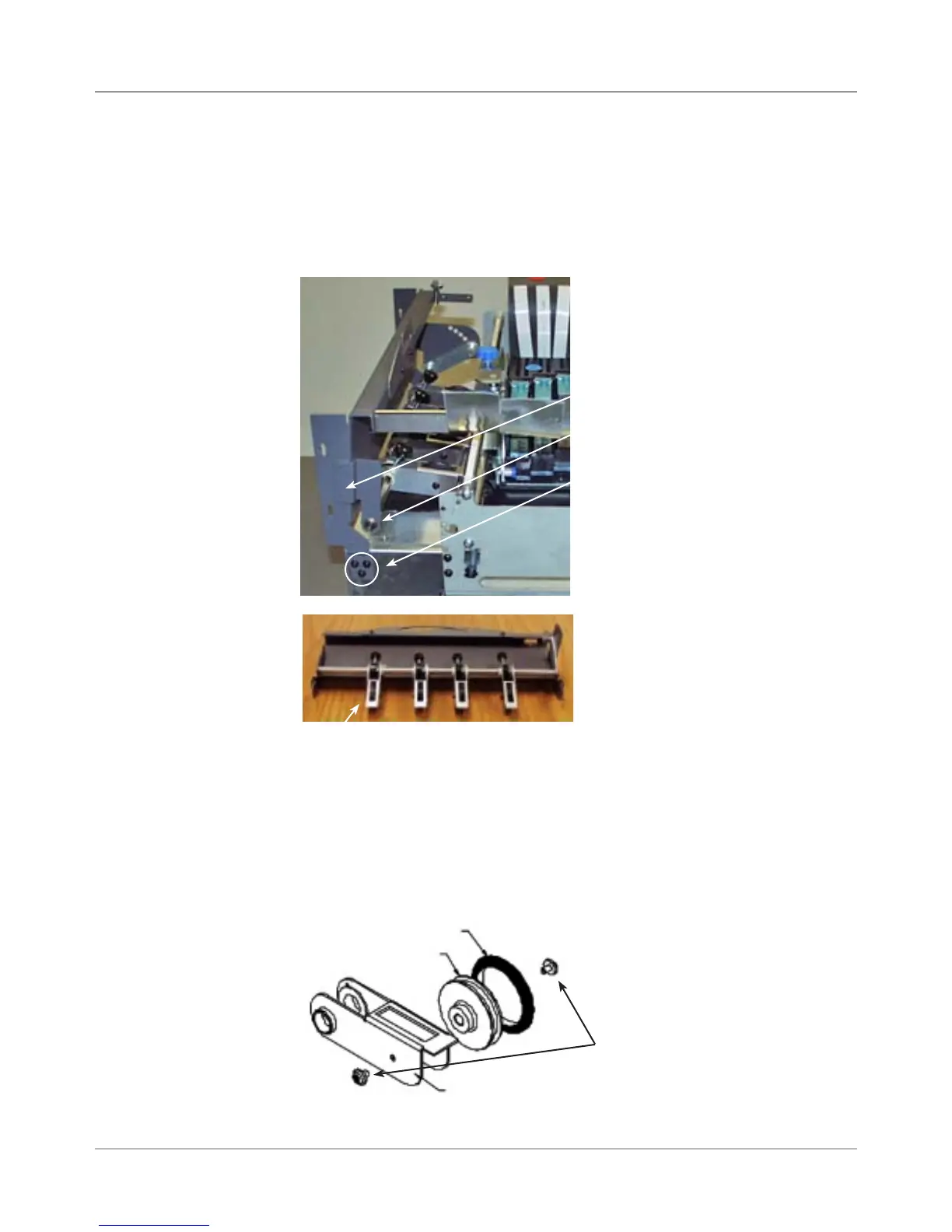
3. Unfasten the six screws (three on either side, see figure below) and re-
move the entry roller support frame and assembly.
Entry Roller Support Frame
Screws for Entry Roller Support
Frame (shows one side only)
7. Reinstall in reverse order.
E-clip for Idler Roller Pivot
Shaft (shows one side only)
Entry Roller Support Frame
and Assembly (removed)
3. Unfasten the e-clip on either side for idler roller pivot shaft if you need to
remove and replace shaft (see above).
4. Unfasten the two screws (one on either side) of the idler roller pivot arm
and remove the entry idler roller from the idler roller pivot arm (see figure
below).
5. Peel the o-ring off the roller.
Screws for Entry Idler Roller
O-Ring
Entry Idler Roller
Idler Roller Pivot Arm
Idler Roller Pivot Arm



 To Next Page