EasyManua.ls Logo

Pitney Bowes DA80F - Appendix B - Printer Communications; B.1 Communication Scenarios

Pitney Bowes DA80F
199 pages
Print Icon
To Next Page IconTo Next Page
To Previous Page IconTo Previous Page
Loading...
DA80F/DA95F AddressRight™ Printers Service Manual (SV61962 Rev. A)
B-1
Appendix B • Printer
Communications
B.1 Communication Scenarios
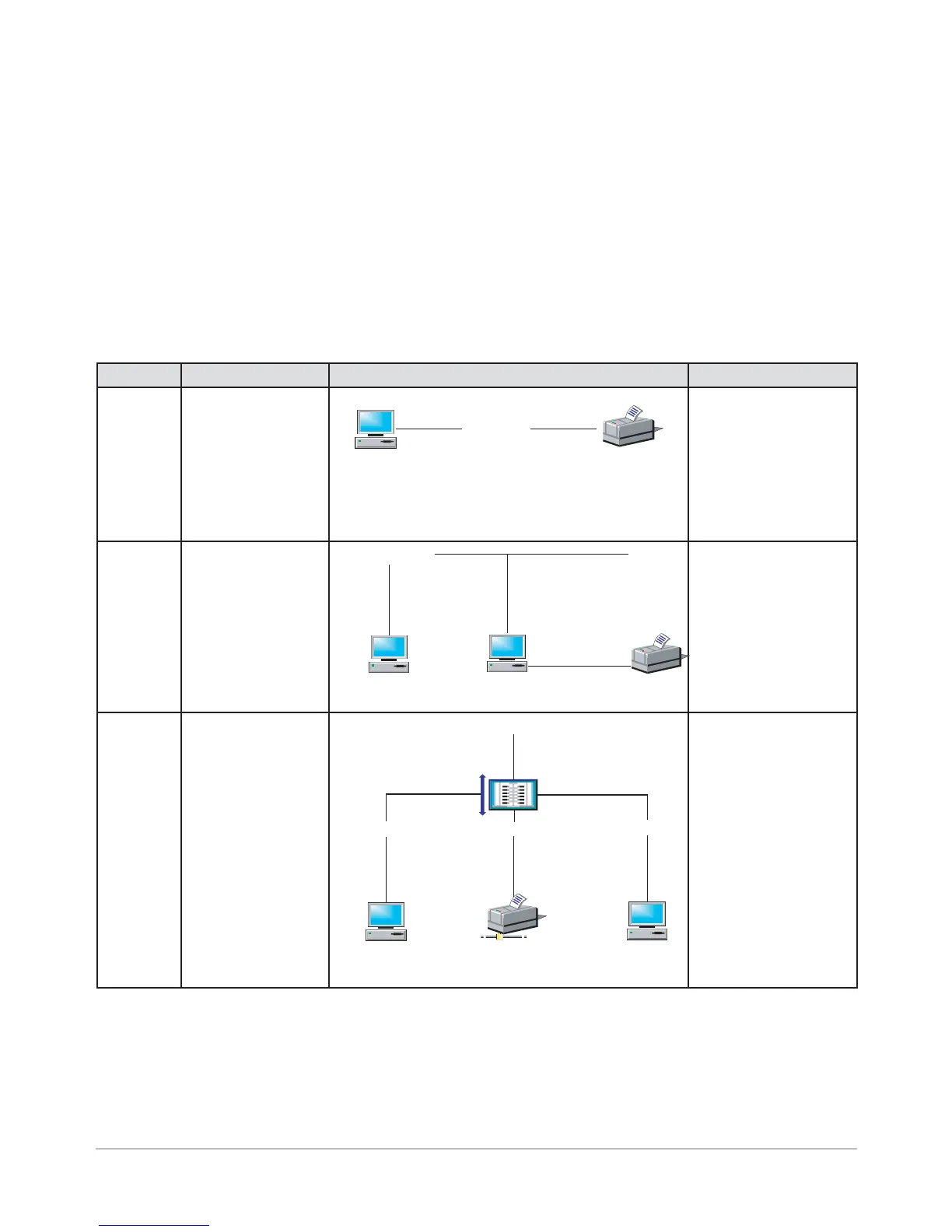
The scenarios below and on the next page describe the different ways the printer can communicate
to a PC.
Scenario Description Diagrammatic Representation Notes
A
(USB)
Printer set up as a
local printer to PC
via USB port (print-
er not shared on a
network)
Computer
USB Cable
USB
Port
USB
Port
DAxxF
Most common setup
for our printers. Also
useful for trouble-
shooting and isolat-
ing network issues
if printer is normally
used in a network en-
vironment.
B
(USB/
Print
Sharing)
PC has Windows
print sharing ON
and printer is
shared on a net-
work; printer con-
nection via USB
port. Allows multiple
PCs to print to it.
Computer
DAxxF
Ethernet Cable
NIC
Port
USB
Port
Computer
NIC
Port
USB
Port
C
(Network
Static IP
Address)
Printer is set up
as printer on the
network with a
static IP Address
via a router on the
network; allows
multiple PCs to
print to it.
Computer
DAxxF
Ethernet Cable
Router
Ethernet Cable
Computer
WAN/LAN
Ethernet Cable
NIC
Port
Ethernet
Port
NIC
Port
Need to obtain IP Ad-
dress, Subnet, and
Gateway values from
customer’s IT depart
for both the printer
and PC. Also, you
need to turn off DHCP
on the printer.
continued->

Table of Contents

Other manuals for Pitney Bowes DA80F

Related product manuals