5-34 DA80F/DA95F AddressRight™ Printers Service Manual (SV61962 Rev. A)
5 • Removal and Replacement
DA80F (WF81) Parts Removal
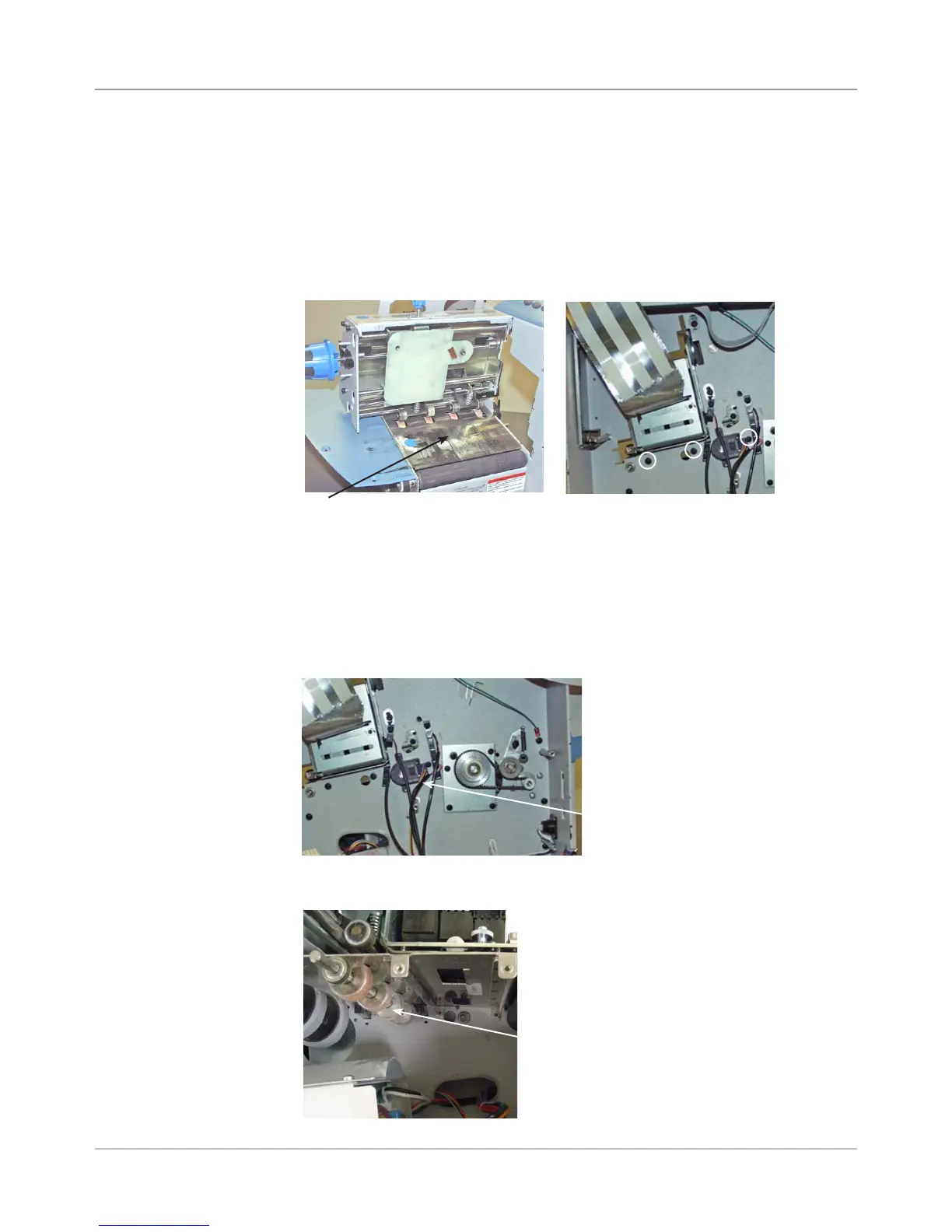
5.18 Transport
(Metal Grit)
Roller
1. Remove the rear cover (see section 5.2), encoder assembly (see section
5.4), front bottom cover (see section 5.8), transport timing belt (see sec-
tion 5.9), feed motor timing belt (see section 5.10), feed deck (see sec-
tion 5.17A), and front plate assembly (see section 5.17B).
2. Raise the print head assembly and “H” blocks fully up.
4. On the rear chassis side of the roller, remove the bearing holding the roller.
The encoder should have been removed already.
NOTE: Use care when removing the transport roller, as the bearing lo-
cated in the rear chassis may not come out with the roller and could get
damaged in the course of removal.
3. Remove print deck by unfastening three screws behind main board.
Transport
(Metal Grit)
Roller
Three Screws Behind
Main Board (Circled)
Print Deck (Shown with Print
Head Assembly Removed)
Rear Chassis
Side of Roller
(under Encoder)
5. Remove transport (metal grit) roller.



 To Next Page