4-12 DA80F/DA95F AddressRight™ Printers Service Manual (SV61962 Rev. A)
4 • Troubleshooting/Diagnostics
4.5 Print
Samples for
Troubleshooting
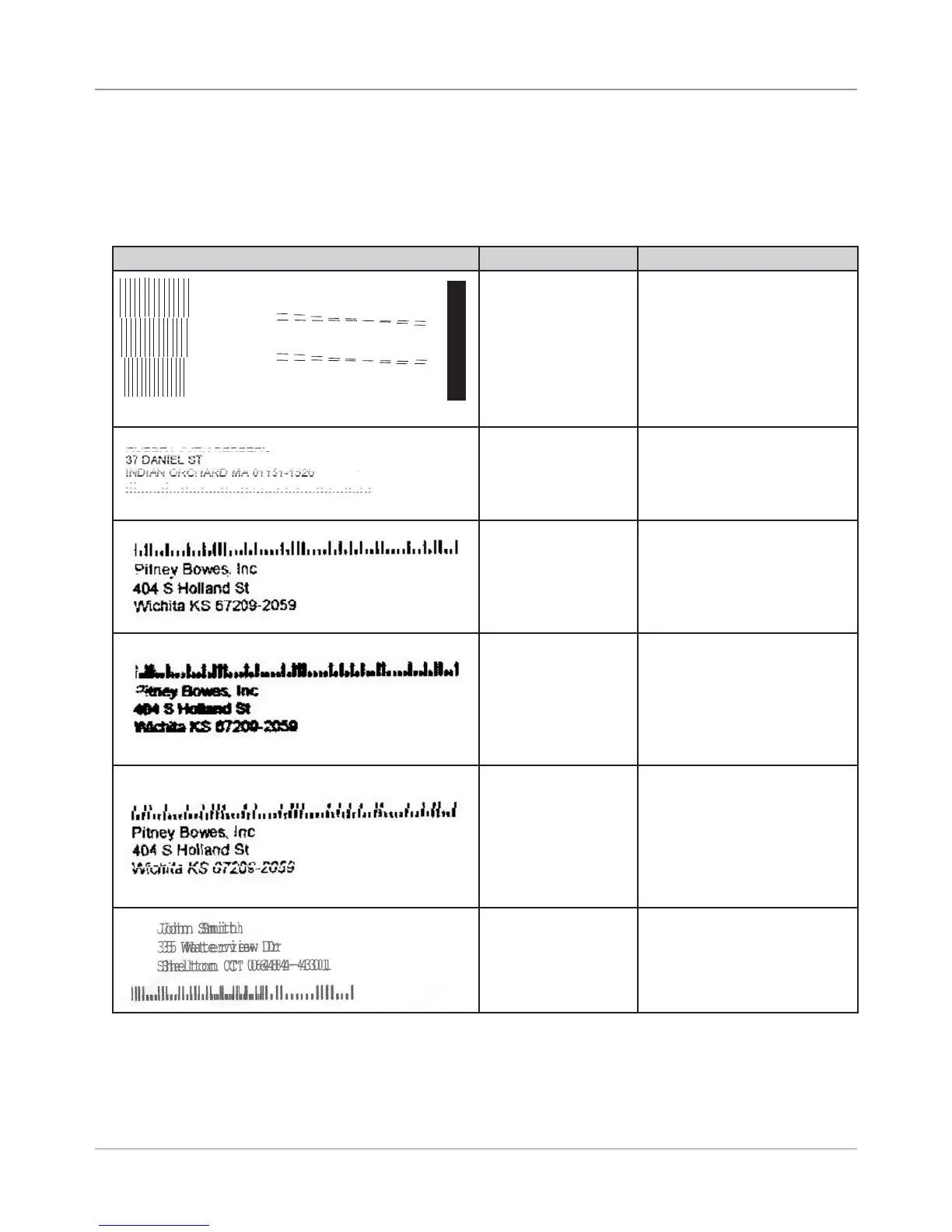
The print samples below are provided to help troubleshoot printing problems
you may encounter.
Sample Print What It Indicates How to Fix
Head 1
Head 2
Head 3
1 2 3 4 5 6 7 8 9
1 2 3 4 5 6 7 8 9
ABCDEF G H I J K L MNO
Good test print
Poor printing due to
low ink
Replace ink cartridge
Smudging Multiple causes. See 4.7
Printing Issues, Streaking on
media.
Satellite Print Need to lower printer heads,
or clean or replace heads if
needed.
“Stitching” Issue
(multiple print heads
used to print a bar-
code)
Move barcode location on
mailpiece so barcode marks
are not printed across mul-
tiple print heads
Shadow Print Do standard printer setup
(see page 4-1)
Table 4-7 Sample Prints



 To Next Page