4-20 DA80F/DA95F AddressRight™ Printers Service Manual (SV61962 Rev. A)
4 • Troubleshooting/Diagnostics
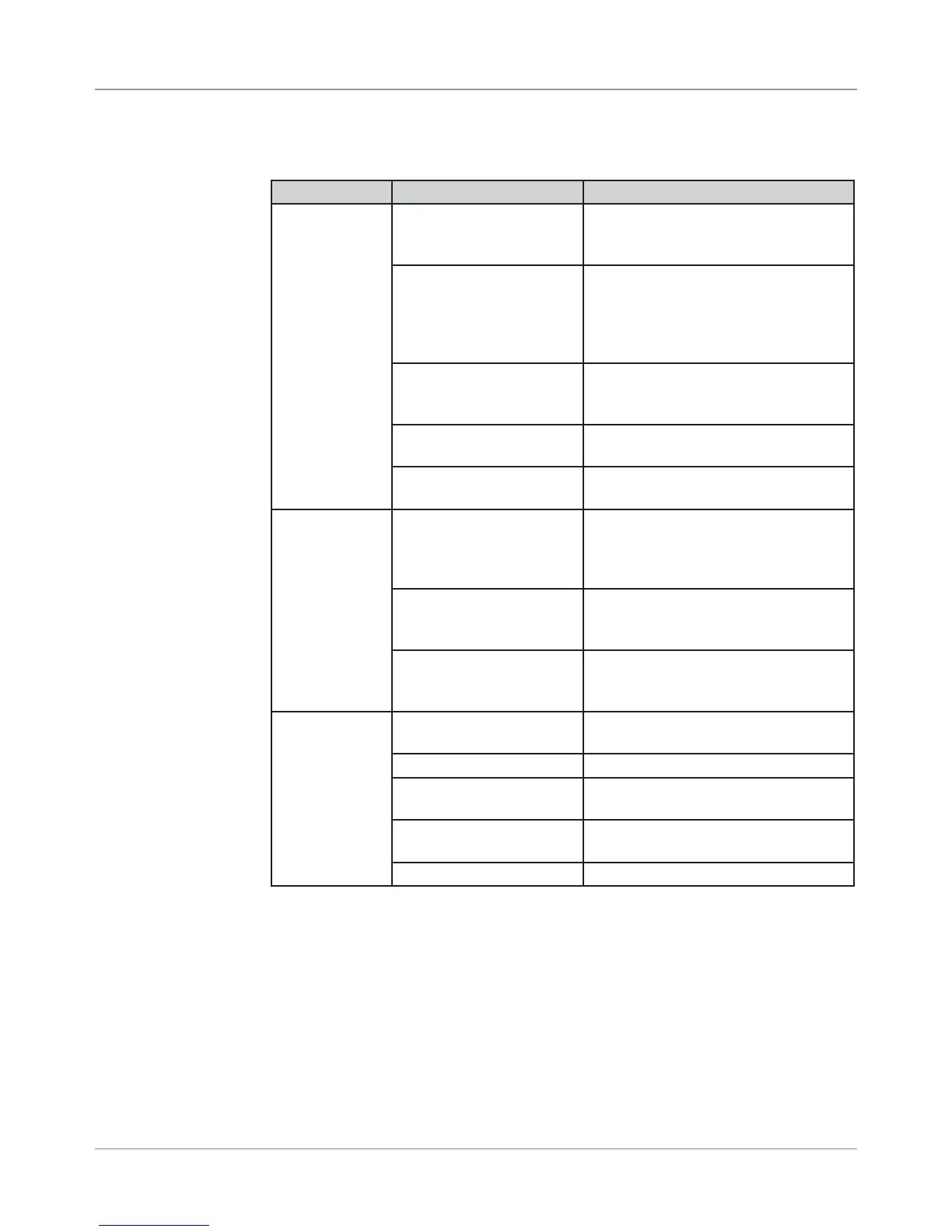
Symptom Possible Cause Solution
Print is Skewed Feeder ramp not set cor-
rectly
Adjust ramp so it is centered with
respect to material (see standard
printer setup on page 4-1)
Side guides not set cor-
rectly
Adjust fence to within 1/16” of mate-
rial. Check that fence is square
with respect to material (assuming
material is rectangle). See standard
printer setup on page 4-1.
Takeaway Rollers not set
correctly [on DA95F]
Adjust rollers to appropriate tension
and location using thickness adjust-
ment (see Operator Guide)
Check setup of the Entry
Rollers.
Redo the setup of the Entry Rollers
(see Operator Guide).
Roller is running along
the edge of the media
Move print head bank to different
area over media.
Addresses
“walking” to
next piece
Number of lines of ad-
dress varies. No Form
Feed used for address
termination.
Check Line Termination CR-
CR,LF=LF. Address Termination
should be Form Feed.
Incorrect address setup Count carriage returns and line feeds
of address field; should match ad-
dress setup
Thickness and Takeaway
Rollers [on DA95F]
Adjust rollers to appropriate tension
using thickness adjustment (see
Operator Guide)
Ink streaking
on Media
Envelope thickness ad-
justment incorrect
Adjust lever to raise print head
The print cartridge is dirty Clean the cartridge
Print head needs purging Run “Purge Print Head“ from Main
Menu.
Print heads not level to
deck (floor)
Level print heads (see section 6.4 for
WF81 and section 6.5 for WF96)
Exit idler rollers dirty Clean rollers with water to remove ink
4.7 Printing
Issues
Table 4-9 Printing Issues



 To Next Page