Bookletmaker SR 85 February 2001PAGE
PURPOSE
The purpose is to ensure that the staples are parallel to the edge of the sets.
1. Remove the rear Stapler head according to REP 3.1.
2. Move the side guides to the outermost position.
3. Select the Fold mode on the Control panel.
4. Select the Adjustment mode on the Control panel.
5. Fold an A4 (8.5“ x 11“) sheet of paper lengthwise by hand in order to form a straight
edge.
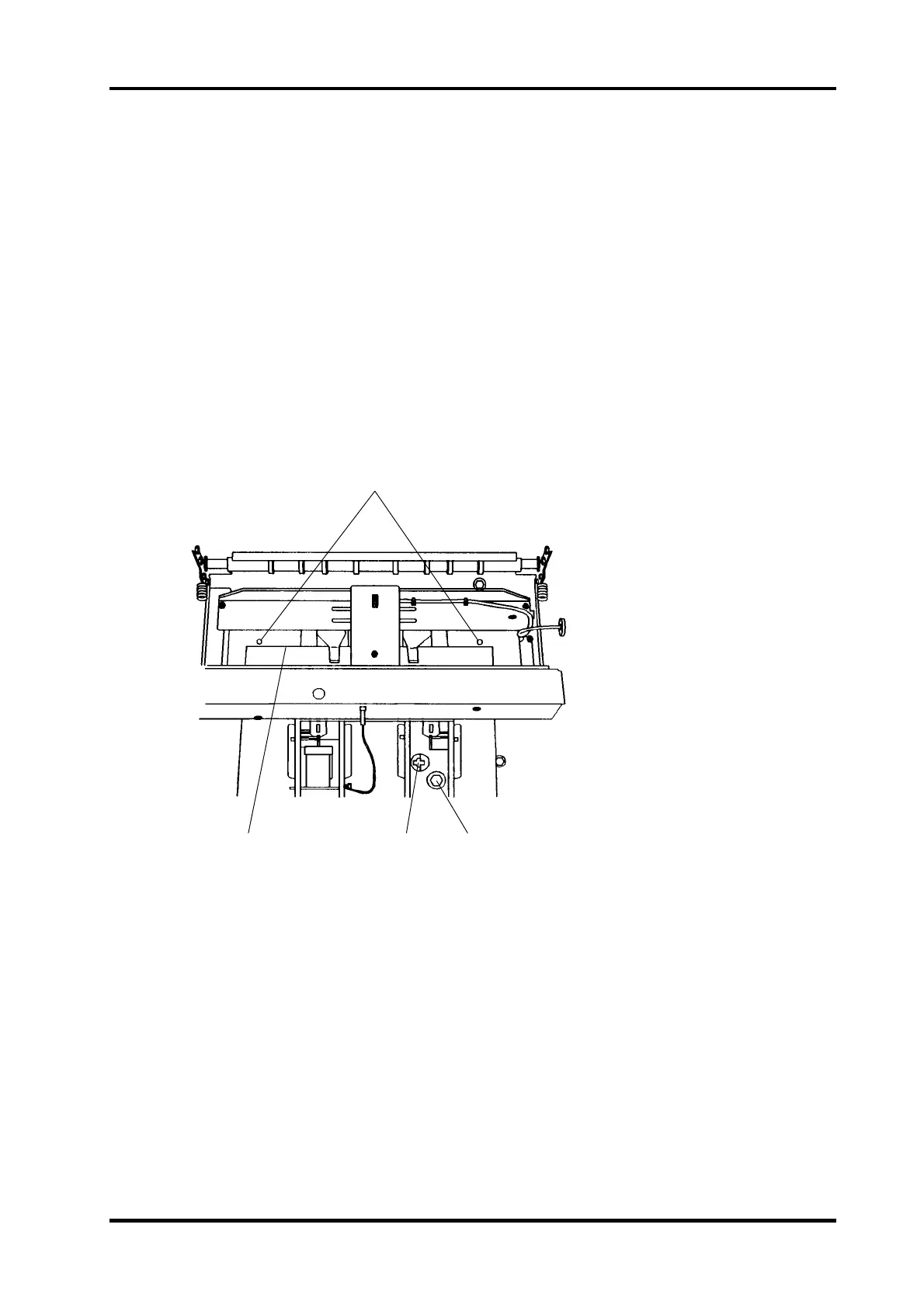
6. Feed the folded paper sidewise into the machine so that the straight edge fold (2) is po-
sitioned against the Staple stop gate.
7. Adjust the sheet size on the control panel to align the straight edge fold (2) with the locat-
ing holes (1) in the paper path.
8. The straight edge fold (2)
must align with both of the locating holes (1).
REP 5.1 Staple stop gate parallelism, adjustment
ADJUSTMENT
1. Loosen the screw (4).
2. Insert a screwdriver in the notches (3) and rotate to align the holes (1) with the straight
edge fold (2).
3. Tighten the screw (4).
4. Check/adjust the Staple/Fold position according to REP 5.2.
1
234
5.1.1



 To Next Page