Bookletmaker SR 85 February 2001PAGE
REP 1.2 Top cover
REMOVAL
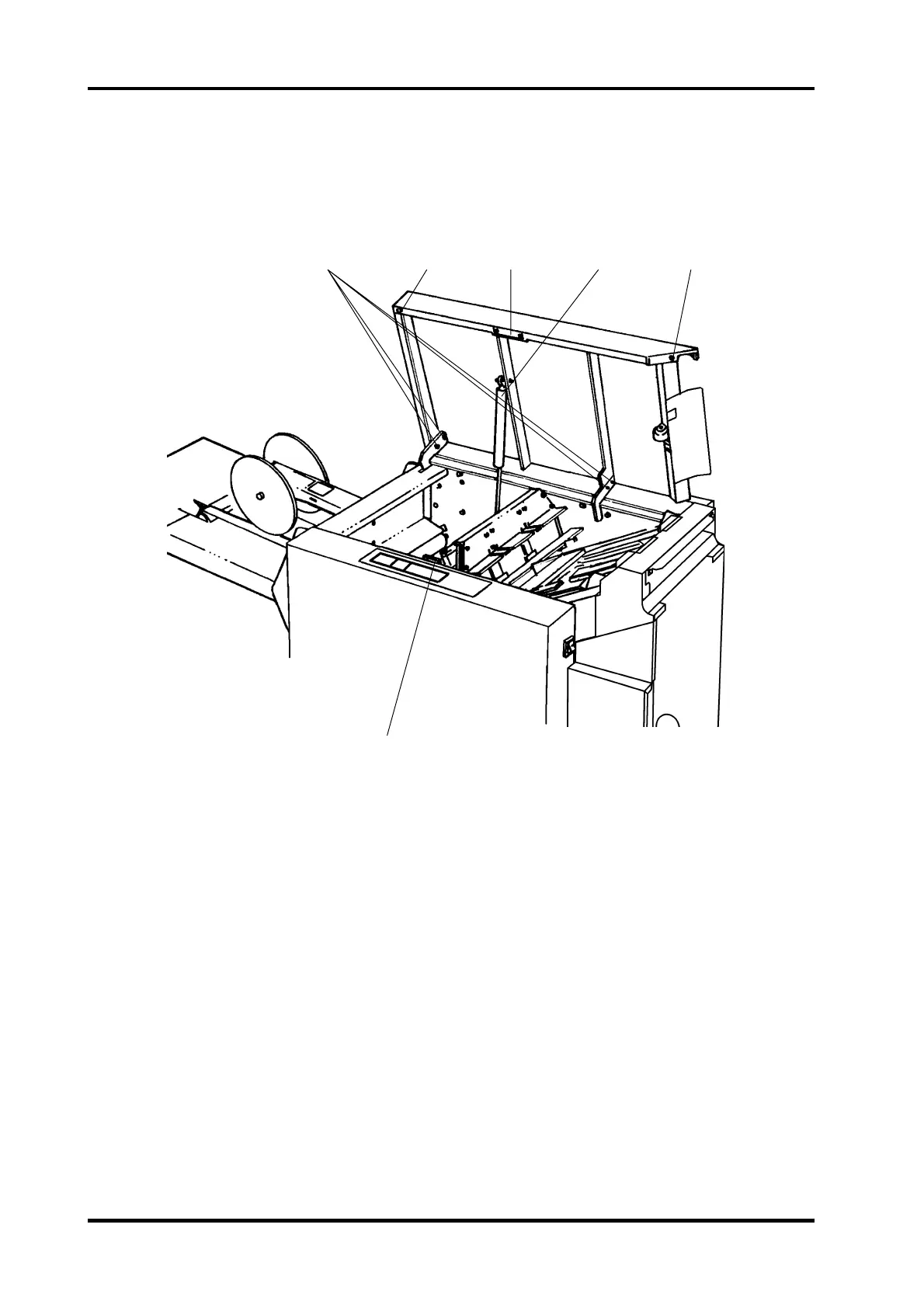
1. Open the Top Cover
2. Disconnect the Gas spring (4).
3. Remove four screws (1) from the brackets.
4. Lift off the Top cover.
INSTALLATION
1. Mount the four screws (1) onto the brackets and tighten.
2. Connect the Gas spring (4).
3. Close the Top cover and check:
- That the magnet (5) locks on the sheet plate (3).
- That both rubber bushings (2) contacts the surface.
- That the Top cover front side is parallel to the front cover.
- That the Interlock switch activates when the distance between the magnet (5)
and the sheet plate (3) is 2 to 5 mm.
ADJUSTMENT
1. Loosen the screws (1).
2. Move the Top cover to adjust.
3. Tighten the screws (1).
4. Repeat the check.
1 23 4 2
5
1.2.1



 To Next Page