Technical Information
132
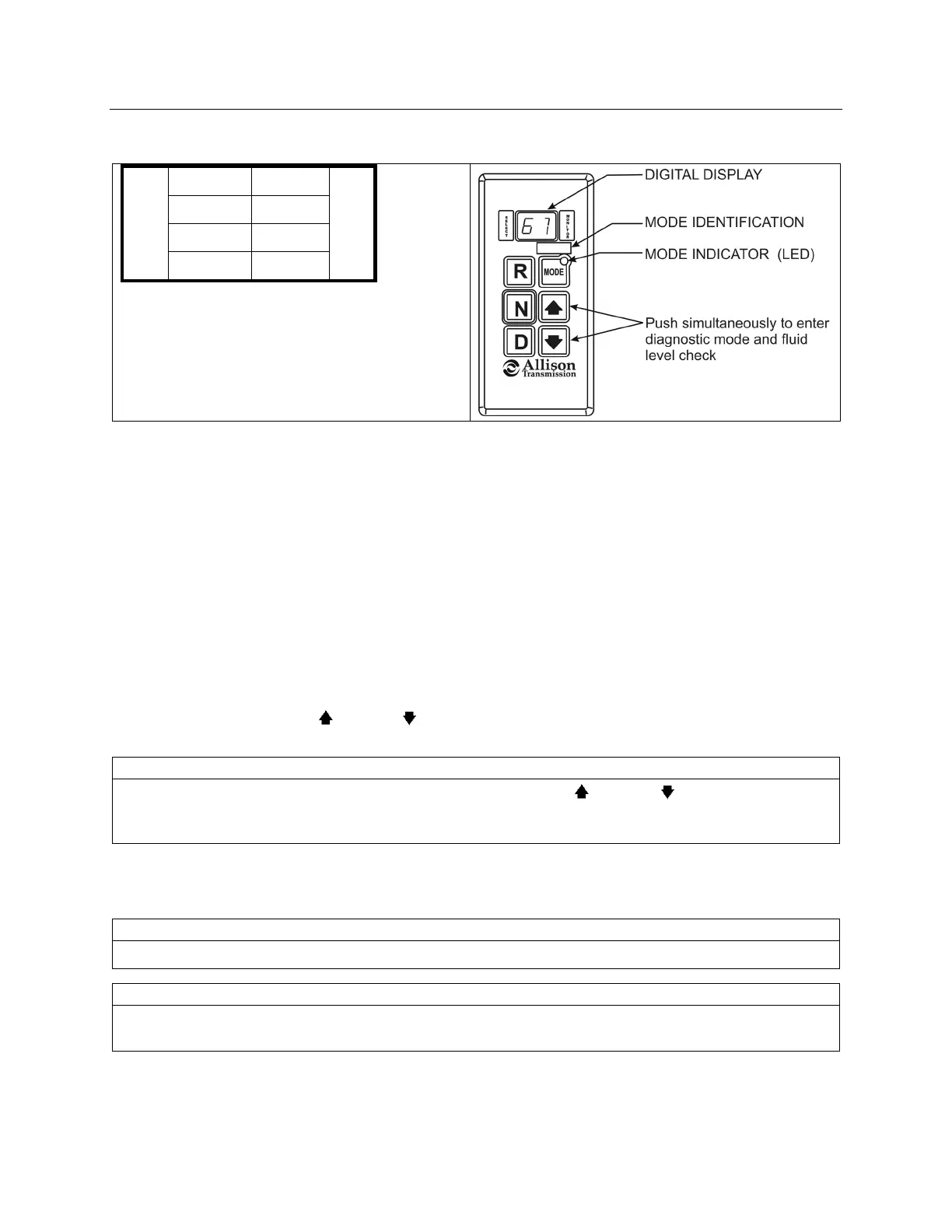
MODE button. The following example shows how DTC P0722 is displayed on the pushbutton shift
selector.
d 1
P
0 7
SELECT
2 2
MONITOR
• d1 (code list position) – The position which a
code occupies in the list. Positions are
displayed as « d1 » through « d5 » (code list
position 1 through code list position 5).
• P0722 (DTC) – The diagnostic troubleshooting
code number referring to the general condition
or area of fault detected by the TCM.
DIAGNOSTIC CODE DISPLAY AND CLEARING PROCEDURE – ALLISON 4
TH
GENERATION
CONTROLS
Diagnostic codes can be read and cleared by two methods:
o Using an Allison DOC™ diagnostic tool. For specific instructions on how to use an Allison DOC™
diagnostic tool, refer to the User Guide.
o Using the pushbutton shift selector.
To begin the diagnostic process:
1. Bring the vehicle to a stop at a safe location.
2. Apply the parking brake.
To display stored codes:
1. Simultaneously press the
(Up) and (Down) arrow buttons twice to access the Diagnostic Display
Mode.
NOTE
To access the Oil Level Display Mode, simultaneously press the (Up) and (Down) arrow buttons
once. Consult paragraph: « ALLISON TRANSMISSION OIL LEVEL CHECK USING THE
PUSHBUTTON SHIFT SELECTOR » at the end of this section.
2. Observe the digital display for code (d1).
3. Press the MODE button to see the next code (d2) – repeat for subsequent codes (d3, d4 & d5).
NOTE
Be sure to record all codes displayed before they are cleared. This is essential for troubleshooting.
NOTE
The Diagnostic Display Mode can be entered for viewing codes at any speed. Codes can only be
cleared when the output speed = 0 and no output speed sensor failure is active
Active indicators (MODE INDICATOR LED) and inactive codes can be cleared manually, while in the
diagnostic display mode, after the condition causing the code is identified.
To clear active indicators and inactive codes:








 To Next Page