Other Features 59
Use the up (
) and down( ) arrows to
highlight a function or a setting. At any given
level, small arrows may appear in the upper and
lower right corner of the display. This means
that more information is available by scrolling up
or down with the arrow keys.
To change the setting of a feature, press enter
key (
). The first value to set is highlighted. Set
the correct value with the arrow keys. Press the
enter key when the correct value is displayed.
The next value to set is highlighted. In some
cases, the enter key will reset compiled data. In
that situation, the MCD will prompt you to press
the enter key for 1 second to prevent accidental
resetting.
To return to the previous level, press Esc key
any time. In most cases, the MCD will return to
the previous level once a setting has been
chosen.
To return to the main menu from any submenu,
press Esc key a few times.
DRIVING MODE MENU
This menu includes the following modes;
Gauge Mode; Fuel Economy, Time/Dist;
Faults?.
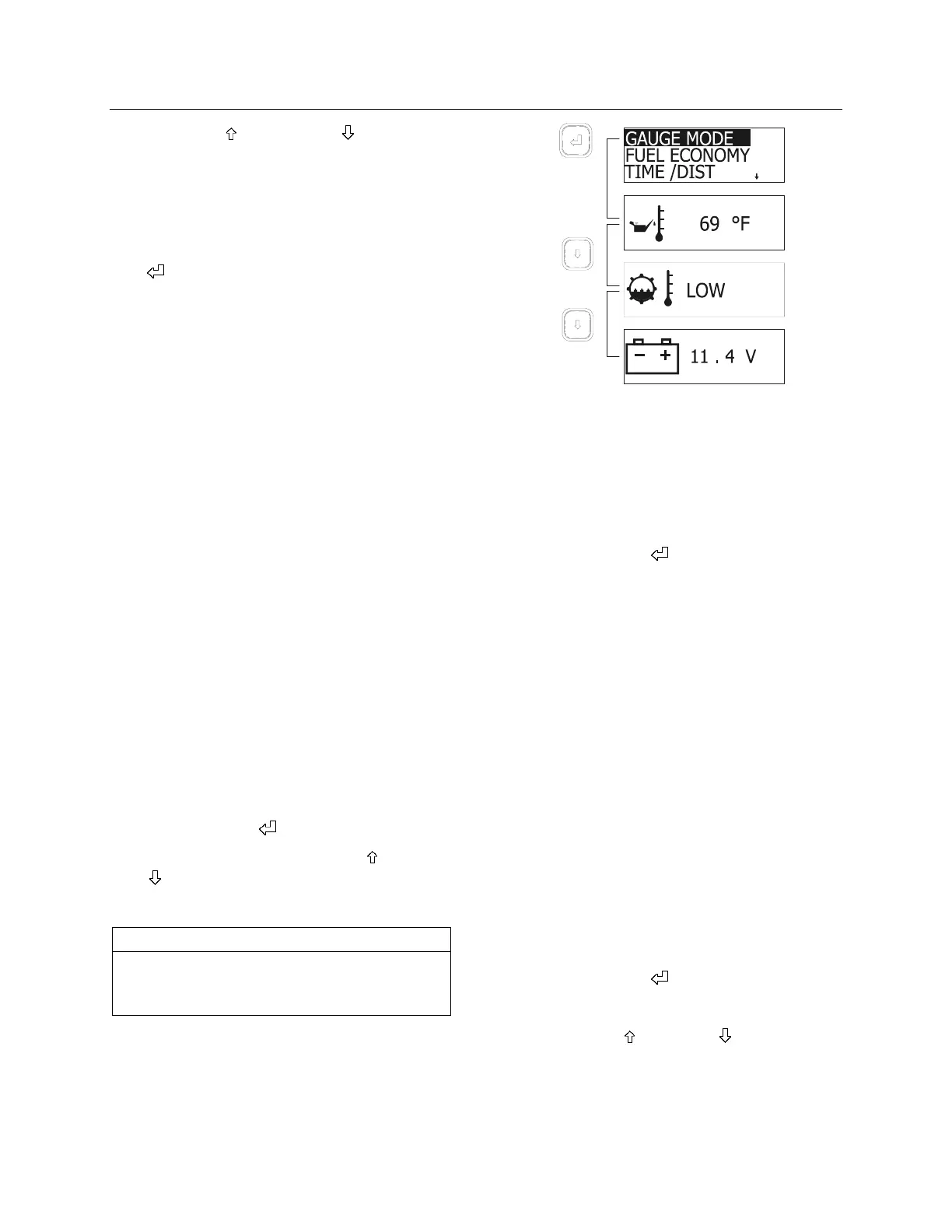
GAUGE MODE MENU
Transmission fluid temperature, engine oil
temperature and battery voltage can be
displayed in this mode.
To display:
1. Highlight GAUGE MODE;
2. Press enter key (
);
3. Choose a gauge using the up (
) or down
(
) arrow keys.
To exit gauge mode, press Esc key.
NOTE
When a condition requiring attention occurs,
the screen relating to that condition will
automatically replace the current display.
06398
FUEL ECONOMY MENU
Check average and instantaneous fuel
consumption, as well as distance until empty.
To display:
1. Highlight FUEL ECONOMY
2. Press enter key (
);
3. Toggle between average/instantaneous fuel
consumption or leg fuel consumption using
the up and down arrows;
To exit FUEL ECONOMY menu, press Esc key
any time.
4. To reset average and instantaneous fuel
consumption, press enter key. The MCD
will prompt you to press enter key for one
second to reset.
If you do not wish to reset the fuel data, press
Esc to return to previous menu.
TIME / DIST MENU
This menu gives access to the digital clock, the
reminder alarm, two trip odometers and the
average speed counter.
To display the digital clock:
1. Highlight TIME/DIST;
2. Press enter key (
);
The digital clock appears;
3. Use the up (
) or down ( ) arrow keys to
display the alarm and clock display, the trip
odometer display or the average speed
counter display.
To exit TIME/DIST menu, press Esc key.








 To Next Page