Other Features
64
DISPLAY TEST
To help identify defects in the graphic display,
the display goes from dark to bright in about ten
seconds.
BUZZER TEST
Sounds each of the buzzer signals for ten
seconds each. The name of the buzzer is
written on the display as the test runs.
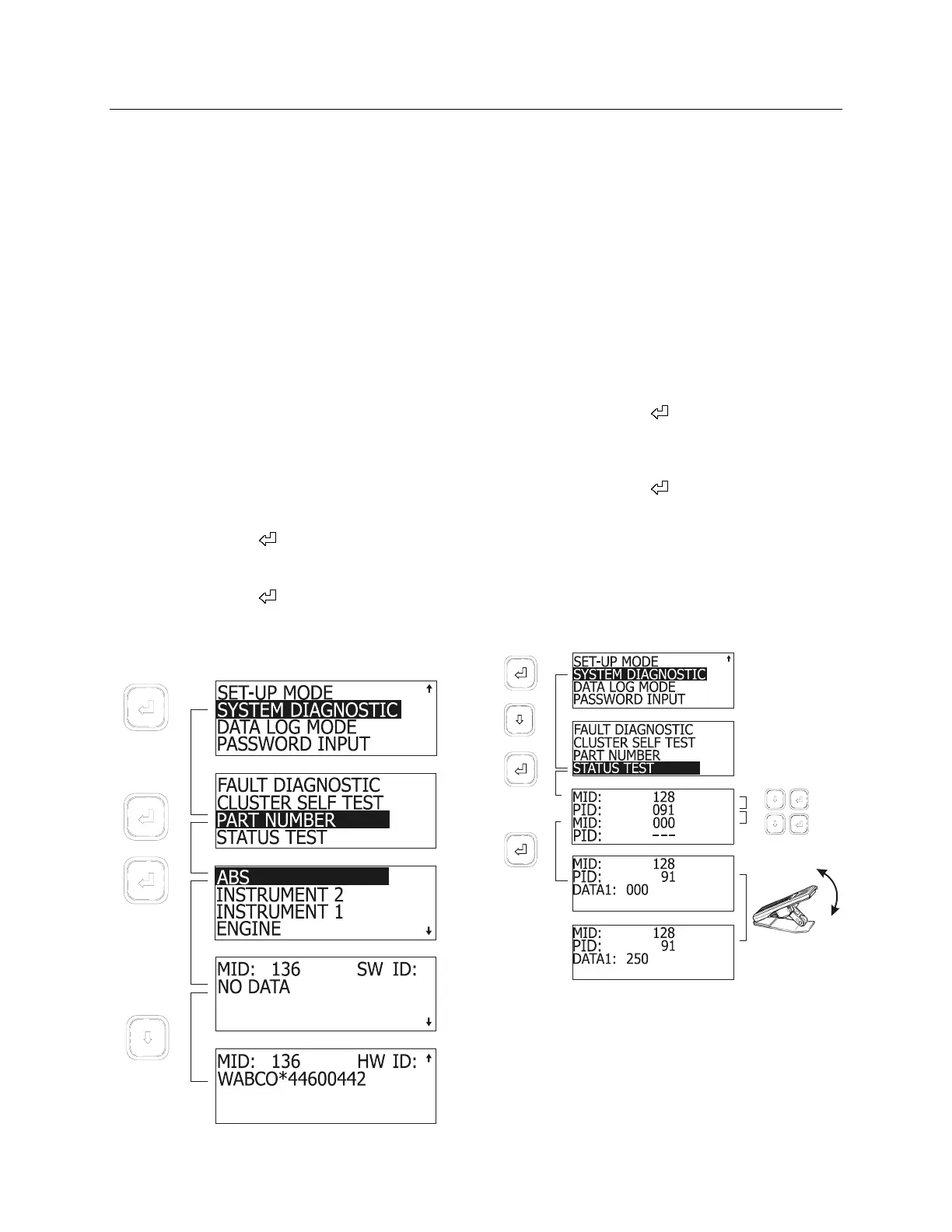
PART NUMBER
This feature requests information from the
available components. This information includes
the component’s SAE message identifier (MID),
its software ID (SW ID) and hardware ID (HW
ID) if available.
To access PART NUMBER:
1. When in SYSTEM DIAGNOSTIC menu,
highlight PART NUMBER using the arrow
keys;
2. Press enter key (
);
3. Highlight the desired component;
4. Press enter key (
).
The MCD displays the information on two
screens. Toggle between screens using the
arrow keys.
06391
STATUS TEST
This feature allows testing the response of
vehicle systems. This can be useful when
troubleshooting or checking the proper working
order of senders and other components. This
feature is enabled when correct password is
entered (see password input)
In Status Test mode, the MCD will monitor the
system and display the data on the screen. Up
to two components can be monitored at once.
To perform a status test:
1. When in SYSTEM DIAGNOSTIC, highlight
STATUS TEST using the arrow keys;
2. Press enter key (
);
3. Using the arrow and enter keys, enter a MID
and PID (or PPID);
4. Press enter key (
).
The MCD now displays in real time the value of
the component. The example below shows how
changing the throttle position will be displayed
on the MCD. That way one can verify if any
identifiable sender unit is working properly or
whether the link is OK.
5. Press Esc key to exit.
06420
In this example, a throttle pedal in good working
order will send a linear and continuous (no
jumps) signal to the ECM, appearing as DATA
value on the MCD screen. Full pedal movement
will display values from 000 (no throttle) to 250
(maximum throttle).









 To Next Page