Controls and Instruments
47
CAUTION
"Riding" the brake by resting one's foot on the
brake pedal when not braking can cause
abnormally high brake temperature, can
damage and cause premature wear of brake
components and reduce brake effectiveness.
ACCELERATOR PEDAL
Controls engine RPM as needed.
NOTE
The accelerator pedal will not operate when
the entrance door is open.
ALLISON AUTOMATIC
TRANSMISSION
The transmission is fully automatic: Proper
ranges should be automatically selected
according to driving speeds to improve vehicle
performance and control. The speed ratio of the
power converter changes automatically as
vehicle speed increases and direct-drive goes in
and out as necessary. The speed ratio is
modulated by vehicle speed and accelerator
pedal position. You will find the complete
transmission operation instructions and driving
tips in the Allison Bus Series Operator’s
Manual included in your vehicle’s publication
box.
OPERATION
When a button is depressed on the transmission
control pad, the corresponding letter or number
is displayed indicating the transmission is ready
to operate in the selected range. If the
transmission control module (TCM) detects a
serious problem in the transmission, a buzzing
tone sounds for 5 seconds and the "CHECK
TRANS" light on the dashboard illuminates to
warn the driver that the transmission is held in
gear. If another button is depressed, the buzzing
sound will continue until the original range is
selected.
NOTE
As a light bulb and systems check, the
"CHECK TRANS" light will illuminate when the
ignition switch is turned to ON. After about two
seconds the light will turn off. If the "CHECK
TRANS" light remains on, the self-diagnostic
system has detected a problem. If the
problem disappears, the light will go out, but a
trouble code will remain stored in the TCM.
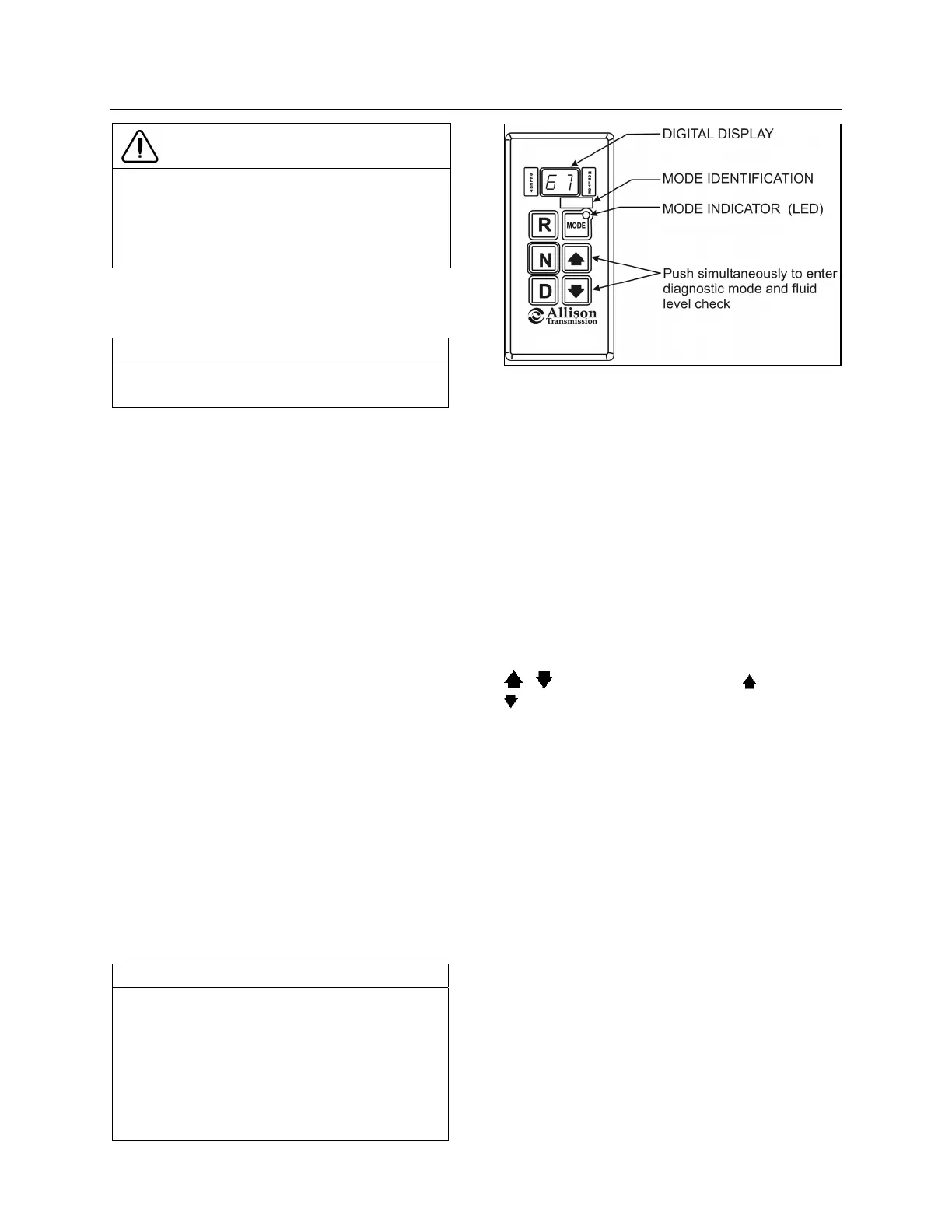
ALLISON PUSHBUTTON SHIFT SELECTOR 07134
PUSHBUTTON SHIFT SELECTOR
The pushbutton shift selector has the following
elements:
R (Reverse) — Press this button to select Re-
verse.
N (Neutral) — Press this button to select Neutral.
D (Drive) — Press this button to select Drive. The
highest forward range available will appear in
the digital display window under SELECT. The
transmission will start out in the lowest available
forward range, displayed under MONITOR, and
advance automatically to the highest range.
— Press respectively the (Upshift) or
(Downshift) arrow button when in DRIVE to
request the next higher or lower range. One
press changes gears by one range. If the button
is held down, the selection will scroll up or down
until the button is released or until the highest or
lowest possible range is selected. Protection
mechanisms inhibit selecting ranges that are not
appropriate for the current speed or which may
damage driveline components.
MODE — The MODE button can allow the
driver to enable a secondary shift mode that has
been programmed into the TCM unit. The name
of the secondary mode appears on the MODE
IDENTIFICATION label adjacent to the MODE
button. Pressing the MODE button activates the
PERFORMANCE shift schedule and illuminates
the mode indicator (LED).








 To Next Page