87
MBOX® USER MANUAL
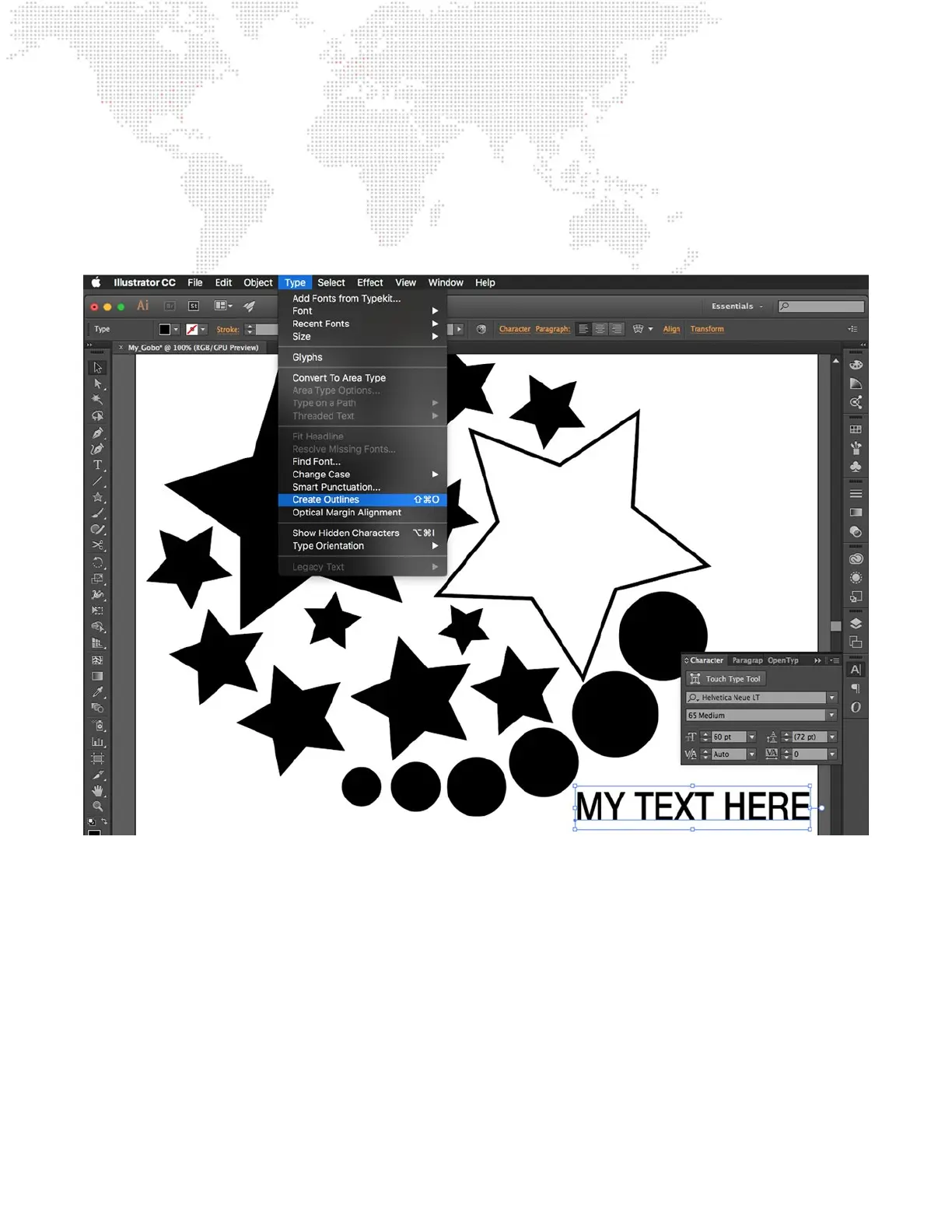
Step 6. Text is a special case, and must be converted out “outlines.” This can be accomplished in two ways.
a. For each text object in the document, switch to the Selection Tool and select the text. Then select “Type”
in the menu bar, and select “Create Outlines.” Test cannot be made of only outlines (stroke only), it has to
be lled.
b. When saving the le as an SVG, make sure the “Type: Convert to outline” option is enabled. (See step 10)
Step 7. Before saving the SVG gobo, the document’s artboard may need to be adjusted. The size of the artboard
will determine whether the digital gobo will fall under Option 1 or Option 2. The texture applied to the gobo
will ll the artboard when the gobo is used in Mbox. Note: It is not recommended that the artboard be sized
or positioned so that any portion of an object falls outside the artboard.
a. Option 1: If the texture of any size should be scaled to t to the gobo such that the texture completely
lls the gobo, create the artboard so its borders are at the edges of all of the objects in the composition.
Illustrator provides a preset artboard sizing option for this: Fit to Artwork Bounds.
b. Option 2: If the texture should not be scaled (or scaled to a specic size), make the artboard the same
size as the texture (in pixels) and arrange the objects in the le on the artboard in the desired layout.



 To Next Page