Psion Teklogix 7535/7530 Hand-Held Computer User Manual 83
Chapter 4: Working With Windows CE
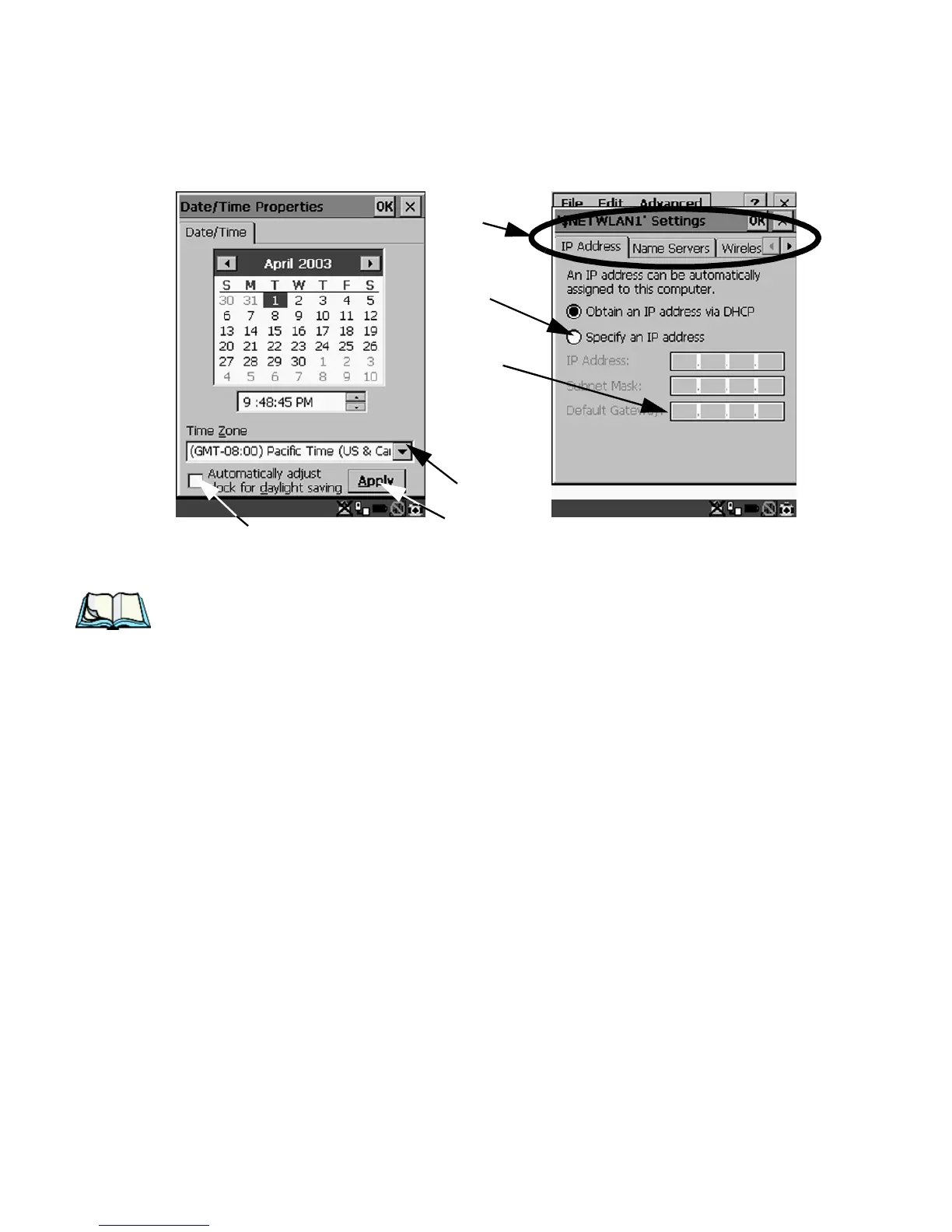
Using A Dialog Box
Figure 4.16 Dialog Boxes
Note: If your unit is equipped with a touchscreen, you can use the stylus to tap
on an element in a dialog box to select or deselect it, display dropdown
menu items, save your selections, and so on.
Dialog boxes contain one or more of the following elements:
Tab: A tab separates different elements of a dialog box. Press the <TAB> key until a
tab in the dialog box is highlighted. To display adjoining tabs, press the <RIGHT>
or <LEFT> arrow key. To display the information in the next tab from anywhere in
the window, press <CTRL> <TAB>.
Textbox: A textbox requires that you type information. Press the <TAB> key to
highlight the textbox and then type the appropriate information.
Dropdown: This type of menu is identified by up and down arrows next to the
dropdown menu to indicate that additional options are available. Press the <TAB>
key to highlight the menu, and use the arrow keys on your keyboard to cycle
through the options.
Checkbox: This box allows you to select or deselect an option. To select or deselect
a checkbox, press the <TAB> key to highlight the checkbox, and press the
<SPACE> key to select or deselect it.
Checkbox
Dropdown Menu
Button
Textbox
Radio
Button
Tabs



 To Next Page