Chapter 2: Basic Checkout
Attaching Carrying Accessories
18
Psion Teklogix 7535/7530 Hand-Held Computer User Manual
Regarding battery calibration, keep in mind that all types of
battery chargers available for the 7535 contain single discharge
circuits so that only one battery can be calibrated at a time (a cal-
ibration cycle requires discharging the battery and then calibrat-
ing to the new full charge). If multiple batteries require
calibration, care should be taken to ensure that these batteries are
placed into a charger that is not already calibrating a battery.
2.1.3 Attaching Carrying Accessories
Psion Teklogix recommends that a carrying accessory – a hand strap, pistol grip or
shoulder strap – be installed on the 7535/7530 before use. If your hand-held is not
fitted with a hand strap or pistol grip, you can install either using the carrying
accessory kit supplied. You’ll need:
• A Phillips head screwdriver.
Important: Do not use adhesives such as Loctite to secure screws on carrying
accessories. These chemicals may damage the plastic casing.
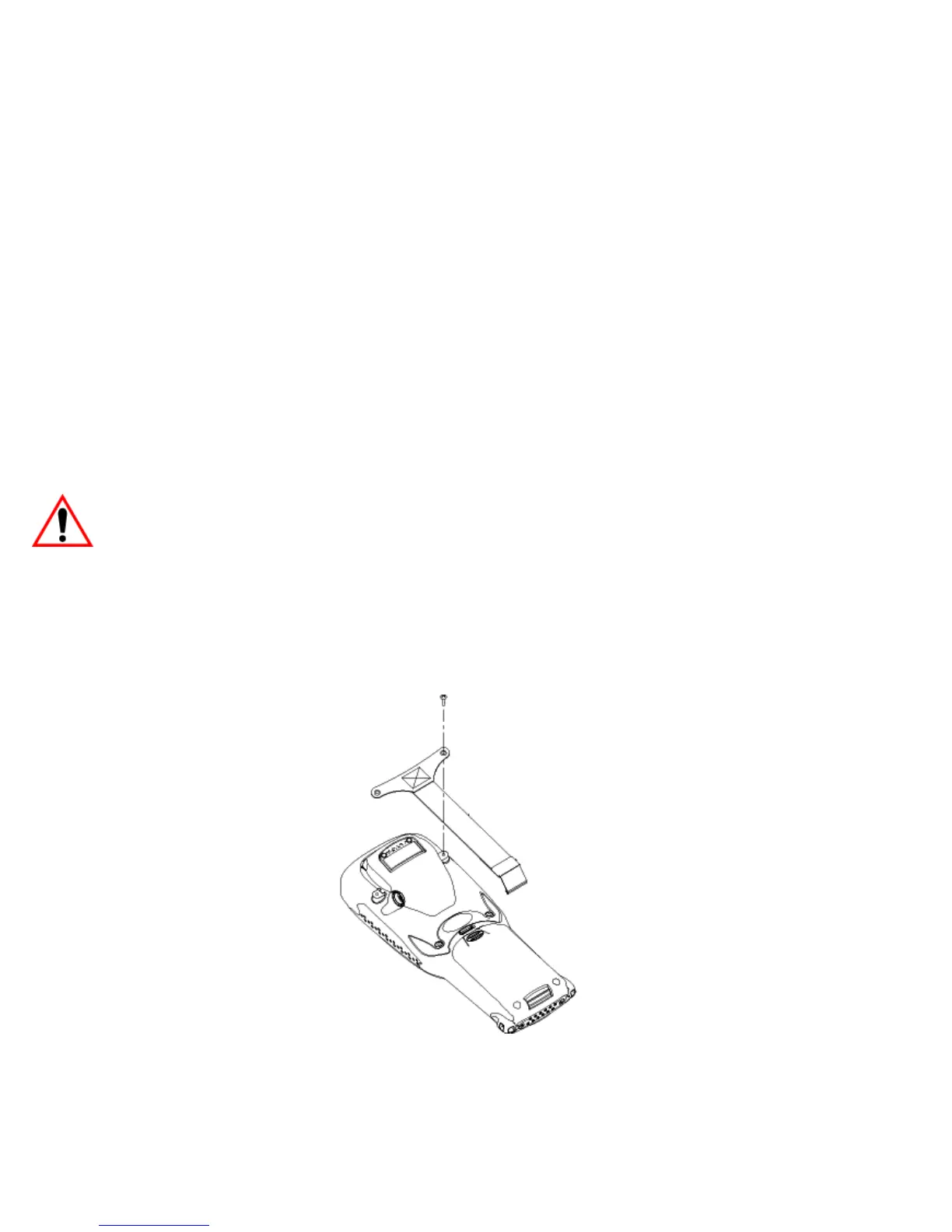
2.1.3.1 Attaching The Hand Strap
Two Phillips head screws are provided with the hand strap.
• Attach the strap to the two threaded inserts located at the back of the
7535/7530 near the top of the unit.
Figure 2.1 Attaching The Hand Strap



 To Next Page