PathMaster® Manual Rev. H 6/03
- 27 -
Communications
Communications is used to configure the RS232 communication settings between the computer and the
Dispensing System. PathMaster® uses control handles to store all communication settings for a machine.
A control handle can be thought of as a record in a database that has multiple fields in which to store vital
pieces of information. The information in the control handles is stored in the Windows® registry.
PathMaster® can have multiple control handles configured, but can have only one control handle selected
at a time.
To configure communications, click the Edit Controller button on the Machine Parameters form. If a
message appears indicating that PathMaster® could not find any controllers in the Windows® Registry,
click OK. This simply means that no control handles have been configured yet.
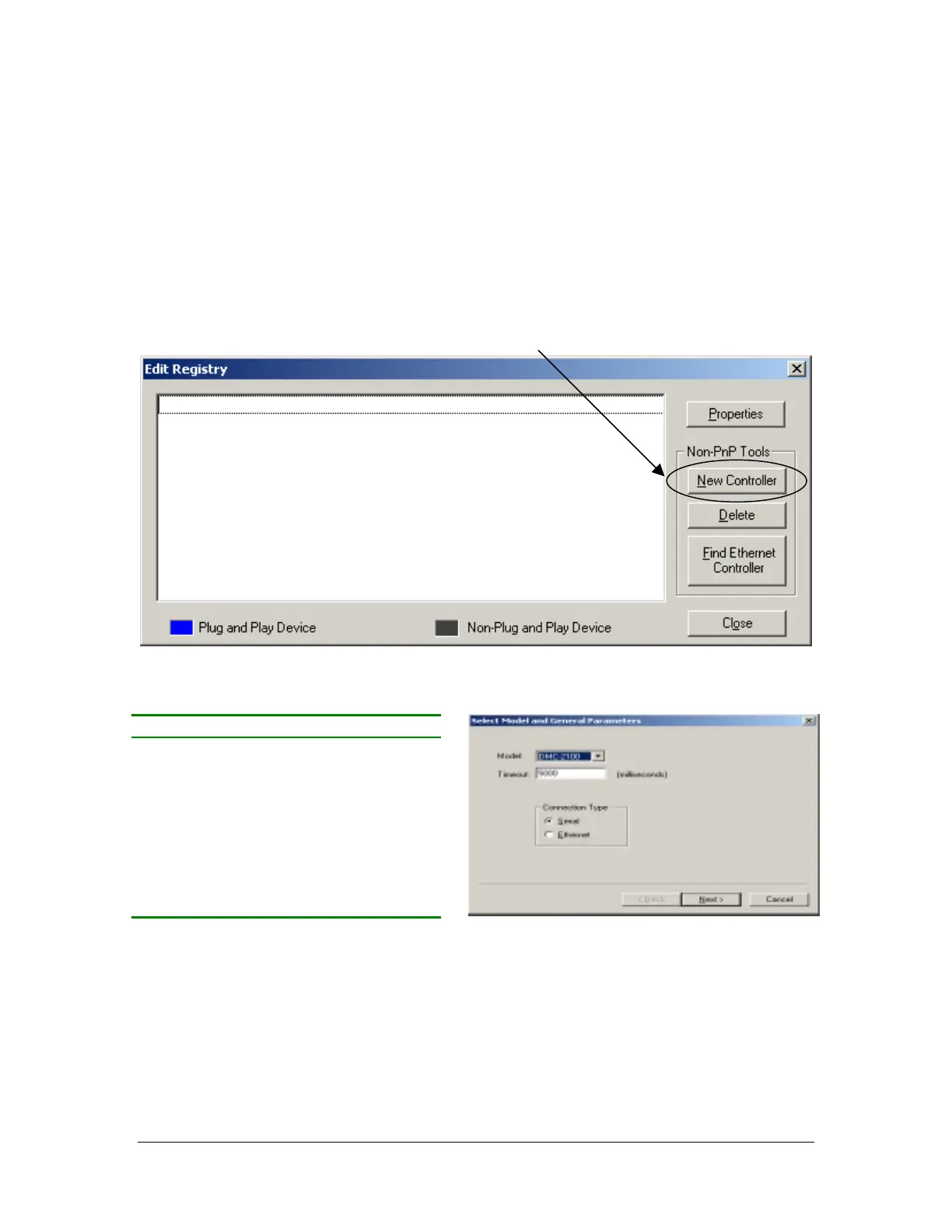
When the Edit Registry window appears, click New Controller.
Select the controller model installed in the Dispensing System from the table below:
Use the default Timeout valve for all controllers and Serial for Connection Type. NOTE: Not all
controller models require configuration of Connection Type.
- Click Next -
PVA Workcell Controller Model
PVA250 DMC-2100
PVA550 DMC-1500
PVA750 DMC-2100
PVA1000 DMC-1500
PVA2000 DMC-1500
PVA2000C DMC-2100
PVA3000 DMC-1500
All other’s DMC-2100



 To Next Page