SECTION 2
INSTALLING PRINTER
11
Connect Printer
Plugging in Printer
1. Make sure Printer’s Main Power Switch is turned OFF and the Power Cord is unplugged.
2. Verify that the Printer is set for the appropriate AC voltage
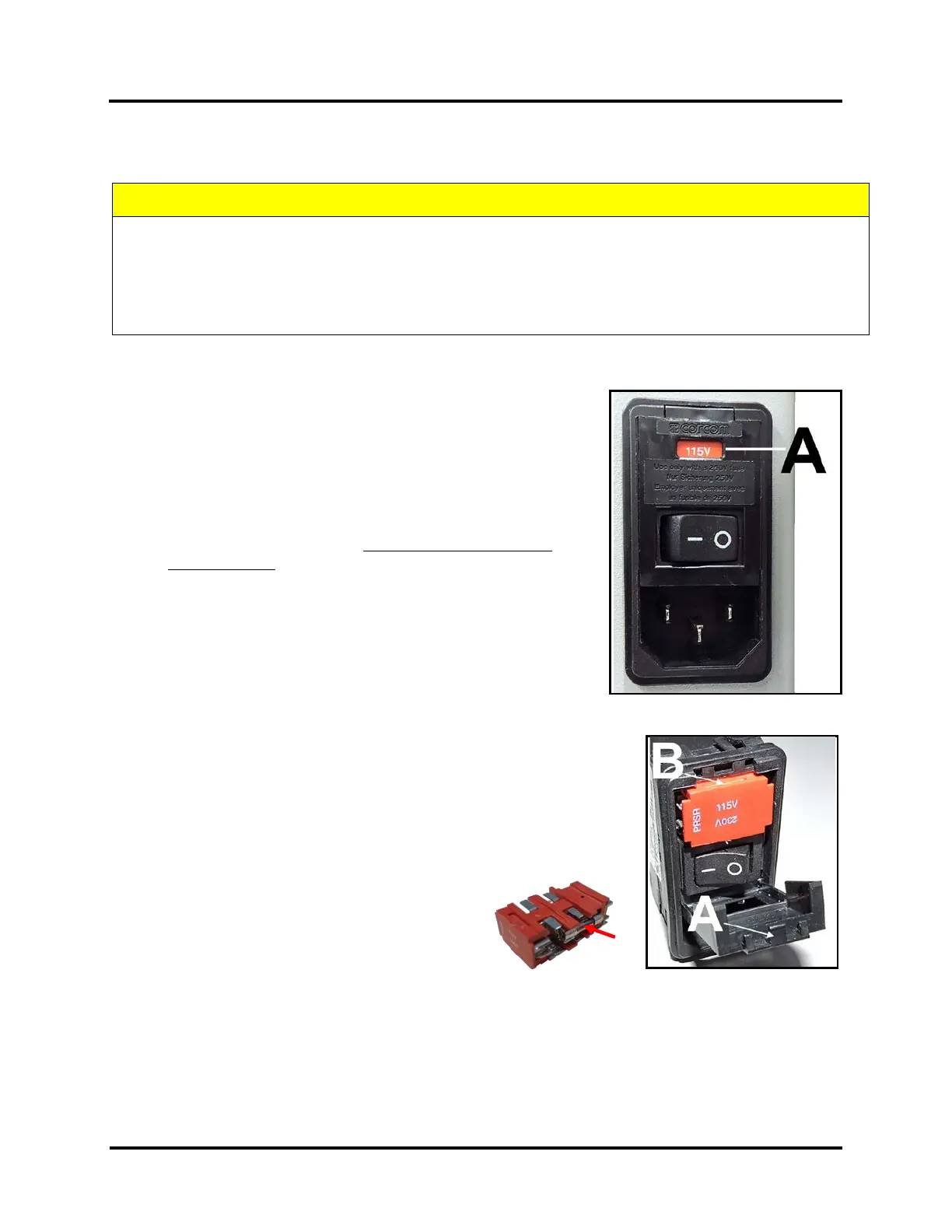
selection (115V or 230V) [A]. Change as needed. See section below
titled “How to Change Voltage Selection (115-230)” for
instructions.
3. Connect one end of the Power Cord to the Power Receptacle
on the Printer.
4. Plug the other end of the Power Cord into a properly grounded,
50/60Hz, AC Power Outlet that matches the Printer’s current
voltage selection (115V or 230V).
The use of a high quality surge protector is strongly recommend.
How to Change Voltage Selection (115V-230V):
1. Power OFF and make sure the Power Cord is unplugged from the Printer.
2. Insert a small flat blade screwdriver into the slot at the top of the
faceplate, on the Power Receptacle, to release the tab [A] and gently pry
the faceplate open.
3. Insert the screwdriver blade into the slot [B] at the top of the Fuse
Pack/Voltage Selector and gently pry it out of the Power
Receptacle housing.
4. Verify Fuses [C] (two, 1.6A, 250V, slow-blow,
5x20mm) are properly inserted, one on each side,
into the Fuse Pack/Voltage Selector; as shown.
5. Invert and re-insert the Fuse Pack/Voltage Selector, so the desired voltage (115V or 230V) is at the top.
Example image shows 115V at the top.
6. Snap the Power Receptacle faceplate closed and verify that the desired voltage selection (115V or 230V)
appears in the Power Receptacle window.
CAUTION
BEFORE CONNECTING THE POWER CORD, VERIFY THAT THE PRINTER IS SET FOR THE APPROPRIATE VOLTAGE
SELECTION [A].
DO NOT USE ADAPTER PLUGS OR EXTENSION CORDS TO CONNECT PRINTER TO WALL OUTLET.
DO NOT USE WITH OUTLETS CONTROLLED BY WALL SWITCHES.
DO NOT USE WITH OUTLETS THAT SHARE THE SAME CIRCUIT WITH LARGE ELECTRICAL MACHINES OR APPLIANCES.



 To Next Page