SECTION 3
OPERATING PRINTER
38
Printer Driver Properties
The Printer Driver for the AS-650 works similar to other Printer Drivers for Windows®. It does contain some
features that are unique to this printer. The Driver properties/features are explained below.
The following information is valid when using FlexSystems driver version 4.38.
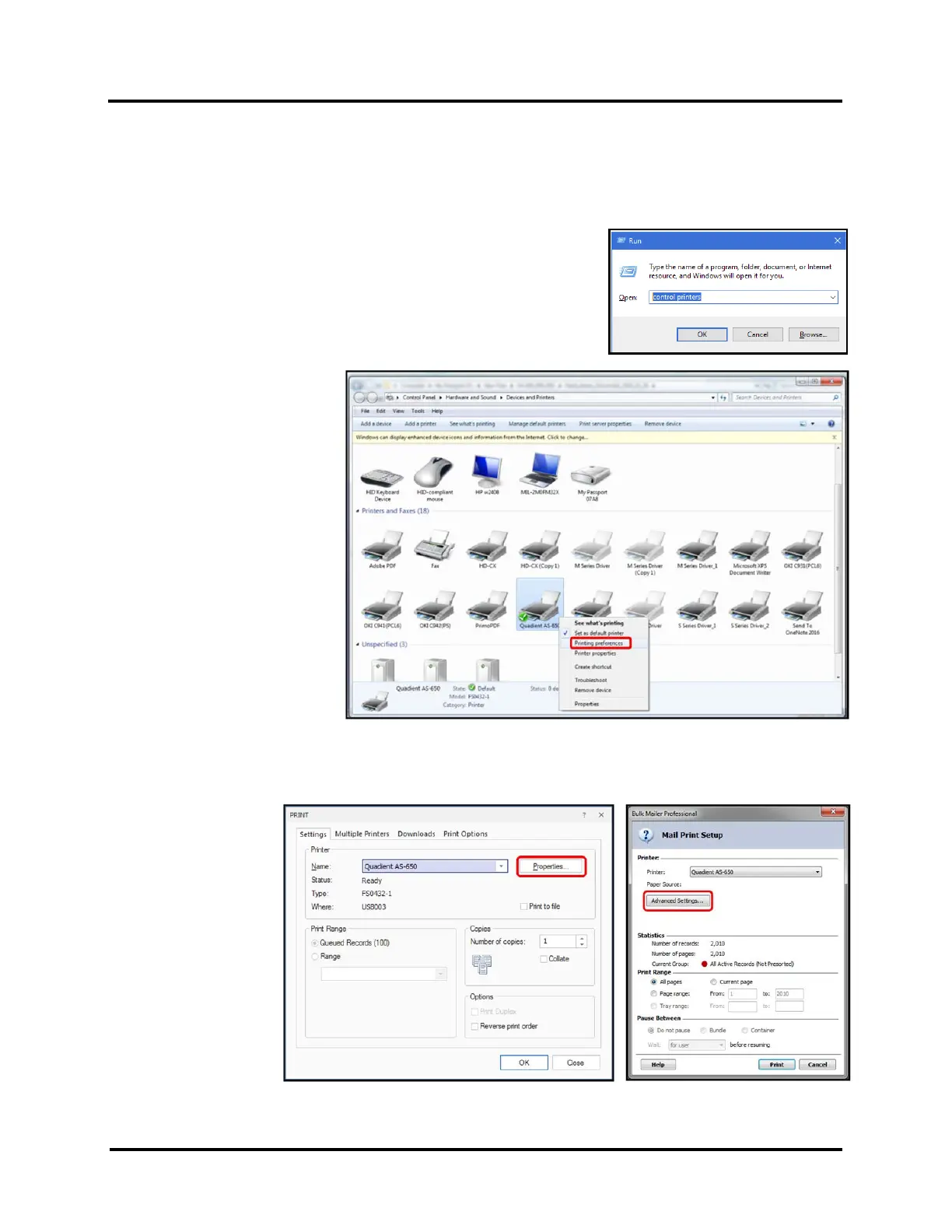
TIP: To open “Devices and Printers” in Windows 10. Press Windows key + R.
Run dialog window will open. Type “control printers” and then press OK.
From “Devices and Printers”,
right-click on the AS-650 printer
and select “Printing Preferences”
to access and change “default”
printing preferences.
TIP: Preferences that you change,
by accessing them from the
“Devices and Printers” folder, will
become “default” settings. This
can be useful if you want specific
settings to be automatically
selected when you select the AS-
650 Driver from your software
application.
For example you commonly use
the “Env #10…” Paper Size and
“300 dpi” Resolution for your
print jobs.
From the “Print dialog
box” of most software
application, clicking on
the “Properties”
button or “Advanced
Settings” button will
give you access to
“Printing Preferences”.
This is how you will
access and change
preferences for a
particular job, at the
time you are ready to
print the job.



 To Next Page