SECTION 3
OPERATING PRINTER
41
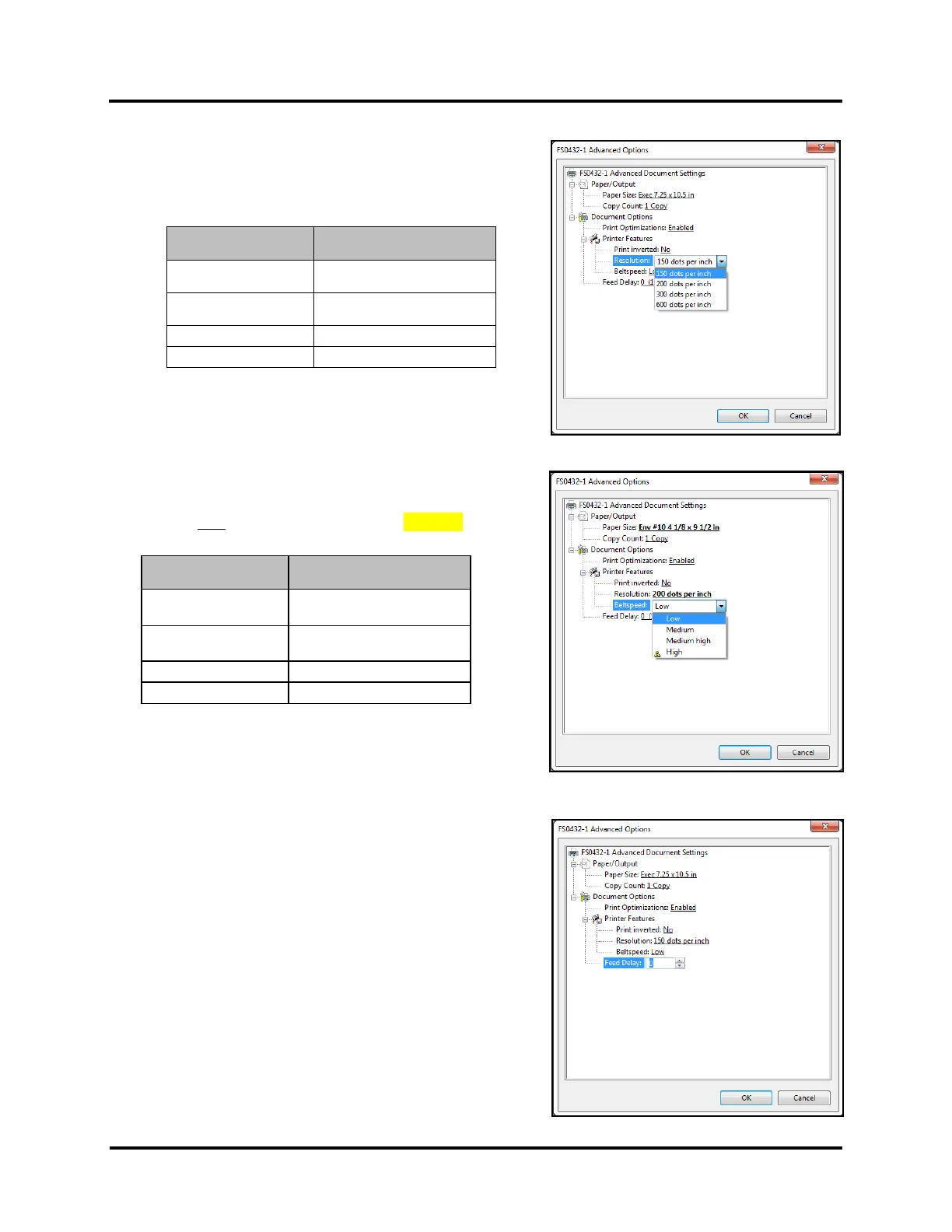
Resolution:
Sets resolution of print quality. Changing resolution to a higher
number (e.g. 200 DPI to 600 DPI) increases image quality.
NOTE: Higher resolutions reduce Belt Speed options.
Belt Speed (Beltspeed):
Sets Print Speed for a print job..
NOTE: Belt Speed selections are limited by the current Resolution
selection. Do NOT select choices marked with CAUTION symbol.
TIP: Print Speed (belt speed) can also be changed, after sending
the job, using the Touchscreen of the printer.
Feed Delay
Use to add a pause between printed pieces.
Adding a Feed Delay, to provide more dry time, may help to
reduce “offset” (ink transfer, image smudging) between pieces.
Adjustment is made in 1/10 of a second (0.1-second) increments.
10 = 1 second
Print Quality
(Resolution)
Compatible Belt Speeds
(Print Speed)
150 DPI (150 x 600)
Low (1), Medium (2),
Medium High (3), High (4)
200 DPI (200 x 600)
Low (1), Medium (2),
Medium High (3)
Print Quality
(Resolution)
Compatible Belt Speeds
(Print Speed)
150 DPI (150 x 600)
Low (1), Medium (2),
Medium High (3), High (4)
200 DPI (200 x 600)
Low (1), Medium (2),
Medium High (3)



 To Next Page