SECTION 3
OPERATING PRINTER
28
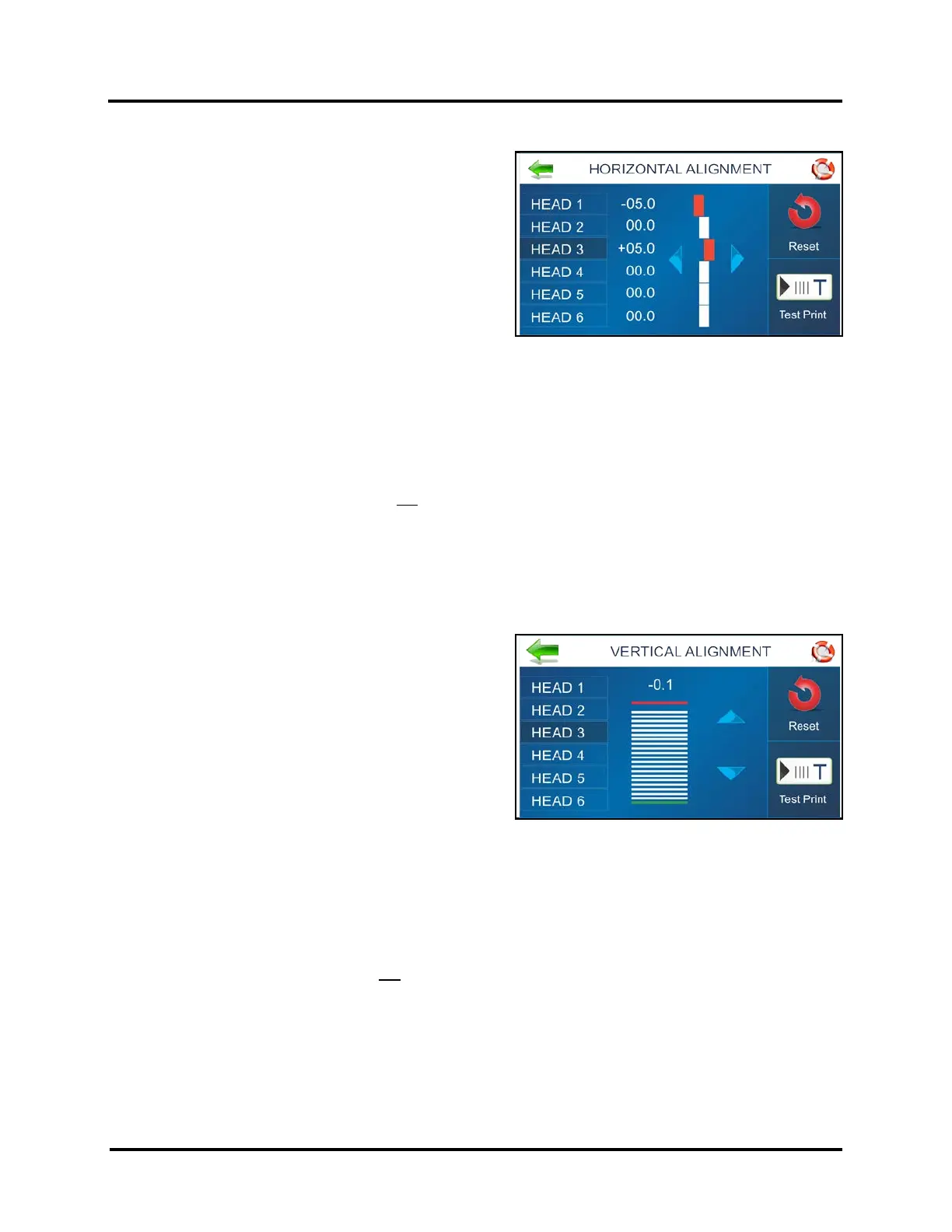
HORIZONTAL ALIGNMENT Screen
Adjusts offsets of individual Printheads (ink cartridges) to fine
tune horizontal positioning of the printout. By doing this the
operator can improve the horizontal alignment of images
that are split between adjacent Printheads.
TIP: Horizontal print alignment will never be perfect from
media leading edge to trailing edge. Alignment
characteristics will vary from piece to piece and application
to application. Therefore, when possible, position data in
software application (design screen, layout) to avoid splitting
text/images between adjacent Printheads.
Horizontal Alignment is also accessible by pressing the Quick Menu key on the Control Panel.
Heads (1-6): Align individual Printheads (side-to-side) ±100. Each step is 1/1000 of an inch increment.
To use: Select the desired Printhead. Move the bar in the desired direction by pressing the directional arrows.
Reset: Horizontal alignment resets to 00.0 (default).
Test Print: Prints a test page using current adjustments and print parameters to check printing quality and
Printhead alignment.
NOTICE: The Horizontal Alignment feature is not accessible when there is job data present in the printer.
VERTICAL ALIGNMENT Screen
By design, the Printhead (ink cartridges), within a Print Unit,
are purposely overlapping by a few nozzles. This feature
allows the operator to control how many of the top nozzles,
for each printhead, are enabled or disabled; in order to
remove any overlap or gap, in the printout, between
adjacent Printheads.
Vertical Alignment is also accessible by pressing the
Quick Menu key on the Control Panel.
Heads (2-6): Adjust individual Printheads ±12.0
Each step is 1/1000 of an inch increment.
NOTE: You can NOT adjust the vertical alignment of HEAD 1, since this is the reference position.
To use: Select the desired Printhead. Move the bar in the desired direction by pressing the directional arrows.
Reset: Vertical alignment resets to 0.0 (default).
Test Print: Prints a test page using current adjustments and print parameters to check printing quality and
Printhead alignment.
NOTICE: The Vertical Alignment feature is not accessible when there is job data present in the printer.



 To Next Page