12 Commissioning, Operation, Diagnostics
12.1 Operation and Diagnostics
12.1.1 Diagnostic LED Displays
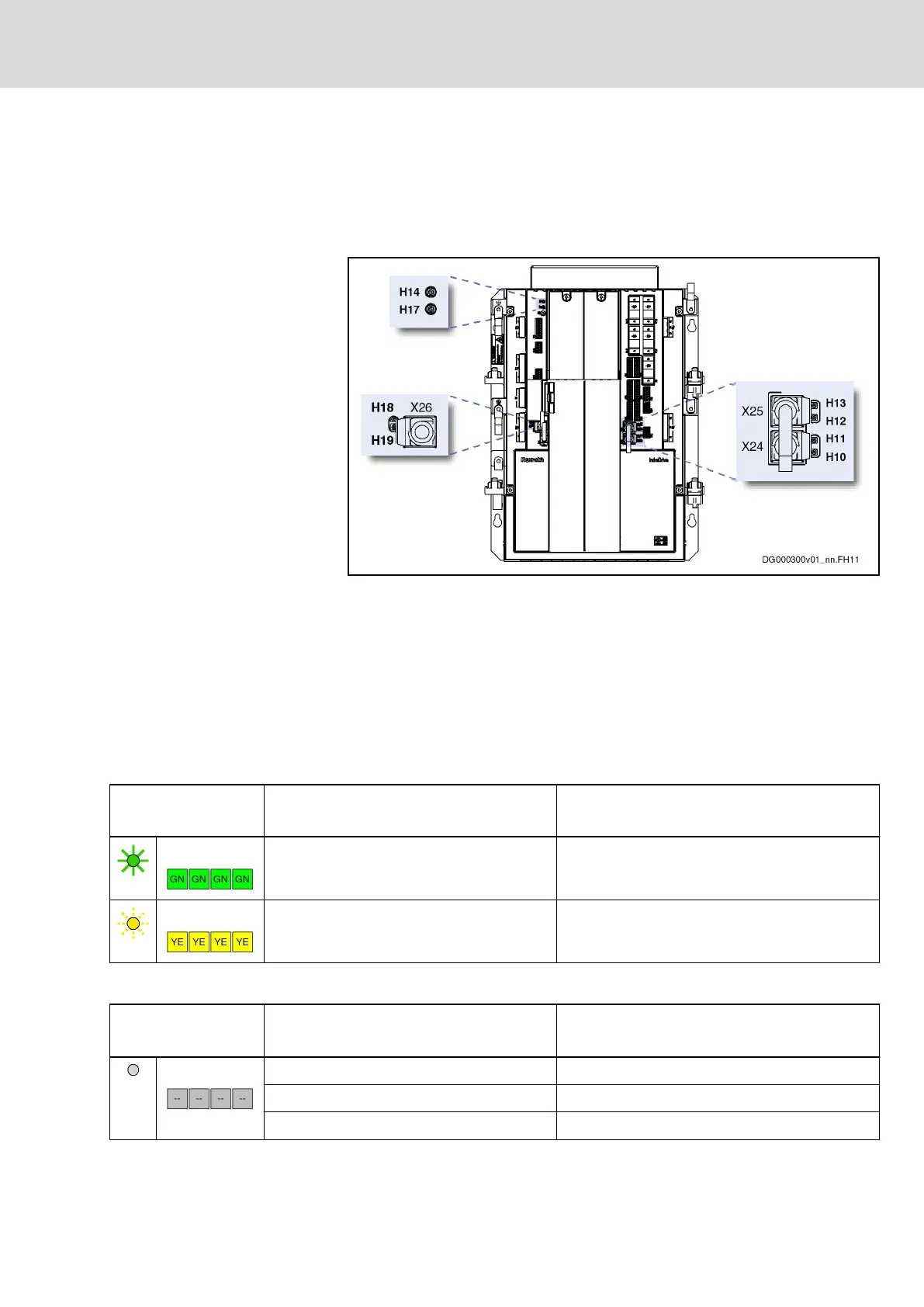
H10…13 Ethernet status (X24, X25)
H14 Drive status
H17 Control unit status
H18, H19 Ethernet status (X26)
Fig.12-1: Diagnostic Displays – LEDs
12.1.2 Diagnostic LED Displays with Drive Firmware MPM-16VRS
Via the operator panel, you can find out which drive firmware has been instal‐
led on your system:
Operating area "Maintain" ▶ F-key "F6 About"
H10 … 13; H18 … 19
Color / flashing pattern
Significance (Ethernet status) Measures
Green Connection to network available
Yellow Data transmission running
Fig.12-2: LED Displays H10, H11, H12, H13, H18, H19
H14
Color / flashing pattern
Significance (drive status) Measures
Off Supply unit not switched on Check 24V supply and switch it on, if not yet done
Cable interrupted Check cable and connector X18
Hardware defective Replace hardware
DOK-INDRV*-HCQ-T+HMQ-T-PR03-EN-P
Rexroth IndraDrive Drive Controllers HCQ, HCT
Bosch Rexroth AG 113/145
Commissioning, Operation, Diagnostics



 To Next Page