Getting Acquainted
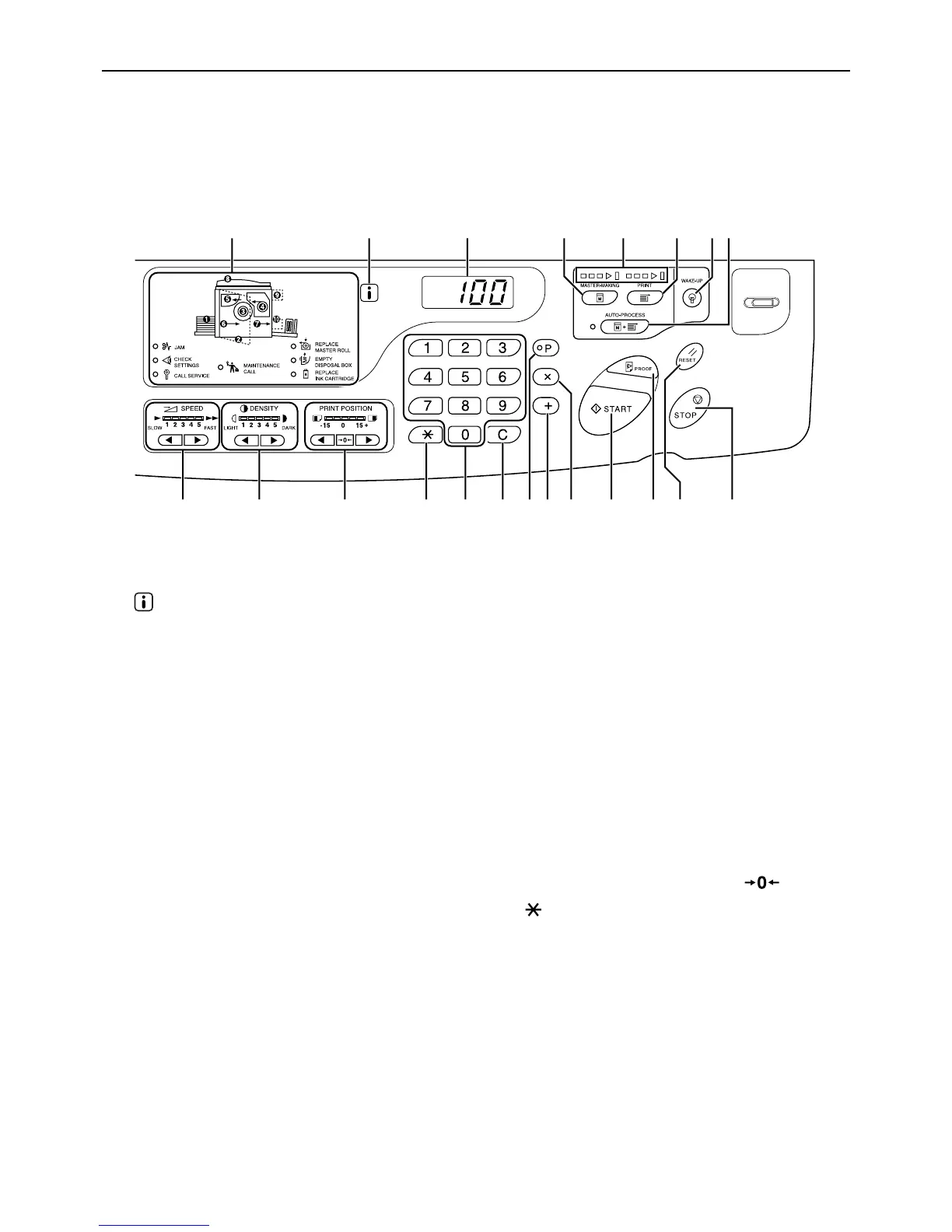
Control Panels
8
Control Panels
Main Control Panel
1) Check & Error Display ()p.100)
Indicates error locations and status.
2) indicator
3) Print Quantity Display (Error number
display)
Shows the number of printed copies, numeric val-
ues entered for various settings, and error num-
bers.
4) Master-Making Key
Makes the printer be ready for making masters.
5) Progress Arrows
Indicates master-making and printing progress
status.
When making masters is ready, all the indicators
above the Master-Making Key light.
When printing is ready, all the indicators above the
Print Key light.
6) Print Key
Makes the printer be ready for printing.
7) Wake-Up Key / Logout Key
Wakes up the printer in Energy Saving mode.
Use this key also to log out from the machine.
8) Auto-Process Key/Indicator ()p.44)
Performs non-stop operation from master-making
through printing.
When activated, the indicator besides the key
lights.
9) Print Speed Adjustment Keys/Indicator
()p.49)
Selects the print speed from five levels.
The indicator above the keys shows the current
speed level.
10) Print Density Adjustment Keys/Indicator
(For EZ3XX only) ()p.47)
Selects the print density from five levels.
The indicator above the keys shows the current
density level.
11) Vertical Print Position Adjustment Keys/
Indicator ()p.48)
Adjusts the print position in the vertical direction
(within ±15 mm (±
1
/
2
")) after making a master.
The indicator above the keys shows the offset
amount from the center.
To clear the offset amount, press .
12) Key
Use when setting up for programed printing.
13) Print Quantity Keys (0 to 9 Keys)
Use to enter the number of copies to be printed or
to enter other numeric values.
14) C Key
Cancels entered numeric values or resets the
counter to zero.
15) P Key/Indicator ()p.50)
Allows the printer to print and group copies as
specified (programed printing).
When activated, the indicator above the key lights.
1
2345678
10 11 12 13 14 15 16 17 18 19 20 219



 To Next Page