SPIROR HP - DR
6.3.3.OPERATOR AND PASSWORD
CHANGE KEY
Some settings can only be accessed by
the machine Manager after entering the
password (editable), in order to prevent
unauthorized personnel from changing
the password.
Caution - Warning
The factory responsible should assign
password to qualified personnel only and
each password is to be considered secret
and confidential.
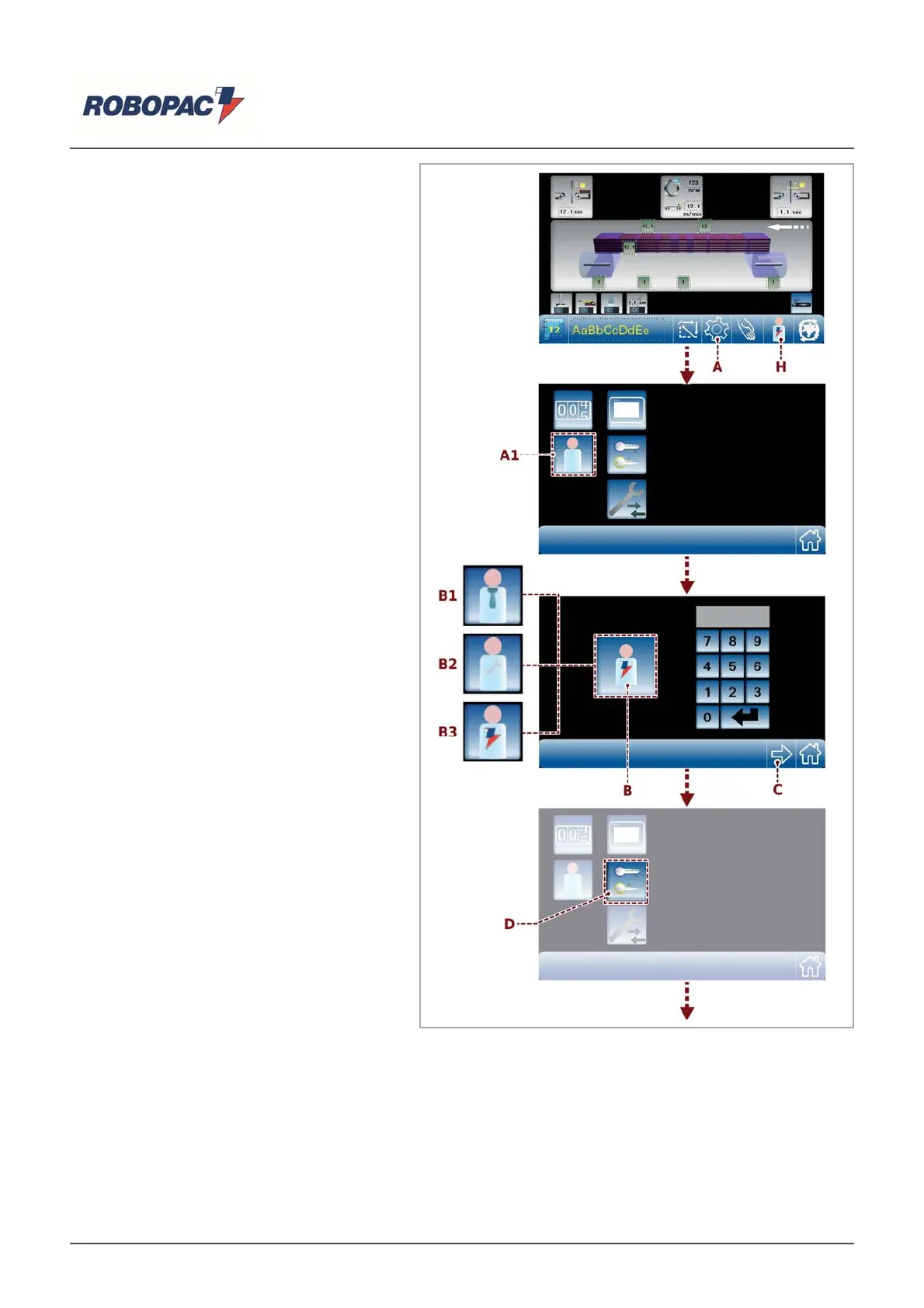
Operator change
Access the main page and:
1. Tap the key (A) to display the general
parameters screen.
2. Tap the key (A1) to open the general
parameters screen.
3. Touch the (B) key to change the
reference operator.
4. Enter the password (1111) assigned to
machine (B1) Manager.
B1) Machine manager (department head).
B2) Assistance service (reseller).
B3) Software manager (Robopac).
Once it has been replaced and confirmed
by the operator, the icon (H) on the
main page will turn to operator
confirmed.
At this point, all functions protected are
released and you can change some of
the parameters, including the password.
Password change
1. Tap the key (C) to return to the general
parameters screen.
2. Touch the (D) key to display the keypad,
type the new password and confirm by
touching the key (Enter) (E).
English



 To Next Page